Burn charts
Burn charts help a PM, Scrum Master, or executive answer “are we still on track?” at a glance. TruePPM offers three standard progress charts for a single project: burn down (remaining work over time), burn up (completed work measured against how much scope you’ve taken on), and a combined view overlaying both. All three let you choose the unit on the vertical axis — story points or task count — so you can read them in the unit that matches your planning cadence.
Portfolio-level burn charts (aggregated across projects) are an Enterprise feature.
Where this lives in the story
Section titled “Where this lives in the story”Step 7 (Forecast and confidence) of the hybrid PM flow. Janet checks this tab to answer “are we still on track?” before her weekly executive update; Alex uses it between sprints to spot scope drift that the sprint burndown doesn’t show.
Chart variants
Section titled “Chart variants”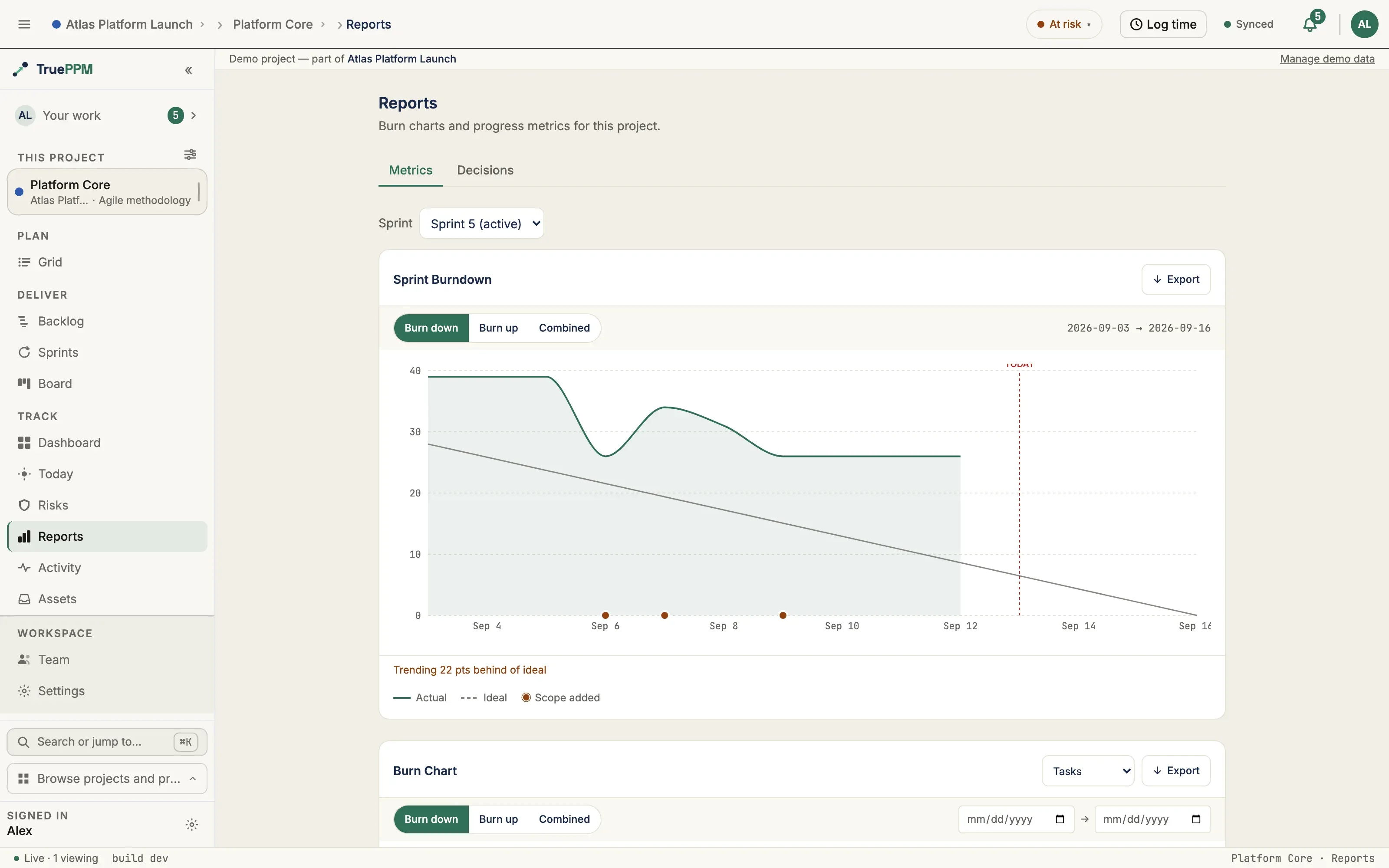
Burn Down
Section titled “Burn Down”Plots remaining work from the project start date to today. The ideal burn line runs from total scope at start to zero at the planned finish date. From 0.4, a project that started more than 366 days ago is charted over its most recent 366 days rather than its whole history — see the window limits under API endpoints.
- Y-axis: remaining story points / task count (user-selectable)
- X-axis: calendar dates across the charted window — project start to planned finish
- Ideal line (dashed): straight diagonal from total scope to zero
- Actual line (solid): cumulative remaining work per day
- A line above the ideal means you’re behind; below means ahead.
Burn Up
Section titled “Burn Up”Shows how much work has been completed as scope grows over time.
- Completed line (solid): cumulative done work per day, growing from zero
- Scope line (dashed): total scope per day — flat until a scope change, then stepping up or down
- The gap between the two lines is the remaining backlog. A narrowing gap means delivery; a widening scope line means scope creep.
Combined
Section titled “Combined”Overlays burn down and burn up on the same axes. The area between the two lines is the active backlog — useful for presenting at reviews where both the “how much is left” and “how much is done” questions arise in the same conversation.
Where to find it in the app
Section titled “Where to find it in the app”- Route:
/projects/:projectId/reports - Tab: Reports — visible on Hybrid, Agile, and Waterfall projects
- Mode selector in the chart toolbar: Burn Down · Burn Up · Combined
- Unit selector: Points · Tasks
- Date range: the From / To pickers in the chart toolbar (project charts only — in a sprint the range is the sprint). From 0.4 the range they can ask for is bounded; the limits are under API endpoints
API endpoints
Section titled “API endpoints”| Method | Endpoint | Purpose |
|---|---|---|
GET | /api/v1/projects/{id}/burn/ | Burn chart data series for the project |
Query parameters:
| Parameter | Values | Default |
|---|---|---|
chart_type | burndown, burnup, combined | burndown |
metric | tasks, points | tasks |
since | ISO date (window start) | project start date |
until | ISO date (window end) | today |
From 0.4 the window will be bounded on both axes. until may be at most 31 days
past today, and the span between since and until at most 366 days: an until
past that horizon, or an explicit since more than 366 days before until, is a
400 naming the limit. A request that supplies no since — or an empty one — is
never refused for span; the window is clamped to the 366 days ending at until
instead, and the response echoes the since it actually used.
The response echoes chart_type, metric, since, and until, plus a series array with one entry per calendar day. For burndown/burnup, each row is {date, actual, ideal, scope}; for combined, rows are {date, remaining, completed, total, ideal}. For burndown / burnup only, a project with an active baseline also gets a baseline_series planned-remaining overlay ({date, planned} rows); combined does not carry one.
IsAuthenticated + project read permission required. Project must be a member of the requesting user’s accessible projects.
Related ADRs
Section titled “Related ADRs”- ADR-0022 — Burn charts: API endpoint design and snapshot semantics
- ADR-0062 — Burn charts web implementation (recharts, combined mode, unit selector)
If you are…
Section titled “If you are…”- Janet (executive) — open the Reports tab before your weekly update. The Combined chart answers “how much is left and how much is done” in one view. A diverging scope line is your prompt to ask the PM what changed.
- Alex (Scrum Master) — use Burn Down between sprints to see whether the project-level trajectory matches what the sprint burndowns predict. Sprint burndowns show iteration health; this shows project health.
- Marcus (PMO / Portfolio Manager) — the Burn Up chart’s scope line tells you whether this project is taking on more work than it planned. Scope creep here often explains why the milestone dates drift in the Schedule view.