Programs
A program is a named grouping of related projects owned by one PM or program team. It is the OSS coordination unit that sits between standalone projects and the Enterprise portfolio: programs let one PM manage several related projects as a single working set, with shared membership, a shared backlog, and a rollup KPI view across the program’s projects.
Scanning the programs directory
Section titled “Scanning the programs directory”The /programs page lists every program you belong to as a card grid. Once the directory grows past a handful of programs, three header controls will help you find the right one without scrolling the whole wall:
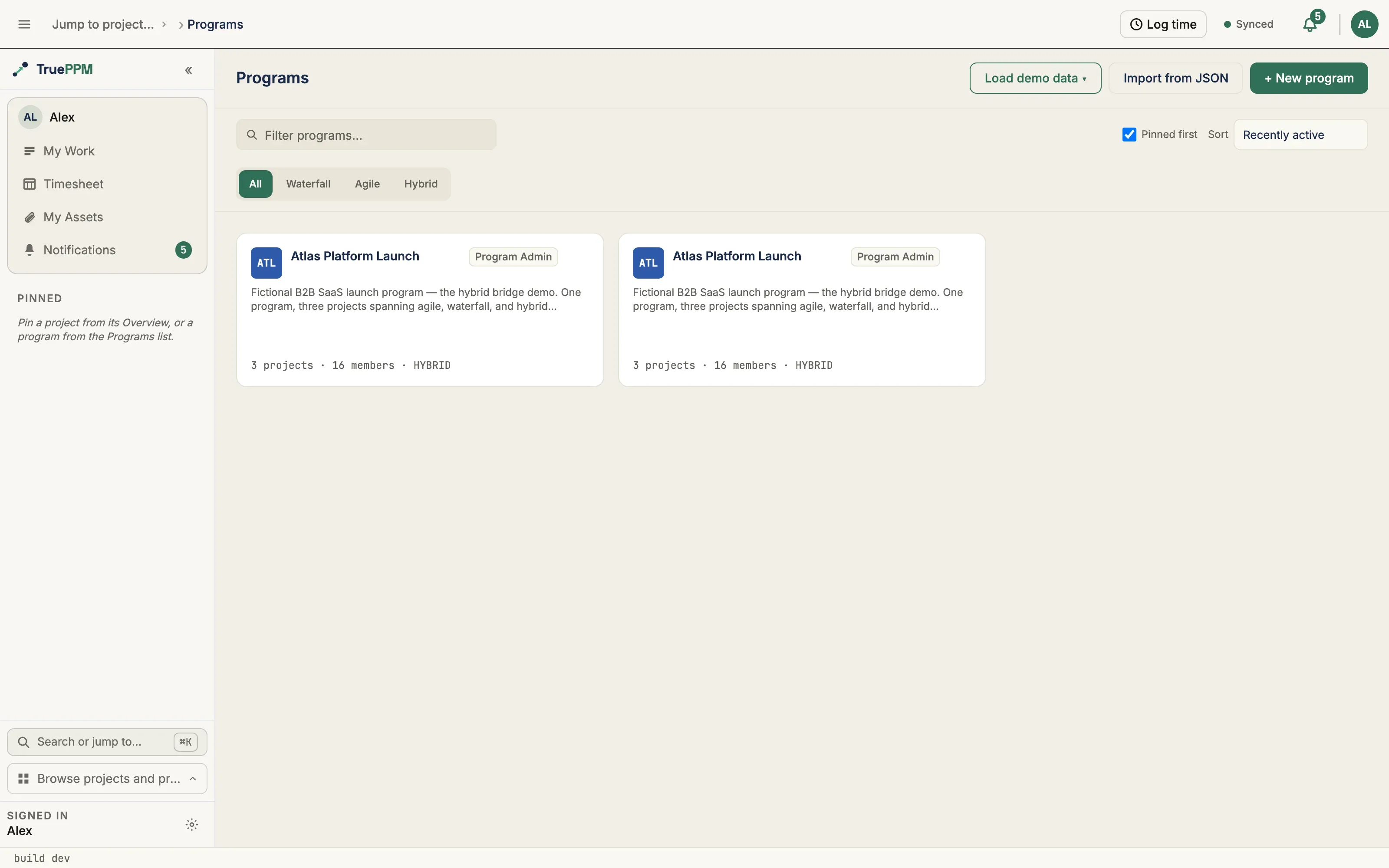
- Filter — type in the search box to narrow the cards by program name, code, or description as you type. A counter shows how many of your programs match.
- Methodology — narrow to Waterfall, Agile, or Hybrid programs.
- Sort — order the cards by Recently active (the default), Name (A–Z), or Health (worst first). Your choice is remembered in your browser, so the directory opens the same way next time.
Pinned programs always float to the top of the grid, ahead of the chosen sort — the header notes this so the order never reads as arbitrary. Pin or unpin a program from the star in the corner of its card. When a filter matches nothing, the directory shows a short empty state with a one-click way to clear the filter.
For jumping straight to a program from anywhere in the app, use the ⌘K command palette — the directory controls are for scanning this page specifically.
When to use a program
Section titled “When to use a program”A PM with three to six related projects benefits from a program when:
- There is a single roadmap or umbrella initiative that all the projects feed.
- Work occasionally moves between the projects — a feature deferred from Project A might end up in Project B’s next sprint.
- You want a single navigation path between the projects without bookmarking each one separately.
If you are running a single project, or a handful of completely unrelated projects, you do not need a program. Projects without a program (the default) are fully functional standalone.
Creating a program
Section titled “Creating a program”Open the sidebar PROGRAMS section and select + New program, or navigate to /programs and select + New program. Fill in:
- Name — display name, e.g. “Phase 2 Modernization”.
- Key — the program’s name in its link, e.g.
/programs/phase-2-modernization/. It is suggested from the name as you type and checked for availability; edit it if you want something shorter. Lowercase letters, digits and hyphens, up to 40 characters, unique across the workspace. You can change it later in program settings, and old links keep working. - Description — optional.
- Methodology — Hybrid (default), Waterfall, or Agile. The choice is a default for new projects created within the program; existing projects in the program keep their own methodology.
You are added as the program Owner automatically.
Adding projects to a program
Section titled “Adding projects to a program”From a program’s Projects tab, select + Add project. The picker lists:
- Standalone projects — projects with no program. Select one to add it.
- In another program — projects that already belong to a different program. Selecting one will move it to this program.
You need at least Project Manager role on the project and Program Manager role on the program you are adding it to. If you are moving a project from one program to another, you also need Program Manager role on the source program. This three-way gate prevents one side unilaterally reorganizing the other side’s container.
Those two names are one role ordinal labeled for its container: the program surfaces say “Program Manager” and “Program Admin” where the project surfaces say “Project Manager” and “Project Admin”.
A project can belong to at most one program. The same project cannot be in multiple programs at once.
The picker has a search box and a methodology filter (All / Waterfall / Agile / Hybrid), and every row shows the project’s methodology — so at organizational scale, or when two projects share a similar name, you can confirm you’re adding the right one before you commit.
Creating a project under a program
Section titled “Creating a project under a program”From a program’s Projects tab, New project opens the Start sheet — one screen, no step navigation — with the project pre-selected to the program you were browsing.
Settings that a project already inherits live from its program — the iteration label, sharing and guest access, Monte Carlo history, attachment policy, and the task-duration-change policy — are not set at creation. A new project leaves them on “inherit”, so they continue to track the program’s value automatically until you deliberately override one in project settings.
You need at least Program Manager role on the program to create a project under it — the same gate that governs assigning a project to a program. From 0.4, it’s also the gate that decides which programs the picker will offer: it will only ever list open programs where you hold that role or higher, so you can’t pick one that would be rejected when you submit.
The program shell
Section titled “The program shell”/programs/:id is a ten-tab shell, in rail order: Overview, Backlog,
Labels, Projects, Schedule, Resources, Agents, Members,
Assets, and Settings:
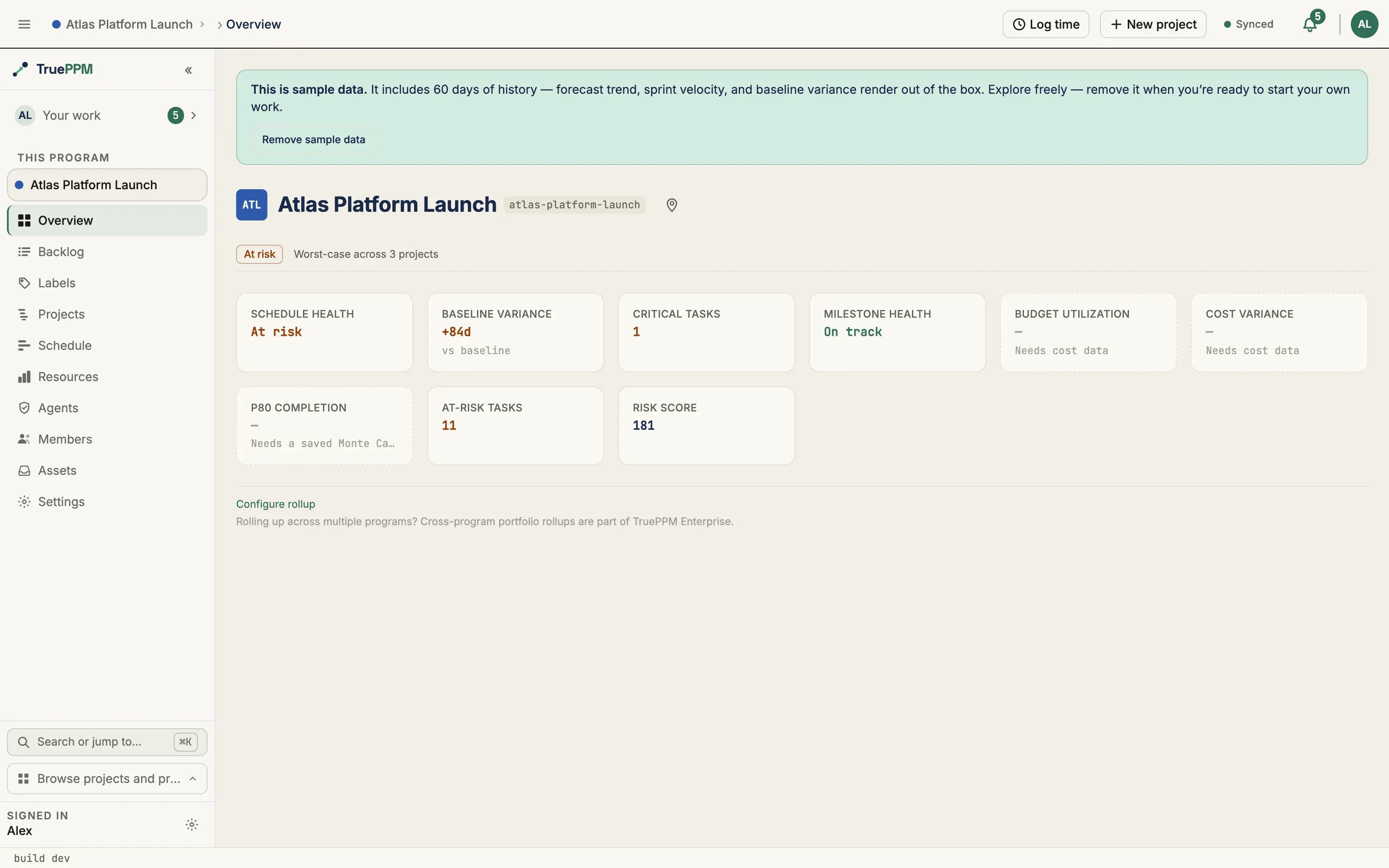
- Overview — rollup KPIs and program health at a glance across the program’s projects.
- Backlog — a shared pool of cross-project program backlog items that
any project in the program can pull from. Each backlog item carries a type tag
that bridges PM and product-owner framings —
epic,feature,story,task,bug,spike, orchore— and an optional story-points estimate for grooming. Each item moves through a lifecycle: proposed → pulled → archived. Pulling an item creates a linked project task in the chosen project and marks the backlog item as pulled; the task carries over the item’s title, description, story points, priority rank, and type (each type maps to its Task equivalent —chorebecomes tech debt,featurebecomes a plain task). Backlog tags are program-scoped free text, and pulling converts them rather than copying them: each tag matches an existing project label case-insensitively, or creates one, clamped to 50 characters. Because the rank carries, items pulled from the same pool keep their relative intake order in the project; an unranked item stays unranked and sorts last. Requires at least Team Member role on both the program and the target project. - Projects — the projects currently in this program. Every project in the
program is listed, but only the ones you are a member of are links — because
program membership does not carry into projects (see above), a project you
hold no membership on is plain text marked No access, and a project owner
has to add you before you can open it. The
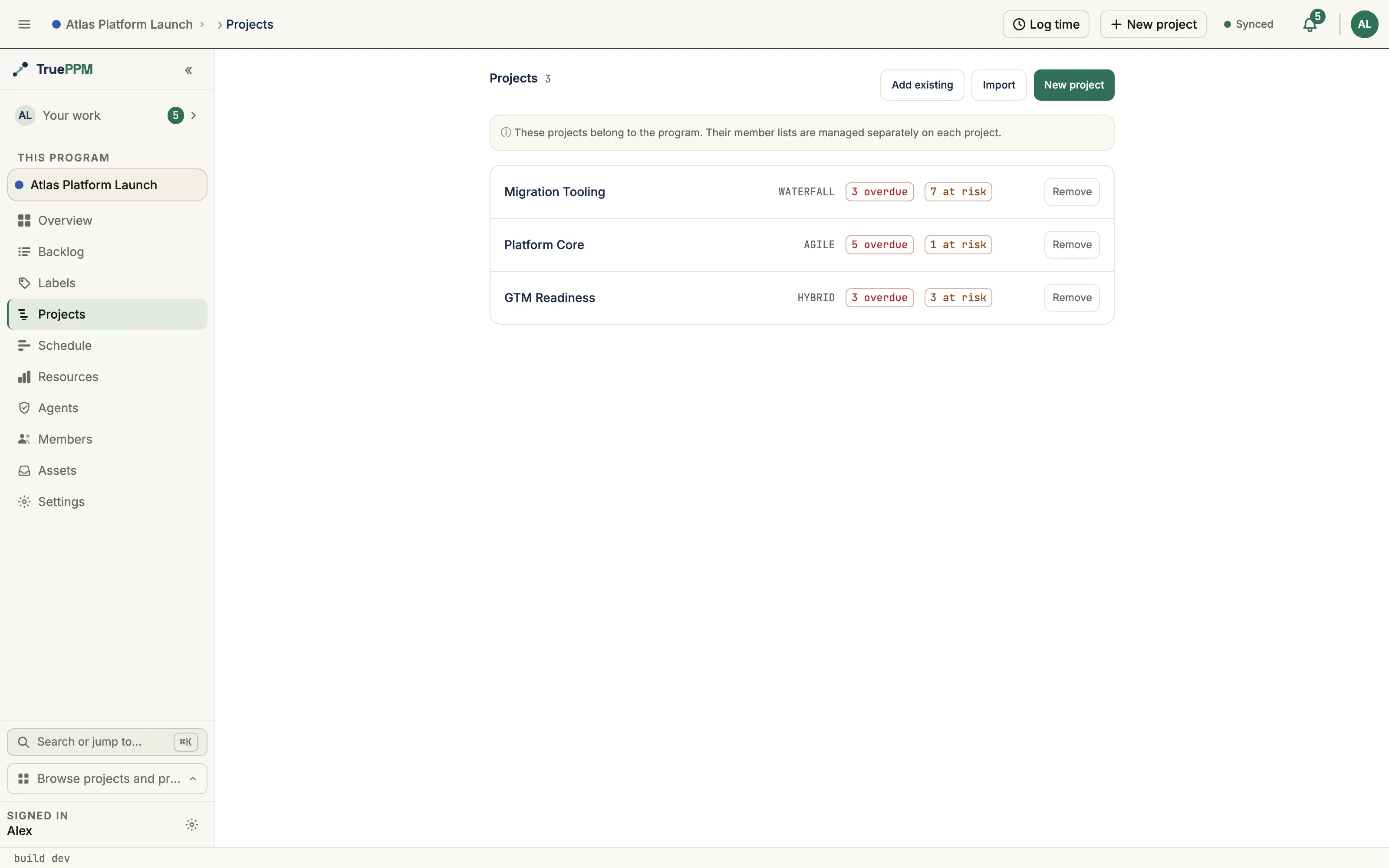
Removeaction detaches the project (it becomes standalone, untouched). When the program has a target date set, it shows at the top of this tab. Each project row carries a standup-style count of its overdue tasks (past their scheduled finish) and at-risk tasks (five or fewer working days of float), so the tab reads like a morning dashboard rather than a plain directory. - Labels — the program-scoped label set that a pulled backlog item’s tags convert into (see Labels).
- Schedule — the cross-project critical path across every member project’s timeline. See Program schedule for the full read-only view and how cross-project dependencies draw.
- Resources — (added in 0.3) within-program resource contention. Surfaces
people staffed across more than one of the program’s projects in overlapping
windows, broken down by project, with an over-allocation flag when someone is
above their capacity. Read-only and visible to Schedulers and above. It shows
contention; it does not level resources or cross a program boundary —
cross-program leveling and the portfolio heat map remain TruePPM Enterprise.
Each task’s contention window is its span (
scheduled_startthrough finish), not the narrower remaining-work window an in-progress task’s start date shrinks toward as it nears completion — reporting progress does not make a person’s allocation, or their contention with a sibling project, disappear. - Agents — the OSS, per-program read of what the team’s own AI agents did (see Agent oversight).
- Members — manage program-level membership. Roles use the same 5-role model as projects, named for the program: Viewer, Team Member, Resource Manager, Program Manager, Program Admin (Owner). Only the top two names differ, and only in the first word — a Program Manager and a Project Manager hold the same rank, each in its own container.
- Assets — files and external links across the program’s readable member projects, unified into one program-level view (see Assets).
- Settings — deeper program configuration (see below).
In the sidebar, a searchable program picker scopes the project list to one program (or “All programs”). In the all-programs scope, projects are grouped under collapsible program headers, with a “No program” group for standalone projects.
Program settings
Section titled “Program settings”Deeper program configuration lives under /programs/:id/settings:
- General — name, description, code, accent color, health, an optional target date (the program’s headline finish date, shown on its card and Projects tab), visibility, and the methodology default for new projects. The program lead is shown read-only. Edits are staged and committed through a save bar. See Program identity square for what the code and color drive.
- Access — manage program membership: invite members, change roles, and remove members (the same membership model as the Members tab).
- Projects — the child projects in the program. Admins can bulk-edit inherited settings here: select projects, pick a field (methodology or iteration label), and apply a value to just the selected rows — or “Reset to inherited” to clear an override so a project inherits the program default again. Inherited values are shown distinctly from explicit overrides.
- Rollup KPIs — choose which indicators roll up across the program’s projects — schedule health, schedule variance, critical-task counts, risk score, and more. Toggles save as you change them.
- Risk policy — program-wide risk rules: which dependency types are allowed (FS / SS / FF / SF), which risk fields are mandatory, and escalation thresholds.
- Lifecycle — close or reopen the program, transfer sponsorship to another
member, and split the program into sub-programs. Transfer sponsorship opens a
member picker: the chosen member becomes Program Admin, you step down to
Program Manager, and you can optionally reassign the program lead in the
same step — the lead is a display field and grants no access, unlike the two
roles. The new Program Admin must already be a program member. Split into sub-programs
(Program Admin only) opens a dialog where you name one or more new sub-programs you’ll own
and assign each of the program’s projects to one of them; any project you leave
unassigned stays on the original program, which is closed (read-only) after the
split. Only the
Project → programlink moves — each project keeps its full schedule, dependencies, baselines, and history under its new program.
The rollup-KPI and risk-policy settings are backed by
GET/PATCH /api/v1/programs/{id}/rollup-config/ and /risk-policy/ respectively;
lifecycle actions map to POST /api/v1/programs/{id}/close/, /reopen/,
/transfer-sponsorship/, and /split/.
Program identity square
Section titled “Program identity square”Each program carries a small colored identity square — its accent color with the program’s short code — that marks it in the sidebar Programs tree and other program-scoped surfaces, so related programs are recognizable at a glance.
Both are set under General settings (/programs/:id/settings):
- Code — a short label, up to 40 characters (e.g.
MIGorP2). Optional; a program with no code shows a blank square. - Accent color — chosen from the swatch picker and stored as a
#RRGGBBhex. Leave it unset to fall back to a neutral square tinted by the program’s health.
Deleting a program
Section titled “Deleting a program”Only the Program Admin (Owner) can delete a program. The delete dialog explicitly shows the impact:
- All program members are removed.
- All projects in the program are detached (they become standalone — project data and project member lists are not affected).
- The program itself is permanently deleted.
You must type the program name to confirm. The cascade is atomic — there is no intermediate state where some memberships are removed but not others.
Roles and permissions
Section titled “Roles and permissions”| Action | Minimum program role |
|---|---|
| View program shell and tabs | Viewer |
| View program backlog | Viewer |
| View resource contention (0.3) | Resource Manager (Scheduler) |
| Create / edit backlog items | Team Member |
| Pull backlog item to project | Team Member (on both program and target project) |
| Add or remove projects | Program Manager |
| Manage program membership | Program Manager |
| Update program name / methodology | Program Manager |
| Delete program | Program Admin (Owner) |
For details on the OSS / Enterprise boundary around programs and portfolios, see ADR-0070.