Project methodology preset
A project-level preset that tells TruePPM which planning model the team uses, and hides the irrelevant tabs by default. The API surface is unchanged — methodology hides tabs but does not gate routes.
Where this lives in the story
Section titled “Where this lives in the story”The system-level encoding of the hybrid PM flow’s central thesis: one model, multiple persona views. Without methodology, every persona sees ten tabs and the workspace overwhelms.
The matrix
Section titled “The matrix”| Tab | Waterfall | Agile | Hybrid |
|---|---|---|---|
| Dashboard | ✅ | ✅ | ✅ |
| Board | ✅ | ✅ | ✅ |
| Backlog | ❌ | ✅ | ✅ |
| Sprints | ❌ | ✅ | ✅ |
| Schedule | ✅ | ❌ | ✅ |
| Grid | ✅ | ✅ | ✅ |
| Calendar | ✅ | ❌ | ✅ |
| Team | ✅ | ✅ | ✅ |
| Risks | ✅ | ✅ | ✅ |
| Reports | ✅ | ✅ | ✅ |
| Settings | ✅ | ✅ | ✅ |
Waterfall hides Backlog and Sprints; Agile hides Schedule and Calendar; Hybrid hides nothing. The Grid tab replaced the earlier separate WBS and Table tabs (ADR-0053) and is visible in all three methodologies — its Outline mode covers the WBS use case for Waterfall and Hybrid, while Flat mode is the Agile default. Independently of methodology, the Team tab is additionally role-gated: it only shows for users with the Resource Manager role or above.
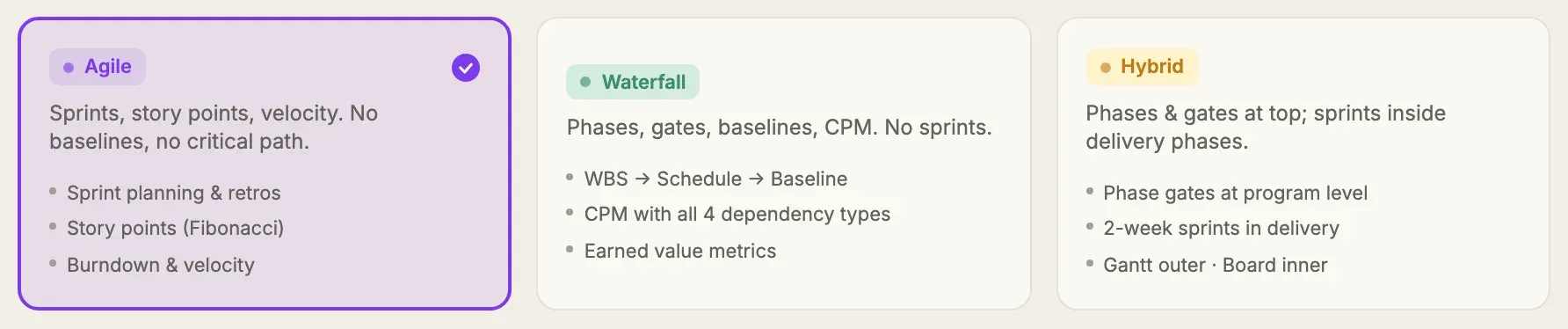
The default for new projects is Hybrid — every tab visible. Existing projects (created before ADR-0041 landed) all default to Hybrid; no behavior change.
Why hide tabs but not gate routes
Section titled “Why hide tabs but not gate routes”The preset communicates “this is not how we work here”, not “this is not allowed.” Power users who know what they want can always reach a hidden view by direct URL. Mobile or API consumers are unaffected. Hiding lowers cognitive load at onboarding without restricting the system.
Landing on a hidden view by direct URL never blocks the route, but it also never pretends the view is the project’s normal workflow. /sprints and /backlog on a Waterfall project (and /schedule and /calendar on an Agile one) show a distinct empty state that names the mismatch, points the primary action at the view the project’s methodology actually uses, and demotes “use this anyway” to a secondary action that opens Settings → How this team works — so enabling the hidden surface is a deliberate configuration change, never an incidental click.
Flipping a project’s methodology never touches existing data, and a hidden view that still holds work says so. Wherever a hidden surface is not empty, it renders the work as usual under a banner naming the mismatch — the same four surfaces the empty state covers, and their mobile counterparts:
- Waterfall — Sprints names how many sprints are already committed; Backlog names how many stories are already groomed.
- Agile — Schedule and Calendar state that the project already has a schedule.
The banner is read-only and always sits above the real content: the work is never hidden, because the route was never blocked. It offers a single Review methodology action, which opens Settings → How this team works. It cannot be dismissed — it states a standing fact about the project’s configuration rather than reporting an event, and it disappears on its own as soon as either half stops being true (the preset changes back, or the work is gone). You will never see the banner and the empty state at once: an empty hidden surface gets the empty state, a populated one gets the banner.
The Settings → How this team works picker will also warn before any save that hides work the project already has, naming the counts so the choice is made with the consequence in view. It covers both directions that hide something, and every view each one takes away:
- Switching to Waterfall hides Backlog and Sprints. The warning names how many sprints are already committed and how many items sit in the product backlog — either one on its own is enough to raise it, so a groomed backlog on a project that has never run a sprint is not waved through.
- Switching to Agile hides Schedule and Calendar. The warning names how many tasks are on the schedule and how many dependency links the project holds, since the dependency network and the critical path are drawn nowhere else.
Switching to Hybrid never warns: Hybrid hides nothing. Neither does a flip whose destination hides only surfaces this project has not used. Cancelling leaves the picker as you set it, with the change unsaved.
Switching the preset tells everyone whose workspace it re-shapes, not just the person who changed it — the preset decides which views the whole team sees, so a silent flip re-arranges other people’s workspace without telling them. That is everyone with work in the project, plus the project’s Scrum Master and Product Owner and everyone at Resource Manager or above — a Product Owner or a PM holding no assigned task is precisely the person the rest of the team asks to explain the flip. The notice names both presets, which views became visible or hidden as a result, and confirms that the reader’s own items keep their status, dates and assignments. It arrives the same way whether the preset is switched from a project’s own settings or in bulk from the program settings matrix. See Config-change notices.
Customize views — your personal layer
Section titled “Customize views — your personal layer”The methodology preset is the team-level default; Customize views is your personal layer on top of it. Open the Views menu in the top bar (or Settings → General → Views) and toggle off the tabs you never use — a Product Owner who lives in Backlog and Board can hide Schedule and Calendar; a scheduler can hide the board. Your choice is saved to your account and applies to every project you open.
A few rules keep it predictable:
- You can only hide views that the project’s methodology already shows — Customize views layers on top of the preset, it never re-shows a methodology-hidden tab.
- Dashboard and Settings are always shown — Dashboard is the orientation landing and Settings is an administrative surface, so your nav can never be emptied. (This row is named “Overview” in the current release — see the note above the matrix.)
- Hidden views are not gone: they stay listed in the Views menu and are reachable from the ⌘K command palette as “Go to {view}”. A hidden view’s URL still works — hiding is cosmetic, never a permission change.
- Reset to {methodology} default clears your personal hides for the current project and falls back to the methodology layout.
Customize views is per-user and cosmetic — it changes only your own navigation, never what teammates see. (An administrator pinning views for everyone is a separate, governance-level capability reserved for TruePPM Enterprise.)
Where to find it
Section titled “Where to find it”- Start sheet — the one-screen “New project” flow derives and states the methodology as a read-only line, based on the way you start (a template’s own methodology, or the program/workspace default for Blank and Import) — it is never asked for directly at creation
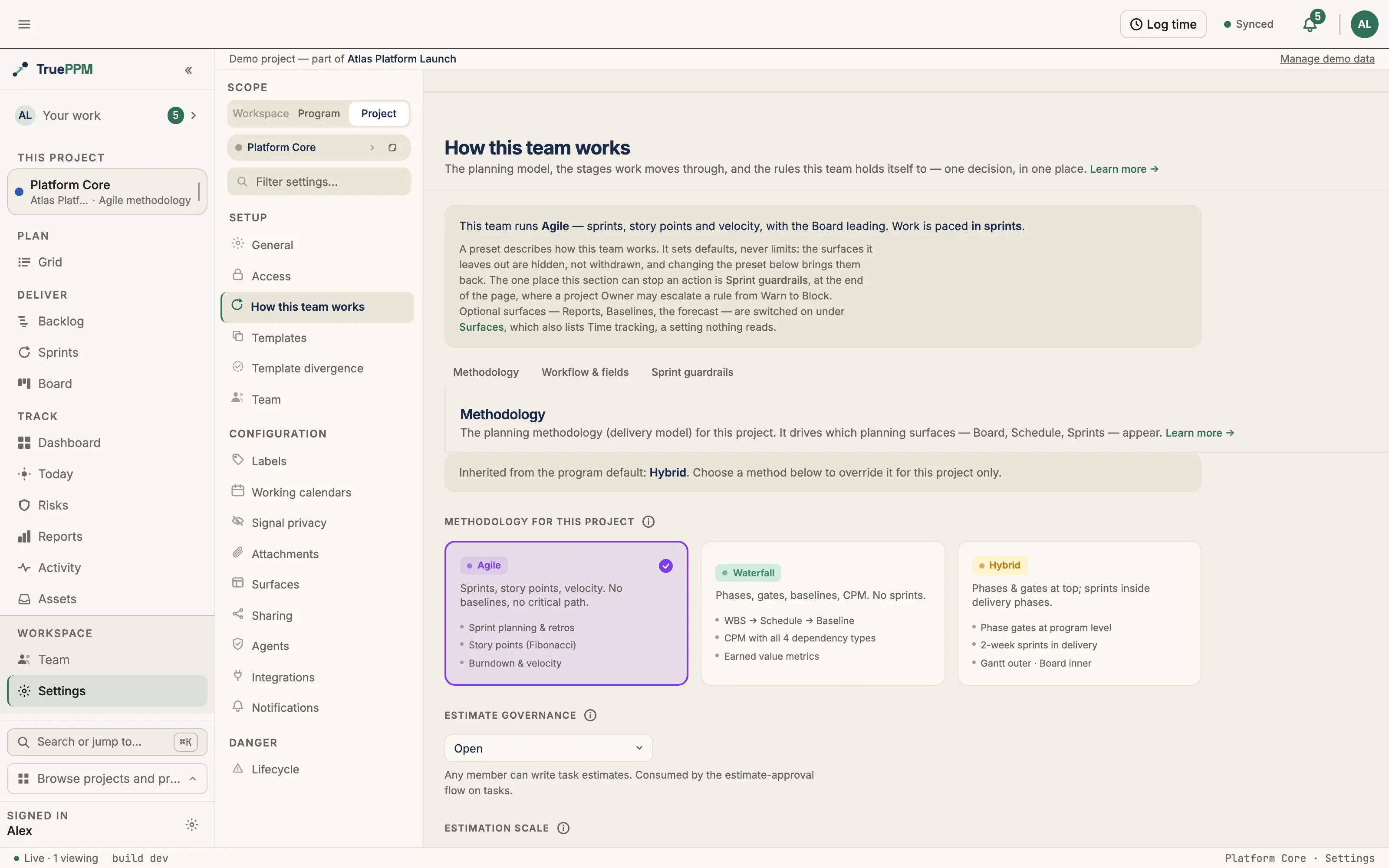
- Project settings — the same selector, editable post-creation; takes effect immediately
Methodology inheritance
Section titled “Methodology inheritance”As of 0.3, you can set the planning model — Waterfall, Agile, or Hybrid — at three scopes: set the default once for the whole workspace under Settings → Workspace → Methodology, and it seeds the programs and projects created after it, each of which can then set its own. Read Seeding is not cascading before you count on a change at one scope reaching the scopes below it.
The key difference from the iteration label is that a methodology is non-null at every scope — there is no blank “inherit” option to choose. Inheritance is therefore policy-driven: the workspace’s override policy will decide whether lower scopes may deviate from the workspace default.
- Suggest (the default) — the workspace default pre-fills new programs and projects, but a PM can change the method per scope.
- Inherit — every program and project follows the workspace default; the per-scope picker is rendered read-only.
- Enforce — the workspace default is mandatory and cannot be overridden. Enforce will be a TruePPM Enterprise capability; in the OSS community edition, Enforce behaves like Suggest — it does not lock.
Seeding is not cascading
Section titled “Seeding is not cascading”Because every scope always holds a concrete methodology, under Suggest a project’s own value always wins. Setting a program’s methodology therefore does not change the projects already in it: it seeds the projects created in that program afterward (a project started from a template starts with the template’s method instead), and existing projects keep whatever they have. The same is true one scope up — changing the workspace default does not re-shape the programs and projects beneath it.
To change projects that already exist, use the bulk matrix under Program settings → Projects, or each project’s own Methodology setting. A workspace Inherit lock is the one case where a parent’s value does reach every scope, because it overrides each scope’s own value at resolution time rather than copying anything.
In 0.4, saving a program’s methodology will report what that save did and did not reach:
Saved. 9 of 12 projects in this program run as Waterfall; 3 do not. Existing projects keep their own methodology. Align the 3
Align the 3 will open the Projects matrix with those three rows already checked and Methodology already chosen — but nothing will be staged and Apply will stay disabled, so the change is still yours to make. When every project already matches, the message will say so (“All 12 projects in this program already run as Waterfall”) rather than showing nothing, because silence there is the state that reads as a successful cascade.
The effective methodology will be resolved on the server, so every client reads the same value. The view-tab matrix above is driven by the effective methodology, so a workspace-level lock immediately reshapes which tabs appear across every project under it.
The read-only picker is only a courtesy render-gate — the server is the source of truth. A direct API attempt to override the methodology while a workspace lock is active will be rejected with a 403.
Iteration terminology
Section titled “Iteration terminology”Not every team that runs timeboxes calls them “Sprints.” Scrumban and SAFe-adjacent teams use “Iteration” or “PI”, and forcing strict Scrum-Guide vocabulary reads as a mandate. As of 0.3, you can label the iteration container — Sprint (the default), Iteration, PI, or a custom word — at three scopes that inherit from one another: set it once for the whole workspace under Settings → Workspace → General, override it for a Program, and override it again on an individual Project. Each scope can also choose to inherit its parent’s term, so a relabel in one place flows down to everything below it. The most specific override wins (project, then program, then the workspace default), and the effective label is resolved on the server so every client shows the same word.
The chosen label will flow through every iteration surface: the tab, the sprint workspace, the board, planning, guardrails, the burndown, and the milestone-bridge dialog. It is display-only — like the methodology preset, it changes what you see, never what the system does: scheduling, permissions, and the API are untouched. Existing projects keep “Sprint”, so nothing changes unless a team opts in. Locking a term workspace-wide so lower scopes cannot override it (Enforce) will be a TruePPM Enterprise capability.
API endpoints
Section titled “API endpoints”| Method | Endpoint | Purpose |
|---|---|---|
GET | /api/v1/projects/{id}/ | Includes methodology, the raw iteration_label override (nullable; null = inherit), the resolved effective_iteration_label, and inherited_iteration_label. Also includes the server-resolved effective_methodology and inherited_methodology read fields |
GET | /api/v1/programs/{id}/ | Includes the server-resolved effective_methodology and inherited_methodology read fields |
PATCH | /api/v1/projects/{id}/ | Accepts methodology (WATERFALL | AGILE | HYBRID) and iteration_label (free text, ≤32 chars, or null to inherit; Project Manager+ only). A methodology PATCH is refused (403) when the workspace override policy locks it |
PATCH | /api/v1/programs/{id}/ | Accepts methodology (WATERFALL | AGILE | HYBRID) and iteration_label (override or null to inherit the workspace default; Program Manager+ only). A methodology PATCH is refused (403) when the workspace override policy locks it |
PATCH | /api/v1/workspace/ | Accepts iteration_label (the workspace default) and iteration_label_override_policy (inherit | suggest | enforce; enforce is Enterprise). Also accepts methodology (the workspace default: WATERFALL | AGILE | HYBRID) and methodology_override_policy (suggest | inherit | enforce; enforce is Enterprise; Admin only) |
Related ADRs
Section titled “Related ADRs”- ADR-0041 — Project methodology preset
- ADR-0107 — Workspace experience preset / methodology inheritance
- ADR-0111 — Configurable iteration-container label
If you are…
Section titled “If you are…”- Sarah (construction PM) — set Waterfall. Sprint chrome disappears; Schedule and Grid (outline mode) dominate.
- Alex (Scrum Master) — set Agile. Schedule and Calendar disappear and Grid defaults to flat mode; Sprints and Board dominate.
- Marcus (PMO Director) — leave Hybrid as the default for projects that span teams. Override per project where the team’s method is clear.