Project Settings
Every project has a Settings area (under /projects/:id/settings) where Admins
configure the project’s identity, who can access it, how its board works, and its
lifecycle. This page covers the settings that are available today.
Fields carrying jargon, a policy choice, or an inheritance cascade also carry a circled ⓘ contextual-help affordance that explains the setting and deep-links to the relevant guide. See In-product help for how it behaves.
What the Start sheet sets at creation
Section titled “What the Start sheet sets at creation”The New project Start sheet — one screen, no step navigation — collects only what changes what happens next. It opens with the way in: one choice among three peer ways to start (Template, Blank, or Import). Below that come the project’s own fields — name, key, program, and start date — and the working calendar sits in the pinned footer above the actions, where it stays in view however long the template list gets. Planning model is derived from the way you choose and shown read-only, never asked for directly. See Creating a project under a program for the full field list and Project methodology preset for how the derived line resolves.
Nothing is created until you press the sheet’s commit button — which is what the footer tells you, naming whichever button is on screen (it reads Create & import spreadsheet on the Import way). The sheet does not create a draft as you type, so closing it leaves no project behind and no notification, webhook, or rollup sees anything until you commit. Note that it does not preserve your entries either: there is no autosave today, so a closed sheet starts fresh.
Everything else on this page — default view, board cadence, visibility, the default role for new members, and the sharing, attachment, and Monte Carlo policies — starts on the program or workspace default (inherited, not copied) and is set here, in project settings, immediately after creation. There is no create-time “copy settings from another project” step: a new project always starts on live inheritance from its program or workspace, which you can override per setting whenever you choose.
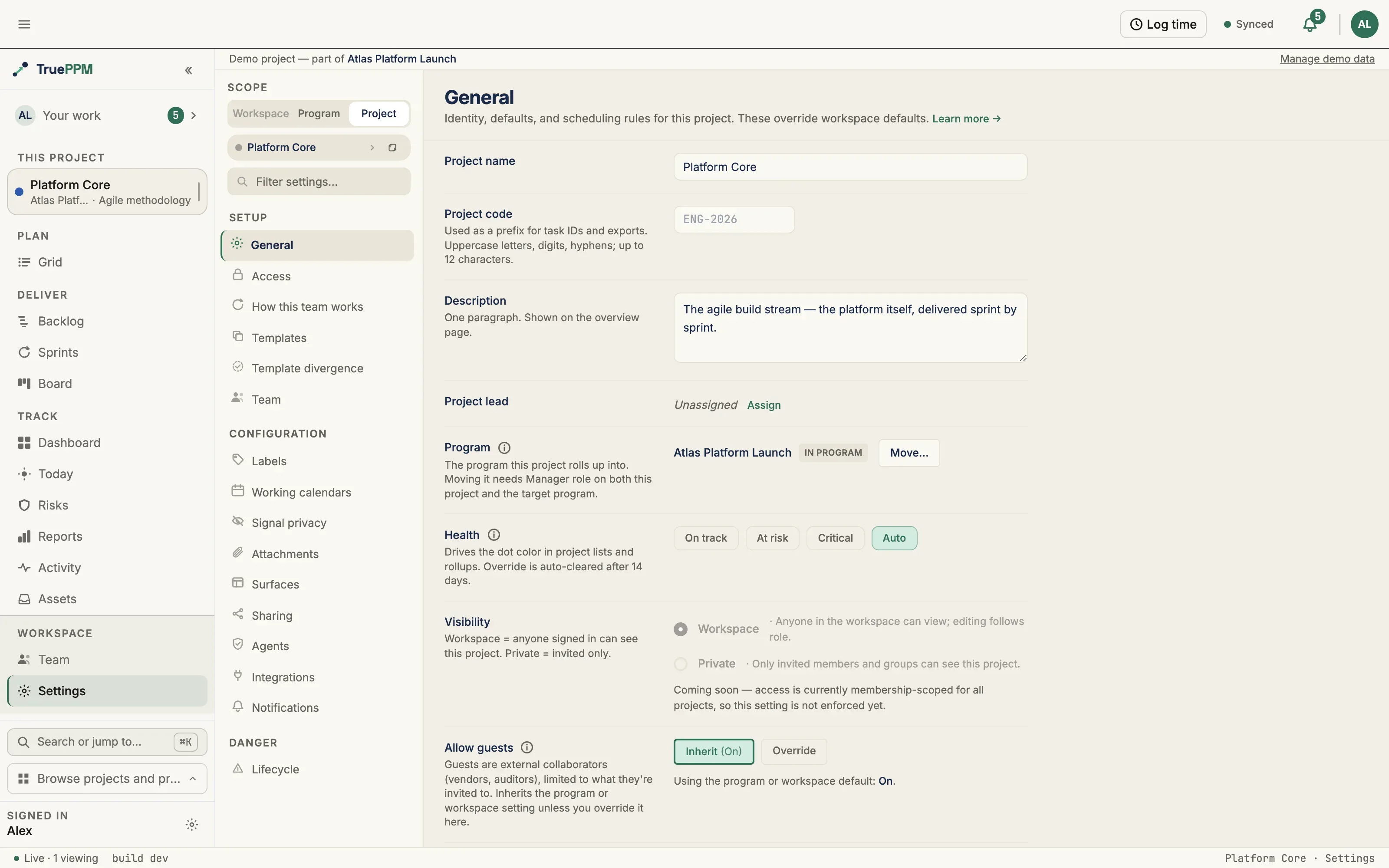
General
Section titled “General”The General page edits the project’s identity:
-
Name, description, and key — see Project key below
-
Health indicator and visibility
-
Time zone — the clock this project’s quiet hours are read in, and the only thing it does. It does not change how dates are displayed to you: task dates are calendar dates, so no time zone moves them, and timestamps follow your own personal time zone. Leaving it on Workspace default falls back to the server’s time zone, which is UTC.
-
Default view — the view this project states it leads with. TruePPM does not route on it: opening a project takes you to the view your own view focus prefers, so two people opening the same project land in different places regardless of what is set here. The value is saved, returned by the API, and shown on an empty schedule among the project’s stated facts.
-
Public sharing and guest access — these inherit from the workspace (or the project’s program) and a Project Manager or Project Admin can override them per project. A control with no override reads Inherit (On/Off), showing the value that would apply from the parent scope. See Sharing & Access Inheritance.
-
Sprint planning — whether the sprint story picker starts filtered to Definition-of-Ready stories for this project. Inherits the program or workspace default unless you override it here (Resource Manager or above may set it — PO/team territory, alongside estimation scale). Advisory only: the picker’s own “Show all” toggle always reveals a not-ready story, and committing one is never blocked.
Changes are staged and committed with a save bar, so you can review edits before applying them. The General page also carries the project’s Working calendar override, which inherits the program or workspace default unless you set one — see Working calendars.
Project key
Section titled “Project key”The project key is the project’s short name in links and IDs: PLAT in
/projects/PLAT/schedule, and the prefix of references like PLAT-T-12. (The API
field is still called code; see
Project and program keys.)
A key is 2 to 10 letters and digits and starts with a letter. It is unique across
the workspace, and capitalization doesn’t matter.
- At creation, the Start sheet fills the Key field from the name as you type
(Platform Migration suggests
PM) and says whether it’s available. Type your own to take it over; clear the field to go back to the suggestion. If a key is already in use, the sheet offers the next free one, such asPM2. If you leave the field blank, a key is derived for you. - Renaming is done in the Project key field here and saved with the save bar. Old links keep working: a link that uses the old key opens this project and the address bar switches to the new key. The old key stays reserved for this project, so no other project can take it. A project can be renamed at most 10 times. After that the field is read-only; contact your workspace admin.
- Links. Links that use the project’s ID instead of its key also keep working, and they switch to the key when opened. A key that doesn’t match any project you can see shows This project isn’t available. This is the same message as for a project you don’t have access to.
- Read-only. If you can’t edit General settings, the key is shown as text with a Copy project link button.
Keys appear in URLs, browser history and server logs, so don’t put confidential
words in one. A key created before 0.4 may contain hyphens (GA-SEC). It keeps
working, but a new key can’t use hyphens.
Access
Section titled “Access”The Access page manages project membership using the 5-role model (Owner, Admin, Scheduler, Member, Viewer). From here you can invite members, change a member’s role, and remove members. Inviting is restricted to the project Owner. See Roles & Permissions for what each role can do.
The page also sets the default role for new members — the role someone receives when
added without one chosen, overridable per person at any time — and the project’s
mention groups, custom @groups that notify a curated set of project members from a
comment. See Project members.
How this team works
Section titled “How this team works”Methodology, Workflow & fields and Sprint guardrails are one section in the settings rail — How this team works — not three. They are one decision: the planning model a team uses, the stages its work moves through, and the rules it holds itself to. Splitting them across the rail meant a delivery lead standing a team up had to find all three before they could see the shape of what they had configured.
The section opens with a plain restatement of the preset — what this team runs, and how its work is paced — followed by a jump strip to the three blocks below, in order:
| Block | What it sets | Detail |
|---|---|---|
| Methodology | The planning model, and which surfaces lead | Methodology |
| Workflow & fields | Board cadence, phases, statuses and their lanes and WIP limits, custom fields | Workflow & fields |
| Sprint guardrails | Which composition mistakes warn and which the Owner blocks | Sprint guardrails |
Board columns appear here as the Statuses list, with each column’s WIP limit and its lane expander — the same editor described under Workflow & fields. There is no second column editor.
The preset communicates; it does not enforce. It decides which planning surfaces a project leads with — the ones it leaves out are hidden, not withdrawn, and changing the preset brings them straight back. Note that Surfaces is a different control: it toggles the four optional surfaces (Reports, Time tracking, Baselines, the Monte-Carlo forecast), not Board / Schedule / Sprints.
Two things on this page can stop an action, and neither is the preset:
- Sprint guardrails — a Project Admin may escalate a composition rule from Warn to Block, and a Block has no override. That is a deliberate, Project Admin-only, per-rule decision, which is the opposite of a preset silently deciding for a team.
- A phase committed to a sprint is rejected unconditionally by the API — a data-integrity rule, not a preset consequence. See Sprint guardrails.
Everything else here configures what a team does, not what it may do.
Old settings links keep working
Section titled “Old settings links keep working”The three addresses these sections used to answer on still resolve, in both forms:
| Old address | Now resolves to |
|---|---|
/projects/:id/settings/methodology | /projects/:id/settings#how-this-team-works |
/projects/:id/settings/workflow | /projects/:id/settings#how-this-team-works |
/projects/:id/settings/guardrails | /projects/:id/settings#how-this-team-works |
/projects/:id/settings#methodology | /projects/:id/settings#how-this-team-works |
/projects/:id/settings#workflow | /projects/:id/settings#how-this-team-works |
/projects/:id/settings#guardrails | /projects/:id/settings#how-this-team-works |
The address in the bar becomes the section’s, but the page scrolls to the block
the old link named — …#guardrails still lands on the guardrail matrix, not on the
top of a section three blocks tall. A settings URL in a runbook, a bookmark, or a
link someone mailed a colleague does not break, and does not land short, because
the navigation was tidied.
Methodology
Section titled “Methodology”A block within How this team works.
The Methodology block picks the project’s planning methodology (its delivery model). The choice drives which planning surfaces appear — Board, Schedule, Sprints — so a predictive project does not carry sprint chrome it never uses, and an agile one does not lead with a Gantt. See Methodology preset.
Surfaces switched off by the methodology can still be re-enabled individually on Surfaces; the methodology sets the default, not a hard limit.
The Team page assigns facilitation and ownership. Roles control who can manage the team; facets separately mark the Scrum Master and Product Owner. The two are independent — a Scrum Master is not required to be a project Admin, and marking someone as Product Owner grants no extra permission by itself. See Project team.
The page appears only for methodologies that have a team ceremony model; a purely predictive project does not show it.
Templates and template divergence
Section titled “Templates and template divergence”The Templates page publishes this project’s shape (phases, dependencies, durations — never owners, dates, or progress) as a reusable starting point for future projects, and Template divergence reports how far a project adopted from a template has drifted from it since. Both are feature-level, not administration settings, so the full picture — what a template carries, what it strips, and how divergence is computed and reported — lives in Project templates.
Workflow & fields
Section titled “Workflow & fields”A block within How this team works.
The Workflow & fields block configures how the board behaves for this project:
- Board columns — the column configuration the board renders.
- Custom fields — define task custom fields (add, edit, remove) that appear on cards and task detail.
Each status row carries a Lanes expander. Adding a lane splits that one column into named tracks on the board — Review into Peer review and QA, say — up to six per column. Requires the Resource Manager role or above, the same gate as the rest of the board column configuration.
A lane is a board-presentation split, not a sixth status: a card in the QA lane still
carries status = REVIEW, so burndown, throughput rollups, MS Project export and every
API integration are unaffected. Lane names must be unique across the whole project.
Removing a lane never deletes or hides a card — anything left in it reappears in the
column’s first lane.
Labels
Section titled “Labels”The Labels page manages the project’s colored labels. A label categorizes tasks across the board and the schedule independently of status, sprint, or WBS position, so it is the right tool for a cross-cutting concern (“needs design”, “customer-committed”) that does not fit the workflow columns. See Labels.
Working calendars
Section titled “Working calendars”The Working calendars page manages the calendars this project can schedule against — working days, working hours, and holiday exceptions. The calendar a task uses determines how CPM converts a duration into dates, so a change here moves dates. The project inherits the program or workspace calendar unless it defines its own. See Working calendars.
Notifications
Section titled “Notifications”The Notifications page sets per-member notification preferences — each member controls which project events notify them. Preferences are stored per membership, not as a single project-wide switch.
Stale-task threshold
Section titled “Stale-task threshold”A daily background scan nudges the assignee of any task that has sat in a
non-terminal status (anything other than Complete) longer than the project’s
stale-task threshold — stale_task_threshold_days, default 7 days. The nudge
lands in the assignee’s notification inbox (and, if they opt in, as email) via the
“When a task you own goes stale” preference on their personal
notification settings. Re-runs dedupe
against the existing unread nudge, so a still-stale task is not notified twice.
The threshold is a board-level setting on the project, editable by a Project Manager
(Admin) or Project Admin via PATCH /api/v1/projects/{id}/ with
{"stale_task_threshold_days": <1–365>}. A dedicated settings-page control is planned;
today it is set through the API. Unassigned stale cards are surfaced by the board card’s
stalled chip rather than a notification, since there is no single owner to nudge.
Project end-date shift threshold
Section titled “Project end-date shift threshold”When a schedule recompute moves the project’s overall finish date by more than the
project’s end-date shift threshold — end_date_shift_threshold_days, default
5 days — the project’s Project Manager (Admin) and Project Admin members are
notified. The comparison is against the project’s most recently recorded forecast
snapshot (a background record of the project’s schedule finish over time, captured on
every recompute), so a slip is reported once, not once per recompute — a recompute
that leaves the finish unchanged produces no repeat notification. The move is measured
in working time: a milestone finish shown at the start of a Monday is the same finish as
the end of the Friday before it, so a finish whose shown date only hops a weekend or
holiday is not a shift and notifies nobody (see
Scheduler Conventions). Notifies only
Project Manager and Project Admin members; Resource Manager, Team Member, and Viewer roles do not receive this digest.
The threshold is a board-level setting on the project, editable by a Project Manager
(Admin) or Project Admin via PATCH /api/v1/projects/{id}/ with
{"end_date_shift_threshold_days": <1–365>}. A dedicated settings-page control is
planned; today it is set through the API, the same way as the stale-task threshold
above.
Lifecycle
Section titled “Lifecycle”The Lifecycle page handles a project’s end-of-life:
- Archive / unarchive — take a project out of active rotation without deleting it.
- Transfer ownership — hand the Project Admin (owner) role to another member.
- Delete — remove the project (Project Admin only). Deleting also removes the project’s tasks, sprints, risks, and baselines, and the project stops resolving at its URL. Deleting a program is different: its projects are detached and kept intact rather than deleted.
Sprint guardrails
Section titled “Sprint guardrails”A block within How this team works.
The Sprint guardrails block configures the per-project guardrail policy as a
rule-by-rule matrix: each sprint/phase composition rule is either Warn
(default — the team sees a warning and may override) or Block (no override).
Only the project Owner may escalate a composition rule to Block — sprint
composition stays team-owned. The subtasks_split rule is advisory-only and
cannot be escalated. When the policy was supplied externally (an Enterprise
resolver), the page shows a banner naming who set it, and composition Blocks
stay inert until the team toggles acknowledgement.
Phase in a sprint is a hard block, not a policy toggle. Committing a phase
— a task that rolls up one or more real child tasks — to a sprint always double-counts
velocity, so it is rejected unconditionally regardless of this policy: the API returns
400 with the stable error code phase_in_sprint_forbidden, and the sprint picker does
not offer a phase as a target. This block is not owner-escalatable and cannot be relaxed
to Warn. The phase_in_sprint matrix row therefore has no effect on phases; the softer
Warn/Block matrix still governs the summary, out-of-window, and recurring rules. Assign the
tasks inside the phase to the sprint instead. (A leaf task decomposed into drawer
subtasks is not a phase and remains a legitimate, warn-only summary_in_sprint case.)
Signal privacy
Section titled “Signal privacy”The Signal privacy page controls how far each team signal — the health and flow readings the team generates — may travel. The team owns the ceiling; a Scrum Master moves the dial below it but cannot raise it past what the team set. The page appears only for methodologies that produce team signals. See Signal privacy.
Attachments
Section titled “Attachments”The Attachments page controls whether task file uploads are allowed on this project and which file types are accepted. It inherits the program or workspace policy unless you override it here. External links are always allowed regardless of the policy — the setting governs uploaded files, not references. See Attachment policy.
Surfaces
Section titled “Surfaces”The Surfaces page turns optional surfaces on or off for this project. Each inherits a default from the project’s methodology unless overridden here.
Hiding a surface removes its chrome only — the data stays computed and reachable by direct link. Turning off the Schedule surface does not stop CPM from running or make the schedule private; it removes the navigation entry. Treat this as decluttering, not as an access control. Use Access for permissions and Sharing for external exposure.
Time tracking is stored but not read
Section titled “Time tracking is stored but not read”Three of the four toggles do what they say. Time tracking does not, and the row is shown inert rather than editable so you are not offered a save that changes nothing.
Every time-logging surface in TruePPM is personal and cross-project — the top-bar timer, Quick log, My Work, and your timesheet each cover every project you are on. None of them is per-project chrome that a per-project setting could hide, so there is nothing for the toggle to switch off.
The column, the API field, and the methodology default are all still live: the value
saves, round-trips on reload, and is returned by GET /api/v1/projects/{id}/. Only the
consequence is missing. Hiding it also no longer notifies the team — a
config-change notice about a change nobody can see is noise, so this
one surface is excluded from that notice.
Making it real needs a per-task delivery signal on the My Work payload, which is a feature rather than a wiring fix; nothing tracks it yet. Until then, treat the row as a statement of intent, not as a control.
Sharing
Section titled “Sharing”The Sharing page generates public, read-only links to this project’s schedule or board. Anyone holding a link can view it with no login, so a link is a credential — revoke it here when it should stop working. Whether this page is available at all depends on the workspace (or program) public-sharing policy, which an Owner or Admin may override per project. See Sharing & access.
Agents
Section titled “Agents”The Agents page sets Agent read access — whether an AI agent connected over MCP may read this project’s data. Inherits the program or workspace setting unless you override it here. Turning it off blocks the read outright (it does not affect people signed in through the web or mobile app, or a member’s own personal API token) and cannot be reversed by a program or workspace administrator — only this project can re-enable it. See Team-level opt-out for the full inheritance and audit behavior.
Integrations
Section titled “Integrations”The Integrations page manages this project’s outbound webhooks and inbound API tokens: add, edit, test, and delete webhooks (with a format picker and delivery log), and mint and revoke API tokens. Per-user credentials are not configured here — those live under User → Connected Accounts.
See Webhooks, Personal access tokens, and Git-event automation. A program-scoped equivalent, firing across every project in a program, is documented at Program settings → Integrations.
Backing API
Section titled “Backing API”The functional pages map to these endpoints:
| Page | Endpoint(s) |
|---|---|
| General | PATCH /api/v1/projects/{id}/ |
| Access | GET/POST/PATCH/DELETE /api/v1/projects/{id}/members/… |
| Workflow & fields | GET/PUT /api/v1/projects/{id}/board-config/, …/custom-fields/… |
| Lifecycle | POST /api/v1/projects/{id}/archive/, …/unarchive/, …/transfer/, DELETE /api/v1/projects/{id}/ |
| Integrations | GET/POST/PATCH/DELETE /api/v1/projects/{id}/webhooks/…, …/api-tokens/… |
| Sprint guardrails | GET/PATCH /api/v1/projects/{id}/guardrail-policy/ |