Product backlog & scoring
The product backlog is the Product Owner’s home surface: a single, priority-ordered list of the work a team will deliver, expressed in agile vocabulary — epics, stories, acceptance criteria — with no WBS or critical-path jargon required. It lives at Projects → (a project) → Product backlog.
Landing here after creation
Section titled “Landing here after creation”Applying an agile template from the Start sheet lands the new project directly on this page, its backlog already standing — epics, stories, and points in place, not an empty “add your first task” card. Template rows arrive over the board’s live connection a moment after creation; while they’re still arriving, the page shows a brief “Setting up your backlog…” skeleton instead of the ordinary empty state, so a genuinely empty backlog and a not-yet-arrived one never read the same.
A Not [iteration]-assigned strip (the label follows the project’s configured iteration term — Sprint by default) summarizes stories with no sprint commitment yet and how many of those are still unestimated. It is the same “committed vs. not” concept the Schedule view’s Unscheduled gutter shows for waterfall work, read here in backlog terms.
Where this lives in the story
Section titled “Where this lives in the story”The product backlog feeds Sprint planning: the Product Owner grooms and orders work here, and the team pulls from the top of it into a sprint. From this page, that pull is planning-only — grooming never assigns work to a sprint directly (sprint sovereignty is preserved; see Sprints). The Board’s own backlog rail is a separate, direct-manipulation surface: dragging a card from it into a phase column does assign that task to the viewed sprint immediately — see Board → Sprint integration. The two are not in tension: this page is where the Product Owner grooms and orders before a sprint exists to pull into, and the Board’s rail is where the team pulls during an active or planned sprint.
The grooming view
Section titled “The grooming view”The grooming view shows stories grouped under their epics, ordered by priority, each row carrying its Definition-of-Ready signal, an acceptance-criteria meter, and its story points. A grooming-health strip across the top summarizes:
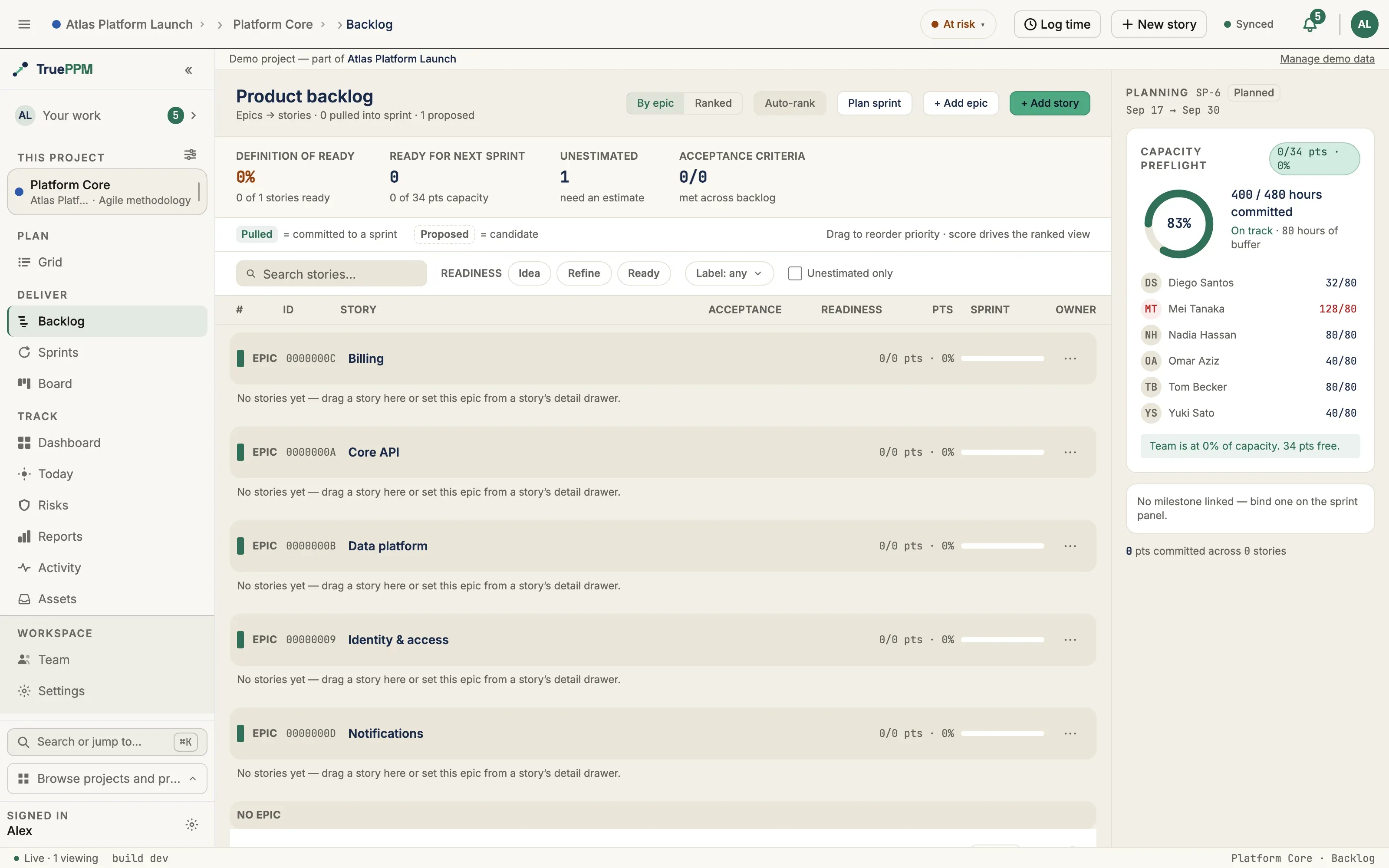
- Definition of Ready — the share of stories marked Ready
- Ready for next sprint — ready story points against the active sprint’s capacity
- Unestimated — stories still missing points
- Acceptance criteria — criteria met across the whole backlog
A dashed next-sprint ready line is drawn where the cumulative ready points reach the active sprint’s capacity, so the Product Owner can see at a glance what fits the next sprint. The ready line is advisory — it never blocks the team from pulling a story.
Reorganizing by drag
Section titled “Reorganizing by drag”Grooming is direct-manipulation: drag a story onto an epic to move it under that epic. The target epic region lights up to show where the drop lands, and its header switches to a ”↳ Drop to add to this epic” prompt. Dropping a story on the No epic bucket removes it from its epic; dragging within a group reorders it. The move applies immediately and rolls back if it can’t be saved. Drag-to-reparent is limited to users who can manage the backlog (see Who can do what below) — everyone keeps the keyboard-accessible Parent epic picker in the story drawer.
Work-item types
Section titled “Work-item types”Every task carries a type: Story, Task, Bug, Spike, or Epic. The type drives the card icon, grouping, and filtering — it never partitions data, so existing work continues to behave exactly as before (everything is a Task until you say otherwise).
Epics group stories through a parent-epic link that is independent of the WBS — an epic can gather stories that sit anywhere in the schedule hierarchy. Epics are excluded from the schedule (CPM) and from capacity math; an epic’s dates and points are rolled up from its child stories rather than scheduled in their own right.
Managing epics
Section titled “Managing epics”The grooming view is also where you shape the epic structure itself — not just the stories underneath it.
- Add an epic — a + Add epic button in the header opens an inline input; type a name and press Enter to create the epic. It appears as its own group immediately, even before any story is assigned to it, so you can lay out the epics first and fill them in later.
- Edit an epic — clicking an epic’s name opens an epic detail drawer (the same side panel a story opens into) where you can edit the epic’s name and description. Edits batch behind a Save bar that appears only once you have unsaved changes, exactly like the story drawer.
- Delete an epic — each epic group header carries an actions (⋯) menu with a Delete action. Deleting an epic never deletes its stories: they move to the Ungrouped group instead, and the confirmation states exactly how many stories are affected before you commit.
Assigning an existing story to an epic stays on the story drawer — set or change the story’s parent epic there. This section is for creating and reorganizing the epics themselves.
Creating and editing epics are open to the Product Owner facet (or an Admin and above); deleting an epic requires Admin and above — a Product Owner can create and edit epics but not delete them. See Who can do what.
Acceptance criteria
Section titled “Acceptance criteria”Each story has first-class, tickable acceptance criteria (with optional Given/When/Then structure), edited from the story drawer. Criteria show an “X of Y met” readiness count and keep a sprint-review pass/fail trail — who marked each criterion met, and when — so “is this actually done?” is answerable at the review instead of from memory.
The review trail stays on the team’s product surface for the sprint review. It is never rolled up to a portfolio or PMO dashboard, and it is shown as the criterion’s status with author attribution on drill-down — never as a per-person scoreboard.
Splitting a story
Section titled “Splitting a story”A story that is too big for one sprint can be split into a sibling under the same epic. What the new half inherits is a deliberate set, not a copy:
- Its position in the backlog carries. A split of the #3 story sits at #3 alongside its parent — a tie, which the backlog already breaks on a secondary sort. The alternative, leaving it unranked, drops it below every ranked item, which is the opposite of where the remaining work belongs.
- The epic carries, so the split stays grouped with the work it came from.
- Only the criteria you have not met yet carry — the remaining work — so the new half reads as what is left rather than as a duplicate.
- Estimates do not carry, and points are never auto-divided. Both halves come back unestimated on purpose: splitting is the moment to re-estimate, and halving a number nobody re-checked is how velocity ends up double-counted.
- The split does not join a sprint, and it starts back at Idea — it is new work that has not been refined or committed to.
Splitting never renumbers the stories around it: the backlog’s order is owned by auto-rank and by your own drag-reorder, and a split does not quietly become a third thing that rewrites it.
Definition of Ready
Section titled “Definition of Ready”Each story carries a Definition-of-Ready signal the Product Owner sets explicitly:
- Idea — captured, not yet refined
- Refine — being groomed
- Ready — ready to be pulled into a sprint
Marking a story Ready requires it to be estimated and to have all its acceptance criteria met. This gate is advisory: it governs the Product Owner’s Mark ready action, not whether the team and Product Owner can jointly pull a not-yet-ready story into a sprint when they choose to.
Prioritization scoring
Section titled “Prioritization scoring”Each project chooses one prioritization model — None, WSJF, RICE, or Value / Effort. With a model selected, you enter that model’s inputs per story:
| Model | Inputs | Score |
|---|---|---|
| WSJF | business value, time criticality, risk reduction, job size | (value + criticality + risk) / size |
| RICE | reach, impact, confidence, effort | (reach × impact × confidence) / effort |
| Value / Effort | value, effort | value / effort |
The score is computed and shown next to each story — it is never stored, so it can’t go stale. Auto-rank sorts the backlog by score in one click; afterward, manual drag-reorder always wins (auto-rank is a one-time sort, not a lock). Switching models is non-destructive — each model keeps its own inputs, so you can trial RICE without losing your WSJF numbers.
Scores stay on the team’s product surface. There is no cross-project or PMO score rollup — prioritization is a planning input the team owns, not an upward productivity metric.
Two backlogs, two orders
Section titled “Two backlogs, two orders”The product-backlog priority order belongs to the Product Owner. Inside a sprint, the team arranges its own execution order: the sprint order is seeded from product-backlog priority when the sprint starts, then the team can freely reorder it without changing the product backlog. This is the standard dual-backlog model — the Product Owner owns what’s valuable, the team owns how it executes.
Quick add
Section titled “Quick add”Capturing a story takes under 30 seconds: type a title, press Enter, and keep going — no required fields. Stories land at the bottom of the backlog as a Story, ready to groom.
Who can do what
Section titled “Who can do what”| Action | Required role |
|---|---|
| View the backlog | Any project member |
| Draft / tick acceptance criteria | Team Member or above |
| Set types, link epics, score, auto-rank, split stories | Project Manager (Admin) or above |
| Create or edit an epic (name, description) | Product Owner facet or Admin and above |
| Delete an epic | Admin and above (a Product Owner can create and edit, but not delete) |
Backlog management is gated to Project Manager and above today; the dedicated Product Owner facet arrived in 0.3 and slots into the same permission seam — it opens epic create and rename, and story grooming, without granting the power to delete. See RBAC for the role model.
Related
Section titled “Related”- Sprint planning — pulling groomed, ready work into a sprint
- Sprints workspace — the team’s execution surface
- Methodology preset — agile / waterfall / hybrid tab visibility