Project Activity
Every project has an Activity tab — one screen that answers “what changed in the last week?” across the whole project. Where Change History shows the history of a single task, project, or sprint, Activity unifies every object type into one newest-first stream: tasks, sprints, risks, dependencies, recurrence rules, and project-settings policies, all in one place.
Opening the Activity view
Section titled “Opening the Activity view”Open a project and select the Activity tab (in the Track group of the view bar, alongside Today, Risks, and Reports). You’ll see a reverse-chronological list: each row shows the change type, the object it affected, its name, how long ago it happened, and — for project admins — who made it.
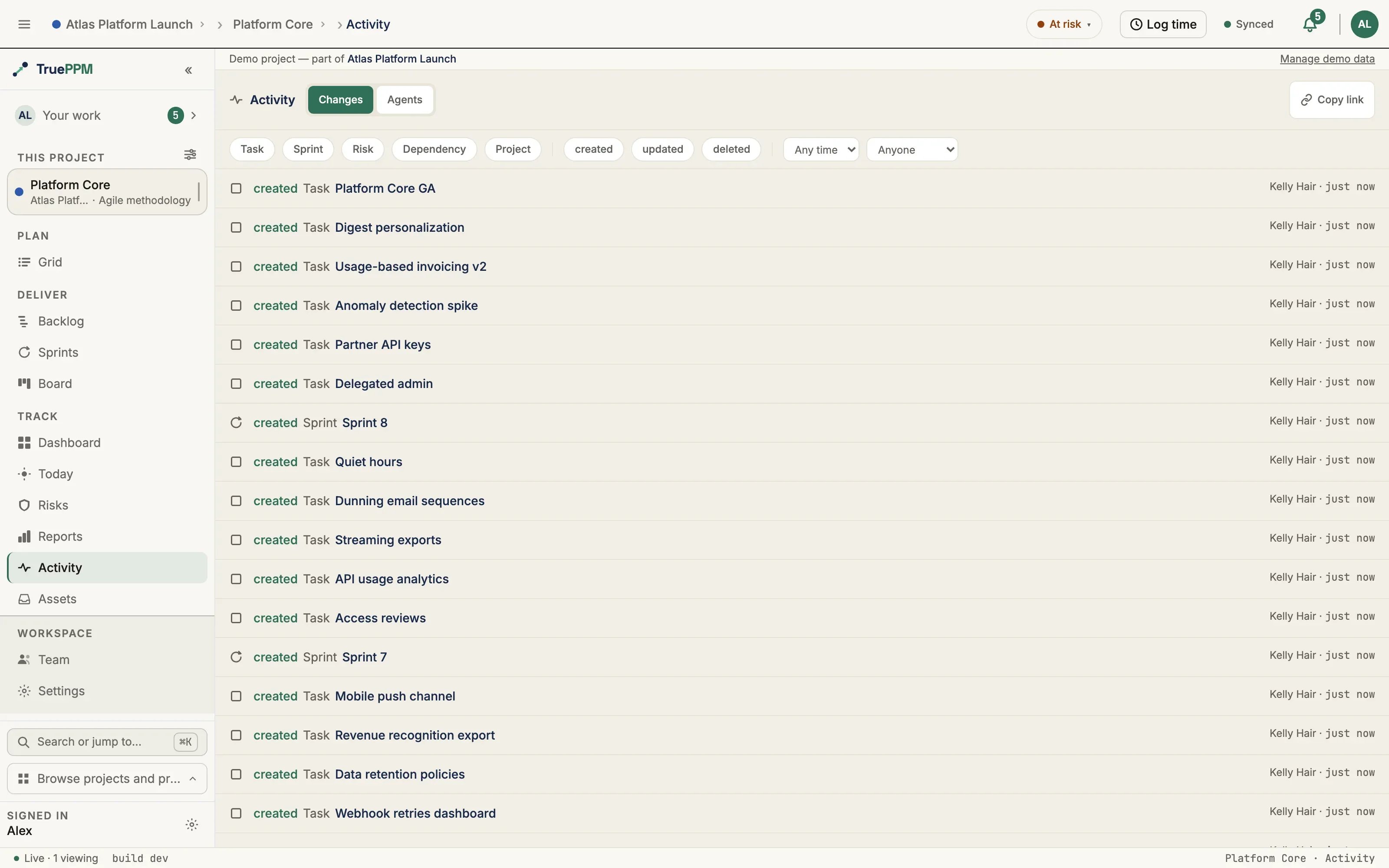
Each row tells you, at a glance:
- What changed — a verb (
created,updated,deleted) paired with the object type and its name, e.g. “updated Task · Design the API”. - Which fields — for an update, the changed fields are listed beneath by the same labels the task drawer’s Activity tab uses (Status, Assignee, Outline position), never as database column names.
- When — a relative time (“5m ago”, “2d ago”).
- Who — the actor’s name, shown to project admins and owners only. Members and Viewers see the change itself but not the user, by design (the same rule as Change History).
Click any row to jump straight to the affected object — a task opens its detail, a risk opens the Risk register, a sprint opens the sprint list, and a settings change opens the project settings.
Filtering
Section titled “Filtering”Filter chips and selectors narrow the stream to exactly what you need:
- Object type — show only tasks, only risks, only sprints, and so on (multi-select).
- Change type —
created,updated, ordeleted(multi-select). - Date range — the last 24 hours, 7 days, or 30 days (or any time).
- User — everything a specific person changed. This selector is honored for admins and owners only; lower roles cannot slice the feed by person, so the view can never become a per-person activity tracker.
The filters live in the URL, so the view is deep-linkable. Set the filters you want, hit Copy link, and paste it into Slack — the recipient lands on the exact same filtered feed (“the changes since last Tuesday”). The list uses infinite scroll: it loads more automatically as you reach the bottom, backed by a stable cursor so nothing is ever skipped or shown twice.
What is and isn’t included
Section titled “What is and isn’t included”Activity aggregates the project-scoped history tables: tasks, sprints, risks, dependencies, task-recurrence rules, the project itself, and the guardrail, signal-privacy, and decisions policies. It shares one field policy with the task drawer’s Activity tab, so a change hidden on one surface is hidden on the other: CPM-derived fields (early/late dates, float, critical-path flag), sync bookkeeping, low-signal housekeeping columns (sprint reorder ranks, derived timestamps), and the private blocker reason field are never shown. The one deliberate difference: a task’s soft delete appears here as updated Task · Deleted, because this stream is the only record of it — the drawer of a deleted task cannot be opened.
Program-level changes (a program’s own settings, ceremony templates) are not in a project’s Activity feed — Activity is single-project by design. Per-user or team-private data (time entries, retrospectives) never appears, because it isn’t recorded in the shared history tables at all.
For integrators
Section titled “For integrators”Activity is backed by a documented, read-only endpoint:
GET /api/v1/projects/{id}/changelog/?since=&object_type=&change_type=&user=&cursor=It returns a newest-first page plus an opaque next_cursor. The cursor is a stable
keyset (safe to persist, no duplicates or gaps across pages even when writes land
mid-scroll), which makes the endpoint a reliable substrate for a polling
integration. See the API reference for the full parameter and response
contract.