Notifications
TruePPM has one notification system, reachable from one place — the bell in the TopBar — regardless of why a notification exists: someone @-mentioned you, a task you own changed state, a scheduled digest fired. This page is the single reference for how it works. If you arrived here from a narrower page — the mention and comment mechanics of Task collaboration or a single project’s Notification routing — this page ties those together into the one inbox they both feed.
The bell
Section titled “The bell”The TopBar bell (NotificationBell) shows your unread count as a badge.
The bell is always the same active glyph — a resting, zero-unread bell
never swaps to a muted or “off”-looking icon, so a calm inbox is never
mistaken for notifications being disabled. The badge caps its display at
“99+”; the underlying count is exact. Once Do Not Disturb ships (below), a
small crescent-moon mark on the bell signals it is on — driven by the real
dnd_enabled setting, never inferred from the unread count.
- Desktop (≥ md): clicking the bell opens a right-anchored slide-out
panel, 380–420px wide, that never traps the page’s focus (it is a
non-modal dialog —
aria-modal="false"). - Mobile (< md): the bell navigates to a full-screen route,
/me/notifications, instead.
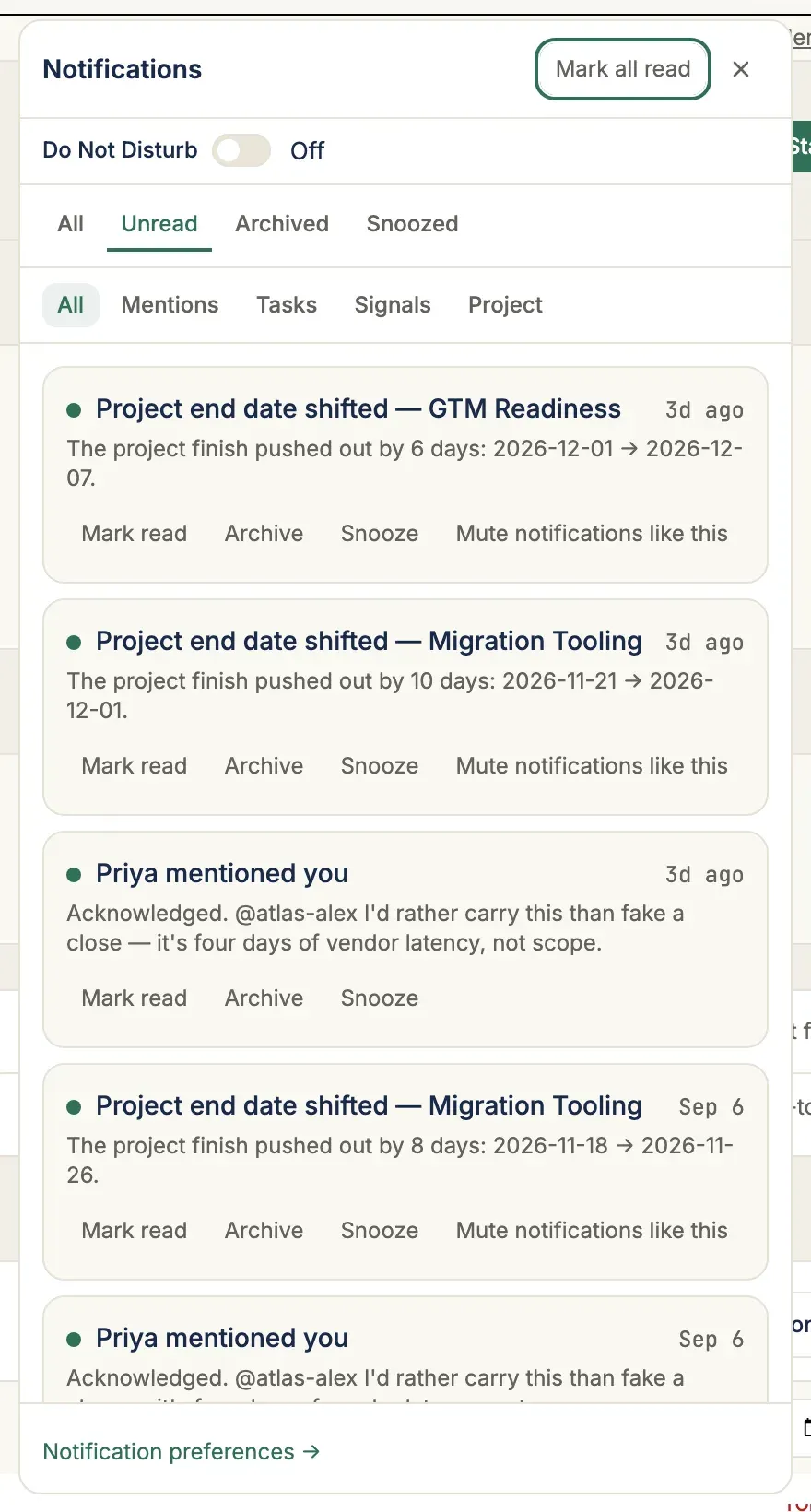
The unread count refreshes on a 30-second poll while the tab is in the foreground; a backgrounded tab pauses the poll.
The inbox
Section titled “The inbox”The slide-out panel (NotificationPanel) and the full-screen route
(NotificationListPage) render the same list — one component,
NotificationRow, shared between them — so what you see from the bell and
what you see at /me/notifications never disagree.
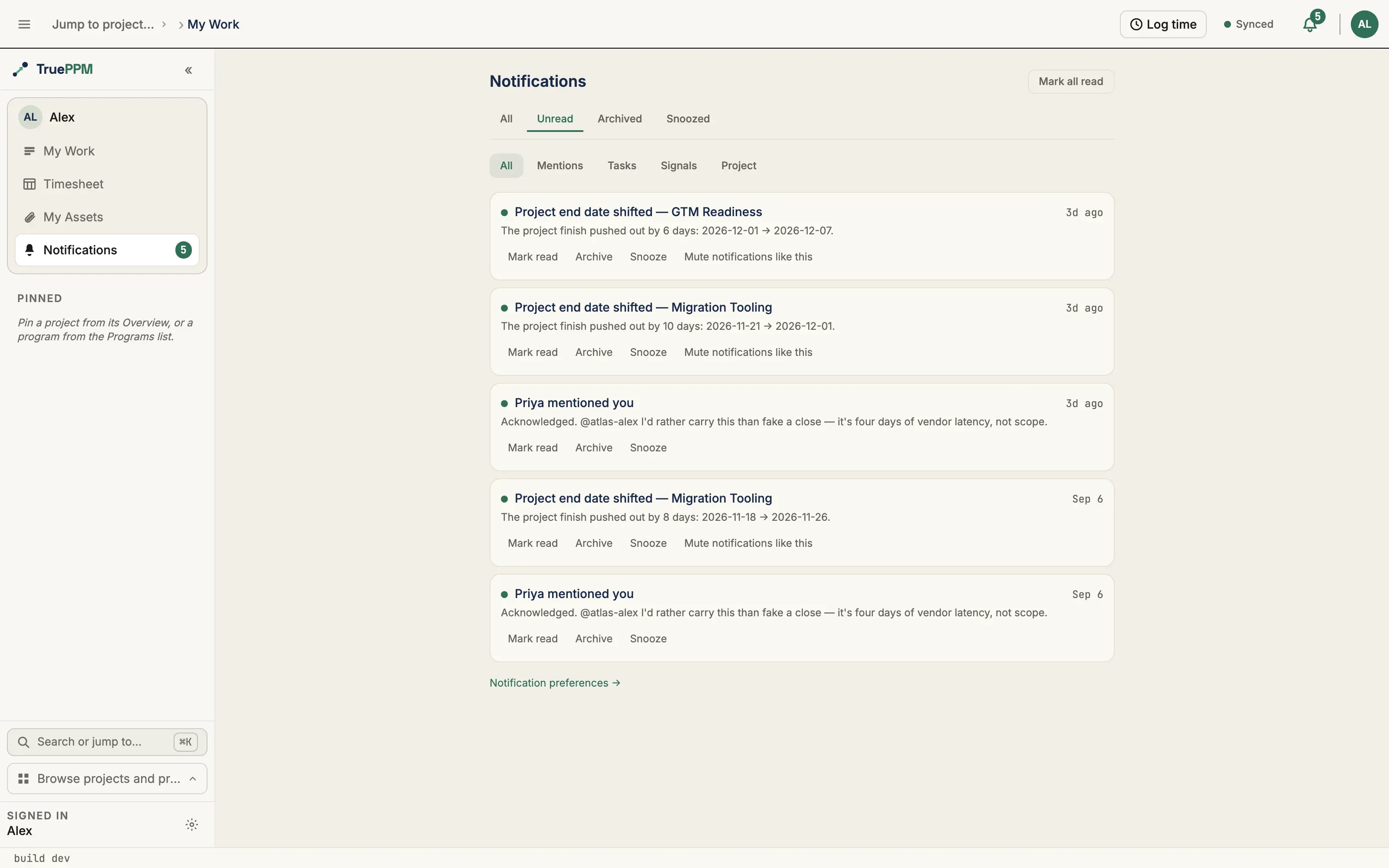
Every row shows who or what triggered it (a mentioner’s name, or the event’s own subject), a relative timestamp, and a preview: a mention row previews the comment snippet; an event-sourced row (a task assignment, a blocked flag, and so on) previews its own body. Clicking a row’s body marks it read and navigates to where it happened — the source task, a settings section for a signal-visibility proposal, or the app root for a notification about a project that was itself deleted (its board/schedule routes no longer resolve).
Read-state tabs
Section titled “Read-state tabs”A tab strip — All / Unread / Archived / Snoozed — decides which
server-side list loads (?unread_only=, ?archived=, ?snoozed=). Every tab
that has no rows shows its own friendly empty copy — “Nothing snoozed”,
“Nothing archived yet”, “No unread mentions right now” — rather than a blank
list.
Per-row actions
Section titled “Per-row actions”Each row carries Mark read / unread and Archive, also available in bulk via the header’s Mark all read.
- Snooze defers the row 1 hour, 3 hours, or Tomorrow (9am in the server’s timezone — not the workspace default, and not your personal one). A snoozed row drops out of every other view — including the unread badge count — until its time passes, then reappears on its own; no background job is involved, it is a pure query-time comparison. The Snoozed tab lists what is currently deferred, and each row there offers Un-snooze to bring it back immediately.
- Mute notifications like this (event rows only — a mention has no mute, since a mention is a person addressing you, not a recurring type) turns off the in-app channel for that event type from here on. Email is untouched, which is why the confirmation reads “Muted in your inbox” with an Undo. This is a shortcut for flipping the same cell the preferences matrix below controls — it never opens a second, separate setting.
Category — a second, orthogonal filter
Section titled “Category — a second, orthogonal filter”A second selector — All / Mentions / Tasks / Signals / Project — narrows
within whichever read-state tab is active (?category=), classifying each
row by its underlying event type. Category is a radio group, not a second tab
strip, so its own “All” never collides with the read-state tab of the same
name. Filtering by category keeps whichever read-state tab you are on.
Preferences: /me/settings/notifications
Section titled “Preferences: /me/settings/notifications”NotificationPreferencesPage is the per-(event_type, channel) toggle
matrix — one row per event, one column per channel (In-app, Email).
On desktop it renders as a table; on mobile each event becomes its own card
with a channel sub-row per column, so the same data has two layouts rather
than one being a cut-down version of the other. A toggle click debounces
300ms before saving, with a “Saved.” indicator that fades after a few
seconds — there is no separate Save button.
The matrix derives its rows and columns from whatever the server returns, so
when an Enterprise extension point registers an additional channel
against the NOTIFICATION_CHANNELS extension point, it appears as a new
column automatically — this page needs no change to support it.
What’s on the matrix
Section titled “What’s on the matrix”| Event | In-app default | Email default |
|---|---|---|
| You’re @-mentioned individually | ON | OFF |
| A group you’re in is @-mentioned | ON | OFF |
| A task assigned to you | ON | OFF |
| The planned date of your task changes | ON | OFF |
| A task you own is blocked | ON | OFF |
| Someone comments on your task | ON | OFF |
| A team signal-visibility proposal opens | ON | OFF |
| A signal-visibility proposal resolves | ON | OFF |
| A project you belong to is deleted | ON | OFF |
| The board or views you work on are reconfigured | ON | OFF |
| A task you own goes stale | ON | OFF |
| A task you own is carried to another sprint | ON | OFF |
| You’re added to a project or program (0.4) | ON | OFF |
| Your role on a project or program changes (0.4) | ON | OFF |
| Weekly program health digest | OFF | OFF |
| Weekly resource overallocation digest | OFF | OFF |
Email defaults to off across the board — a deliberate flip from the V2 Voice of Customer pass so a new account is never opted into a second push channel without asking. The two weekly digests are the only rows off on every channel, including in-app, because a recurring send is traffic you have to actually want; every other row is on in-app by default so nothing in your own work goes unseen from day one.
A contributor with no admin access anywhere sees a simplified Signal-only card first, with two choices: Use signal-only (in-app on for exactly “blocked” and “due date changed”, everything else off — one click instead of auditing the grid cell-by-cell) or Show all notification types to expand the full matrix. Workspace/project admins skip the card and land on the full matrix directly.
Do Not Disturb
Section titled “Do Not Disturb”A single account-wide Do Not Disturb switch, at the top of the preferences page and mirrored as a quick toggle inside the bell panel. It pauses email and push only — your in-app inbox and unread count keep receiving everything, so nothing is lost while it is on. A handful of critical signals — a blocked task, a signal-visibility proposal, a milestone forecast shift — are never held back regardless of the switch.
Do Not Disturb reads and writes through GET/PATCH /api/v1/me/notification-settings/
— the same account-wide fact surfaces read-only on /auth/me so the web
client’s current-user query carries it with no second request, and the same
endpoint serves mobile and MCP clients identically.
The weekly digests and their schedule
Section titled “The weekly digests and their schedule”The two digest rows above are the only notifications that arrive on a clock rather than in response to an event: a program-health digest (which programs are at risk or critical, and what is driving it) and a resource-overallocation digest (who is booked over 100% next week, for the callers who are Resource Manager or above on the relevant projects). Neither computes anything of its own — each links to the same rolled-up numbers the program overview and the resource heat map already show, so a digest line and the screen it points to can never disagree. A week with nothing to report still sends, with a subject line saying so, rather than going silent.
Both digests are scoped to your current memberships. When your access to a program or project is revoked, or the program or project itself is deleted, it leaves the digest immediately — it is not named in the next send, and it is not counted in the “showing the first 25 of N” line when you belong to more than the per-digest cap.
Deactivating an account stops both digests outright, whatever its memberships still say. Off-boarding disables the account without touching its project and program memberships, so this is a separate stop from the membership scoping above — a deactivated member is dropped from the audience before the send is even considered. Any notification email already queued for them when they are deactivated is dropped rather than delivered. See Off-boarding also stops outbound mail.
Turning on either digest reveals a Digest schedule card — a day and hour picker, evaluated in your own timezone, that governs both digests together (there is one schedule per user, not one per digest).
Config-change notices
Section titled “Config-change notices”Removing a board lane, hiding a board column, hiding one of the Reporting, Time tracking, Baselines or Monte Carlo views, or switching the methodology preset changes the surface everyone works on, not just the person who clicked. All four send an inbox notice — though who receives it depends on what moved.
(Hiding a tab from your own navigation with Customize views is a per-user preference that changes nothing for anyone else, and correctly notifies nobody.)
The notice names the consequence, not the setting. It says which lane went away, where its cards landed, and how many of your own items were in it — each recipient’s copy is written for them, with their own count. Some examples of what actually arrives:
- A board lane was removed — 3 items moved — “Dana removed the “QA” lane from Review. Your 3 items in there now show in “Review” — the first lane of that column.”
- A board column was hidden — 2 items no longer on the board — “Dana hid the “Review” column. Your 2 items with that status keep their status and dates, but the board no longer shows them — find them in the task list or search.”
- This project now runs as Waterfall — “Dana switched this project’s planning preset from Agile to Waterfall. Baselines and Monte Carlo are now shown. Your 7 items keep their status, dates and assignments — what changed is where you find them.”
- The views in this project changed — “Dana hid Time tracking in this project. Your 7 items keep their status, dates and assignments — what changed is where you find them.”
- This project now runs as Waterfall — “Dana switched this project’s planning preset from Agile to Waterfall. Baselines and Monte Carlo are now shown. Nothing you own moved.” — the same change, as a Product Owner holding no assigned task reads it. The count clause degrades to a plain sentence rather than disappearing, because an omitted clause reads as an unstated many.
Notices arrive a few seconds after the change, and an identical repeat
collapses. The notice is queued together with the change and delivered by a
background worker, so saving a change — including one applied to many projects
at once from the program settings matrix — no longer waits for everyone’s inbox
to be written, and a notice queued while the worker is unavailable is delivered
once it recovers rather than lost. If the same person repeats a change whose
notice was just sent — hiding a column, showing it again, then hiding it again
within ten minutes — the repeat is not sent, because the last notice already
describes the board as it now stands. A different change, the same change by
someone else, or a change back after a different notice was sent in between
always sends. Operators can tune or disable the window with
TRUEPPM_CONFIG_NOTICE_COOLDOWN_SECONDS.
A preset or view change reaches further than a board change. A Product Owner authors and prioritizes the backlog and is frequently assigned none of it; a Scrum Master facilitates and is neither an assignee nor a booked resource; a project manager who owns the plan routinely assigns none of it to themselves. Those are the three people a preset flip re-shapes hardest, and the ones everyone else asks to explain it. So the preset and view notices also reach the project’s Scrum Master and Product Owner and everyone at Resource Manager or above, whether or not they hold a task. Board-lane and board-column notices stay with the people whose cards actually moved.
Who gets named is deliberate. A preset switch is the act, and the views that appear or disappear are its consequence — so the preset clause is attributed and the views are simply stated. Hiding a view directly is the act, so that clause carries the name instead. Neither wording credits anyone with a decision they did not make.
Three things this deliberately does not do:
- It does not fire on every save. A rename, a reorder, an accent color, a WIP limit, an added lane, a column being un-hidden — none of these move or hide anyone’s work, and none of them notify. A notice on every write is noise, and noise gets muted.
- It does not go to the whole membership. A board change goes to everyone with work on that board — assigned as the task’s owner or booked on it as a resource. A lane going away moves cards, so holding a card is what makes it your business. A preset or view change adds the Scrum Master, the Product Owner and everyone at Resource Manager or above, as above. A Team Member or Viewer who holds no work, no facet and no gate is still told nothing, and a member who has been removed from the project is never notified, even if work is still on their name.
- It never fires from a rejected change. If the change is refused — a Team Member trying to re-shape the board, a Resource Manager trying to hide a view — nothing was saved, so nobody is told.
The row is filed under the Project category, and it is a durable inbox row only: email is opt-in and off by default, and it is never a push interrupt.
Endpoints
Section titled “Endpoints”| Method | Path | Notes |
|---|---|---|
GET | /api/v1/me/notifications/ | Your inbox. ?unread_only=, ?archived=, ?snoozed=, ?category=mentions|tasks|signals|project (category, shipped in 0.4). Every view except ?snoozed=true excludes currently-snoozed rows, including the unread-count read, so a deferred notification never lights the bell. |
GET | /api/v1/me/notifications/{id}/ | Retrieve a single row. |
PATCH | /api/v1/me/notifications/{id}/ | { is_read, is_archived }. |
POST | /api/v1/me/notifications/{id}/snooze/ | { preset: "1h"|"3h"|"tomorrow" } or { until: "<iso>" }; { until: null } un-snoozes. Shipped in 0.4. |
POST | /api/v1/me/notifications/mark-all-read/ | Bulk mark-read; returns { updated: N }. |
GET | /api/v1/me/notification-preferences/ | The matrix; defaults are backfilled on first read per user. |
PATCH | /api/v1/me/notification-preferences/{id}/ | { enabled } on one (event_type, channel) row. |
POST | /api/v1/me/notification-preferences/apply-preset/ | { preset: "signal_only"|"everything" } — bulk-rewrites the whole matrix atomically. |
GET/PATCH | /api/v1/me/notification-settings/ | Do Not Disturb (dnd_enabled, shipped in 0.4) and the digest schedule (digest_weekday, digest_hour). |
GET/PATCH | /api/v1/projects/{id}/notification-preferences/ | Per-project routing — see Project notifications. |
All reads and writes on /me/notifications* are scoped to the authenticated
user by construction (the queryset filters on recipient=request.user) —
there is no cross-user access and no admin surface to edit another member’s
routing; each person owns their own notification contract.
What an inbox row shows once you are not a member (shipped in 0.4)
Section titled “What an inbox row shows once you are not a member (shipped in 0.4)”A delivered notification is a record that a message was sent, not a live view of the project — so the row is kept, and its contents are redacted instead. From the 0.4 beta onward, every read of a row whose project you are not a current member of will return:
| Field | What you get |
|---|---|
subject, body, snippet | "" — the free text that names the project, the task or the comment |
project | null |
task_id, mention.task_comment | null — the deep link and the source-comment reference |
id, created_at, event_type, category, read/archive state | unchanged — the row is still yours, still readable, still archivable |
mention.mentioner, mention.mentioned_group_key, mention.scope | unchanged — who pinged you and which group it came through |
Two different people land here, and both get the same answer. One is a member
whose access was removed: their inbox stops naming a project they can no longer
open, but does not silently lose history. The other has never been a member
— a @program-pms or @program-all mention fans out across a program, so it
reaches people in sibling projects, and for them the row is the point. They are
told they were pinged, by whom, and through which group; they are not shown one
project’s comment body, task or comment id.
The identifiers are dropped because nobody in either group can use one. Reading
a task or a comment re-checks live project membership on its own endpoint, so a
task_id handed to a non-member opens nothing. Keeping it would be a reference
to content you cannot reach, which is worth nothing to you and is worth
something to anyone who gets hold of your inbox.
Rows with no project at all are never redacted — the weekly digests are scoped to your whole membership set rather than one project, so there is no membership boundary to check them against.
See also
Section titled “See also”- Task collaboration — how a comment becomes an @-mention notification in the first place, and the acknowledge/react signals that deliberately never notify
- Project notifications — the per-project routing matrix, quiet hours, and the pause-all switch, which sit alongside (not instead of) the account-wide preferences on this page