Program schedule — the cross-project critical path
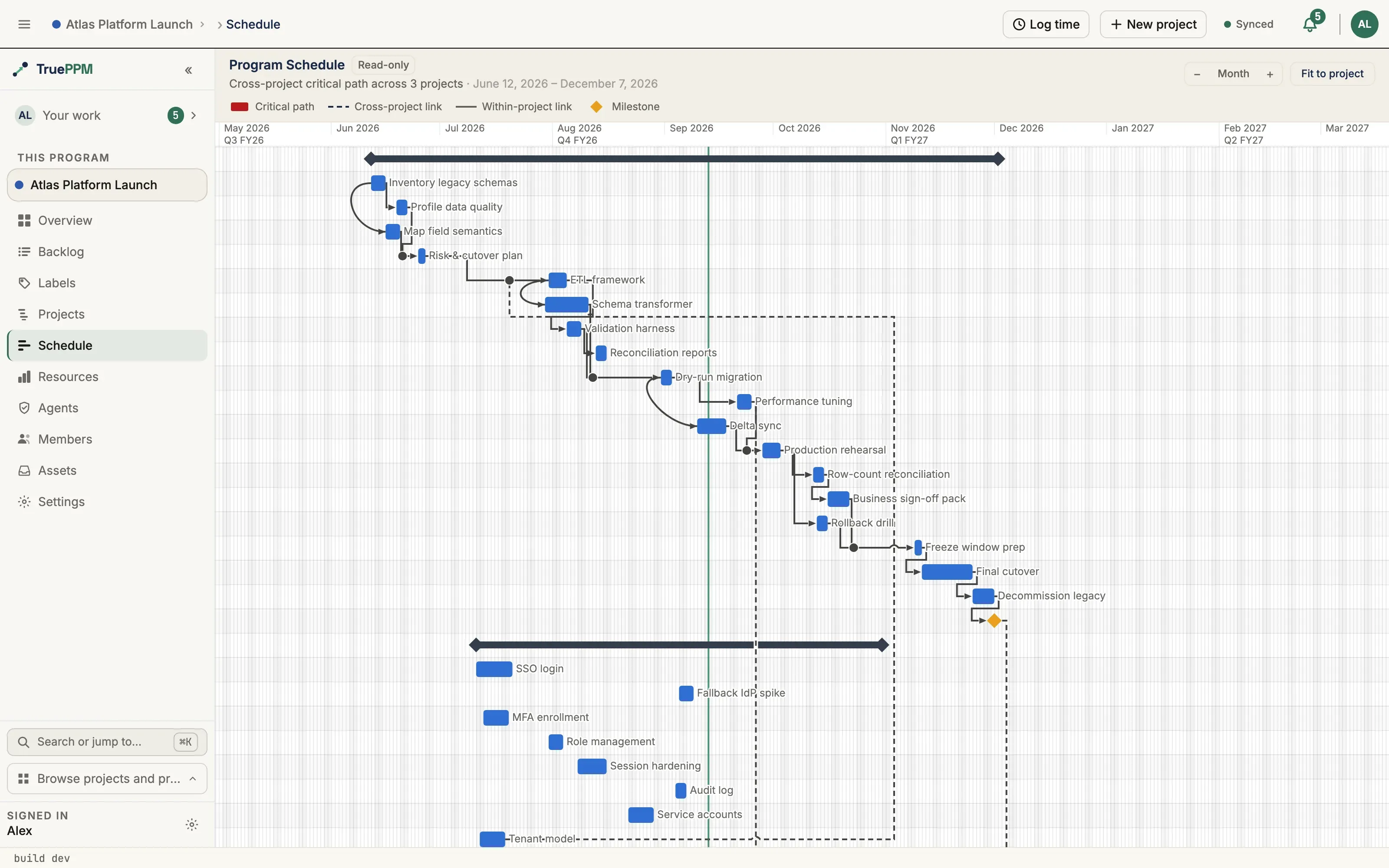
This is for a program manager coordinating several related projects who needs to see how they fit together in time. The Schedule tab on a program shows every member project on one timeline and draws the program-true critical path — the critical path is the longest chain of dependent work in a schedule, the sequence of tasks that determines the earliest possible finish date; here it’s calculated across the whole program, even where the chain crosses from one project into another. It answers the question a single-project schedule can’t: which handoff between projects is actually driving the program’s finish date?
This is a read-only view. It is the place to see and explain the cross-project schedule; you still edit tasks, dates, and dependencies on each project’s own schedule.
Opening it
Section titled “Opening it”Open a program and choose the Schedule tab (between Projects and Resources). Any program member can view it — including on a closed program, so the cross-project schedule stays available for a retrospective. Tasks in member projects you don’t have access to appear as limited-view bars rather than being hidden, so the chain is never broken by a blocked by [redacted] gap.
The view is computed on demand from the current state of every member project, so it always reflects the latest dates — there is nothing to “rebuild.”
Project lanes
Section titled “Project lanes”Each member project is a lane: a summary row carrying the project name, with that project’s tasks grouped beneath it. Lanes are ordered by start date, so the program reads left-to-right and top-to-bottom the way the work actually flows.
The cross-project critical path
Section titled “The cross-project critical path”The critical path is computed across the merged program graph, not stitched together from per-project paths. An upstream task that gates another project’s milestone is therefore shown as critical — drawn with the same red bar fill as on a single-project schedule — and its float is measured against the whole program. The red bars trace the one chain that, if it slips, slips the program.
Cross-project dependencies
Section titled “Cross-project dependencies”A dependency between two different projects is drawn as a dashed line, distinct from the solid lines used for dependencies within a single project. The dashed style makes every cross-project handoff easy to pick out — these are the seams where one team’s delay becomes another team’s problem. Only accepted cross-project dependencies are drawn; a proposed link that the downstream team has not yet accepted is not yet a real constraint and does not appear.
A small legend above the timeline names each treatment — critical path, cross-project link, within-project link, milestone — so the view is readable on first sight.
Limited-view tasks
Section titled “Limited-view tasks”When a cross-project dependency reaches into a project you cannot open, the counterpart task still appears — positioned by its program-true dates — but as a muted, hatched limited-view bar. Hovering it shows only its title, the project it belongs to, its dates, and whether it sits on the critical path. Its description, assignee, status, and estimate are never shown. This keeps the cross-project chain honest without leaking the contents of a project you are not a member of.
Live updates
Section titled “Live updates”The view updates as the member projects change. When a teammate reschedules a task, edits a dependency, or a project’s schedule recomputes, the program timeline refetches and redraws — no reload needed.
Zoom and fit
Section titled “Zoom and fit”Use the zoom stepper to move between day, week, month, and quarter scales, or Fit to frame the whole program at once. The view opens framed to the full program span.
When a cross-project slip threatens a sprint
Section titled “When a cross-project slip threatens a sprint”Because an accepted cross-project dependency now recomputes across the boundary on every member project — not just in this view — an upstream slip can push a downstream task in an active sprint past its sprint boundary, measured in working time: a milestone shown at the start of the Monday after a sprint that ends on Friday sits at the end of that Friday, so it has not crossed the boundary. When a task does cross it, the program records a cross-project slip conflict for the downstream team. The schedule stays honest: the firewall never moves the sprint, its membership, or its commitment math — it only surfaces the conflict so the team can decide how to handle it (move the task out, extend the sprint, or accept the risk) and acknowledge it. Only the threatened team’s Scrum Master / Product Owner (or an Admin) can acknowledge. See the API reference.
Not included yet
Section titled “Not included yet”A couple of related surfaces are planned for a later release and are not part of this view:
- Accepting a proposed cross-project dependency from the program schedule. For now, accept pending links on the affected project.
- Surfacing slip conflicts inside this view — slip conflicts are detected and acknowledgeable through the API today; drawing them on the program timeline (and a sprint-header badge) is planned for a later release.
See Creating a dependency for how the underlying links are created, and “accept pending links on the affected project” above for how a downstream team accepts one.