Sprints workspace
The Sprints workspace is where an agile or hybrid team runs its sprints — fixed-length iterations of work — day to day: a Scrum Master planning and closing them, and the team tracking progress against them. One page brings together five pieces: the sprint header, its goal, a link to the schedule milestone it advances, a timeline of past and upcoming sprints, and the sprint’s task list.
Where this lives in the story
Section titled “Where this lives in the story”Step 5 (Sprint planning) and Step 6 (Execute) of the hybrid PM flow.
What you see
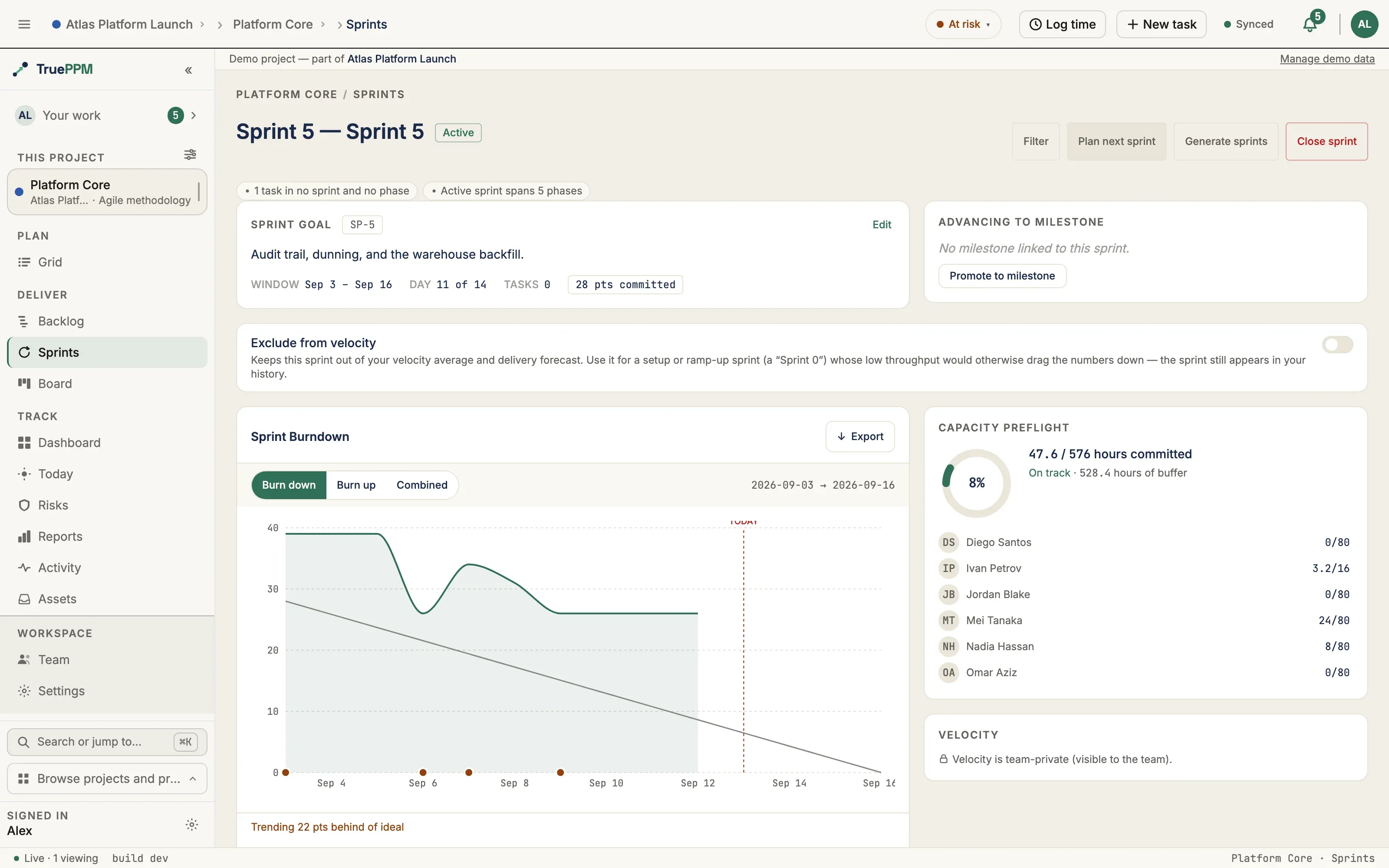
Section titled “What you see”- Sprint header — H1 (
Sprint N — name), state pill, Filter / Plan next / Close sprint actions - Sprint goal card — narrative + day-N-of-M + task count + points committed
- Advancing-to-milestone card — milestone WBS, target date, days-out chip, deep-link to the Schedule view at the milestone task
- Sprint Cadence timeline — Closed sprints (grayed) → Active (sticky-left, ringed) → Planned cards. Each card leads with the sprint name, and its points bar makes over-commitment visible: a sprint that finishes over its committed points shows the overage as a distinct segment past a capacity marker with a
+N overflag, rather than a “full” bar that reads as simply done. The strip is also a selector: click any card to load that sprint in the workspace (the selected card carries a navy ring). - Reviewing a past sprint — selecting a closed sprint shows a read-only review: a five-card outcome row (goal verdict, committed/completed points, rolled-over, velocity Δ), the frozen historical burndown, the retrospective, and a “what didn’t ship” list (each unfinished task with whether it carried to another sprint or was dropped). All of it reads from the consolidated sprint-outcome API; velocity figures stay team-private for readers outside the velocity audience.
- Sprint Review breakdown (added in 0.3, ADR-0118) — the review surface also shows an acceptance breakdown derived from each story’s acceptance criteria. Stories fall into three states: accepted (all criteria met), criteria incomplete (has criteria, not all met), and criteria not set (no criteria — a muted coverage-hygiene state, never counted as accepted). These are framed as coverage states, not grades. Acceptance can be ticked live during the review — the review is the acceptance ceremony. Counts are always visible; story points follow the same team-private velocity gate, so the PM can read the review without seeing per-team throughput.
- Committed → shipped line (added in 0.3) — the review opens with a plain count line, “N committed → M shipped, K carried over”, drawn from the sprint’s at-activation commitment snapshot. These counts are always visible to the whole team, never behind the velocity/points gate — the team already knows what it committed.
- Demo curation (added in 0.3) — a one-tap star toggle marks each shipped story for the stakeholder walkthrough, and Members can drag the demo-flagged stories into walkthrough order and name a presenter for each. Read-only viewers see the curated order and presenter without the controls.
- Criteria click-through, contributor notes, and carry-forward (added in 0.3) — a criteria incomplete story discloses exactly which criteria are unmet on click; a criteria not set badge offers an inline Add criteria jump to the task’s detail page, where acceptance criteria are edited. Contributors can leave an optional note (“visible to reviewers”) — never required — and flag the story for the backlog in one tap, carrying its title and points forward into the project backlog (idempotent, so a second tap never duplicates).
- Burndown chart, Capacity preflight, Velocity panel, and Sprint backlog populate the rest of the page when an active sprint is selected.
- Daily standup — “what changed since yesterday” (added in 0.3, ADR-0121 / ADR-0124) — the active sprint shows a team-facing delta for the Daily Scrum: moved cards (status changes), new blockers — detected from the explicit blocked flag (not a status move) and split into impediment (a blocker type was recorded, so the Scrum Master can route it) vs paused (flagged with no type), each shown with its type and age but never the private reason text — scope added since yesterday, the burndown swing, and a per-person at-a-glance of what each teammate touched. It is pull, not push — you open it at standup; there are no notifications — and it is team-private by membership: a portfolio/PMO viewer who is not a project member cannot reach it, and it shows only status-level changes, never hours or keystroke-level detail. The window defaults to the last 24 hours. Computed live from existing history — no new tracking. (Distinct from the PM milestone-confidence digest, which is the close-time bridge surface.)
- WIP limit (optional) — set a per-sprint ceiling on in-flight work (tasks in In progress or Review) and the Board’s sprint panel header shows a
WIP {count} / {limit}chip that turns amber once the count exceeds the limit. Editable by Resource Manager or above on planned and active sprints; locked once completed or canceled. Distinct from per-column board WIP limits. - Exclude from velocity (optional) — a Resource Manager+ toggle that holds a setup or ramp-up sprint (a “Sprint 0”) out of the team’s velocity average, forecast band, and milestone forecast, so its low throughput doesn’t skew the numbers. Unlike the WIP limit it stays editable after the sprint closes (teams often realize the skew in hindsight). The sprint stays visible in your history, marked rather than dropped. See Setup work & Sprint 0.
Standing up a run of sprints (shipped in 0.4)
Section titled “Standing up a run of sprints (shipped in 0.4)”Creating a year of iterations one dialog at a time is data entry, not planning. Generate sprints in the Sprints workspace header opens a two-step wizard that lays out a whole cadence at once.
Step 1 — describe the cadence. How many sprints, how long each one is in
working days, when the first one starts, and a name pattern containing {n}
(Sprint {n} by default, and {n} can start from any number — useful when
you’re extending an existing series).
Step 2 — check it, edit it, then generate. The server computes the whole run and hands it back as an editable table; nothing is written until you press Generate. Every row shows its start, its finish, the working days it holds, and how many non-working days the window spans. Change any name or date and the run is saved exactly as you left it.
Three things the generator does on your behalf:
- It reads the project calendar. Lengths are counted in working days against the same calendar the schedule uses — weekends, holidays, and any overlay calendars applied to the project. A company shutdown inside a window pushes the finish date out instead of quietly costing the team two days; a run that would start on a Saturday starts on the following working day instead.
- It never creates a duplicate. A proposed sprint whose name already exists is shown greyed out and left completely alone — its dates are not touched. Running the generator twice with the same settings creates the missing sprints and nothing else, so a double submit or a re-run after a partial failure is safe.
- It never guesses at what you’ll commit to. See below.
The suggested capacity is a starting point, not a ceiling
Section titled “The suggested capacity is a starting point, not a ceiling”When the team has closed sprints to draw on, the preview offers a suggested points figure — the average of the team’s recent completed points, using the same eligible set as the velocity panel (so a sprint marked Exclude from velocity is excluded here too).
It is off by default, it is offered for the first sprint of the run only, and it is never written unless you tick it on. (If that first sprint already exists — you’re re-running the generator to fill a gap — the number applies to a sprint this run isn’t creating, so nothing receives it rather than it landing on some mid-series sprint you didn’t point at.) That is deliberate. A number the tool generates and stamps across a year of iterations stops being a planning aid and starts being the tool telling a team what it may commit to — which is exactly what sprint commitment belongs to the team, not to a generator. Forecasting a capacity for sprint twelve from today’s throughput would be fiction either way.
Generated sprints land in PLANNED state with no goal, no capacity, and no
tasks. Activate, name a goal, and pull work in exactly as you would for a sprint
you created by hand.
The Generate sprints button appears for Resource Manager and above, the same gate as the other lifecycle actions in that header. The endpoint behind it is open to Team Member and above, so a script or integration at that role can still generate a cadence — see the API reference.
Planning a sprint — the unified planning surface (added in 0.3)
Section titled “Planning a sprint — the unified planning surface (added in 0.3)”Selecting a planned sprint in the cadence strip switches the workspace into a planning layout — everything the team needs to pull a sprint together lands on one screen instead of being scattered across tabs:
- Backlog (left) — the project backlog of sprint-less tasks, ready to pull into the planned sprint.
- Capacity gauge — the Capacity preflight panel, including the points chip and footer (0.3), so the team sees committed-vs-ceiling as they pull work in.
- Incoming-carryover preview — see below.
- Planning bridge banner — see below.
Planning bridge banner
Section titled “Planning bridge banner”A planned sprint shows its draft goal next to the schedule milestone it advances — the milestone diamond, its name, and its target date — so the team can see which contract date this sprint moves before they commit a single point. Beneath it: “N of M predecessor tasks land in this sprint”, the count of the milestone’s predecessor tasks that are already pulled into the sprint.
An inline milestone picker lets the team bind or change the advancing milestone without leaving the planning screen. Binding here sets Sprint.target_milestone, which is the same link that drives the live sprint → milestone rollup once the sprint activates.
Incoming-carryover preview
Section titled “Incoming-carryover preview”A read-only sidebar lists the unfinished tasks from the previous closed sprint that rolled forward into this planned sprint, with the points each carried. It answers “what came in before we even started planning?” so the team plans on top of the real remaining commitment rather than a clean slate. It is backed by the incoming_carryover endpoint (see API endpoints).
Where to find it in the app
Section titled “Where to find it in the app”- Route:
/projects/:projectId/sprints - Tab: Sprints (visible by default for HYBRID and AGILE projects per methodology preset)
API endpoints
Section titled “API endpoints”| Method | Endpoint | Purpose |
|---|---|---|
GET | /api/v1/projects/{id}/sprints/ | List every sprint for a project |
POST | /api/v1/projects/{id}/sprints/ | Create a planned sprint (see Plan Sprint dialog) |
GET | /api/v1/sprints/{id}/ | Sprint detail with target_milestone_detail nested |
GET | /api/v1/sprints/{id}/incoming_carryover/ | Unfinished tasks that rolled forward from the previous closed sprint, with points carried (added in 0.3) |
POST | /api/v1/sprints/{id}/activate/ | PLANNED → ACTIVE; returns capacity warnings |
POST | /api/v1/sprints/{id}/close/ | Async close via outbox; returns 202 + request id. At most one close is live per sprint (0.4) — if one is already running, a repeat POST returns that close’s existing request_id with deduplicated: true rather than starting a second one |
GET | /api/v1/sprints/{id}/close-request/ | Outcome of the most recent close attempt — status, failure_reason, and whether it will be retried (Viewer+, shipped in 0.4). The raw error text is shown to project admins only, and never to an API token; everyone else sets the reason plus a fixed summary. Branch on terminal, not on status — a failed close may still be retried automatically |
POST | /api/v1/sprints/{id}/cancel/ | PLANNED → CANCELLED |
GET | /api/v1/sprints/{id}/outcome/ | Consolidated review read — commitment, goal, velocity, the “didn’t ship” list, and the review breakdown (added in 0.3) |
POST | /api/v1/sprints/{id}/demo-list/reorder/ | Reorder the demo walkthrough (Team Member+; full ordered outcome-id list, added in 0.3) |
POST | /api/v1/sprint-task-outcomes/{id}/toggle-demo/ | Flag/unflag a shipped story for the demo (Team Member+, added in 0.3) |
POST | /api/v1/sprint-task-outcomes/{id}/set-presenter/ | Set the demo presenter for a story (Team Member+, added in 0.3) |
POST | /api/v1/sprint-task-outcomes/{id}/set-note/ | Set the optional contributor review note (Team Member+, ≤200 chars, added in 0.3) |
POST | /api/v1/sprint-task-outcomes/{id}/flag-for-backlog/ | Carry a not-shipped story forward to the backlog in one tap (Team Member+, idempotent, added in 0.3) |
What carry_over_to does to a task
Section titled “What carry_over_to does to a task”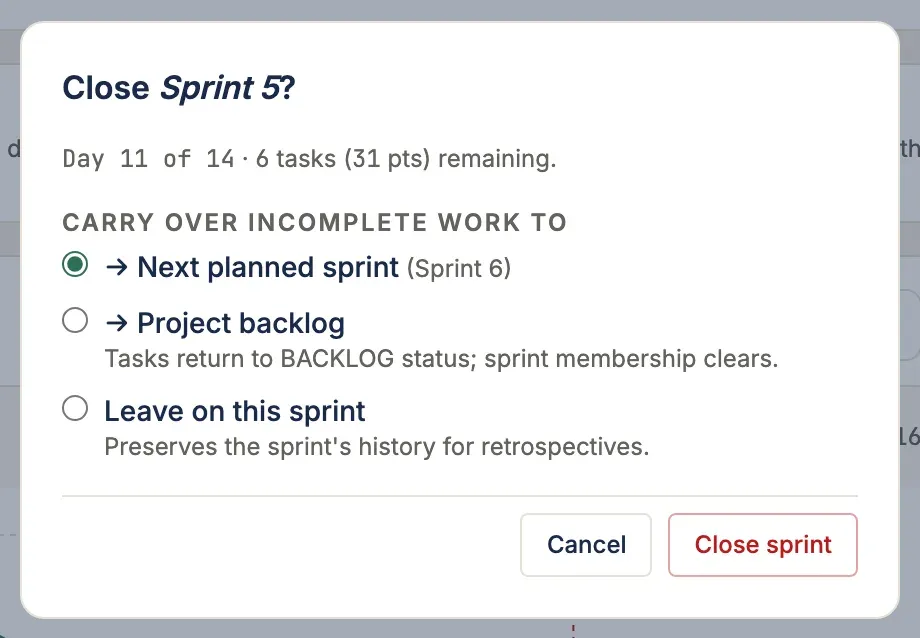
The close body’s carry_over_to takes "none", "backlog", or a sprint id. Only
tasks in a carry-eligible status move — BACKLOG, NOT_STARTED, IN_PROGRESS and
REVIEW. Anything COMPLETE stays in the sprint it completed in, because that is the
set the committed/completed metrics were snapshotted from.
The two moving policies are deliberately not symmetric:
carry_over_to | Sprint | Status |
|---|---|---|
| a sprint id | moves to that sprint | unchanged — a re-commitment moves nothing else |
"backlog" | cleared | NOT_STARTED → BACKLOG; IN_PROGRESS and REVIEW preserved |
"none" | unchanged | unchanged — incomplete tasks stay in the closed sprint |
NOT_STARTED means “committed to this sprint, not begun” — no longer true once the
task is out of every sprint — so the "backlog" policy rewrites it. That is also what
keeps the row in the product-backlog grooming list, which is scoped to
status=BACKLOG with no sprint. IN_PROGRESS and REVIEW describe what a person is
actually doing rather than a commitment level, and sprint housekeeping somebody else
performed must not discard them.
Either way the pre-close state is recoverable: GET /api/v1/sprints/{id}/outcome/
records every task’s final_status as of the close, captured before the carry-over
moves anything.
Related ADRs
Section titled “Related ADRs”- ADR-0036 — Hybrid PM philosophy and sprint model
- ADR-0037 — Sprint model: data, API, and board integration
- ADR-0041 — Methodology preset (drives tab visibility)
If you are…
Section titled “If you are…”- Alex (Scrum Master) — the Sprint header is your home. Set a goal at planning, watch the day-of-N counter during execution, fire Close sprint at retro time. As of 0.3, selecting a planned sprint gives you the whole planning screen — backlog, capacity, carryover, and the milestone bridge — in one place.
- Priya (engineer) — you’ll mostly see the Sprint backlog table below. The header tells you which sprint you’re in and how many days are left.
- Sarah (PM) — the Advancing-to-Milestone card links directly into the Schedule view scrolled to the milestone task. The bridge between sprint cadence and contract dates lives there.