Evaluation guide
This page is for someone evaluating TruePPM — or a reviewer doing a release walkthrough — who wants to confirm each capability works without first learning where everything lives. It maps every 0.3 capability to a bundled sample, a persona login, the exact screen to open, and what you should see.
The fastest way through it: load a sample, sign in as the named persona, open the screen, and check the expectation. Every sample imports as a program already in flight — its history is replayed with backdated, attributed events, so you are reviewing a program that has run for months, not a blank slate.
What makes the demo data realistic
Section titled “What makes the demo data realistic”Most of what an evaluator distrusts about demo data is that it looks staged — every task owned by one person, every status frozen, no trail of how the work got there. The bundled samples are authored as event timelines instead, so the history holds up to inspection:
- Tasks change hands. Work is reassigned for coverage (someone is out), for load-balancing (a teammate is overloaded), and to hand a task to the right specialist. Open any reassigned task’s History and you see dated “reassigned from … to …” rows by name.
- Work moves non-linearly. A few “hero” tasks per program fail review and bounce back to In Progress before they ship — the path a real task takes, not a straight line to Done.
- People talk. Standup notes, blocker call-outs, handoff notes, and review feedback appear as dated comments by named personas.
- Sprints have verdicts. Closed sprints carry an honest goal outcome (Met / Partially met) and a real burndown curve, not a single fabricated number.
- Risks have a life. A risk’s status walks Open → Mitigating → Resolved/Closed over time, tied to the tasks that drove it.
- Scope is governed. A mid-sprint injection is accepted in one program and rejected (deferred) in another, each recorded as a scope-change audit entry.
Set up once
Section titled “Set up once”Run these three steps before any walkthrough below. They start from a machine with nothing running and end with a signed-in browser.
-
Bring the stack up. From your TruePPM checkout:
Terminal window make upWait for the web UI to answer on
http://localhost:5173. If you have not installed yet, do that first — see Installation. -
Load a sample. Pick the one that matches the methodology you care about — Aurora for pure agile, Bayside for waterfall/CPM (Critical Path Method scheduling), Helios for the small hybrid bridge, Atlas for the whole story at program scale, and 1.0 GA Launch for coordination across four workstreams — and run its line. Loading more than one is fine; they do not collide.
Terminal window docker compose exec api python manage.py load_sample_project --sample aurora-mobile-app --with-personasdocker compose exec api python manage.py load_sample_project --sample bayside-civic-center --with-personasdocker compose exec api python manage.py load_sample_project --sample helios-crm-replacement --with-personasdocker compose exec api python manage.py load_sample_project --sample ga-launch --with-personas # shipped in 0.4docker compose exec api python manage.py load_sample_project --with-personas # Atlas (default)Prefer to click? On a fresh install the Programs page has a Load demo data button that does the same thing.
-
Sign in. Open
http://localhost:5173and sign in as the persona the walkthrough names.--with-personasprints the usernames and the shared password when the command finishes — read them off that output. On a local Docker stack (DEBUG=True) the password isdemo; anywhere else it is$TRUEPPM_DEMO_PASSWORDif you set it, otherwise a random token printed once, so copy it before you clear the terminal.
Persona accounts are namespaced <sample>-<name> — aurora-priya,
bayside-sam, helios-jordan, atlas-alex, ga-dana. Without --with-personas they
exist but cannot sign in. You can also stay on your own admin account: you own
every sample you load, so you already see everything the walkthroughs point at.
Each persona sees only their own projects
Section titled “Each persona sees only their own projects”Signing in as a persona is not a cosmetic change of name in the corner — access is scoped per project, so what a persona can open and what they can change both depend on who they are. Atlas is built to show this, because it sets roles per project rather than once per account, so one person can hold two different roles:
| Sign in as | Sees | Role |
|---|---|---|
atlas-alex | all three projects | Project Admin — the program lead |
atlas-priya | Platform Core, Migration Tooling | Project Manager on Platform Core, Team Member on Migration Tooling. She cannot see GTM Readiness at all |
atlas-jordan | GTM Readiness, Platform Core | Project Admin on GTM Readiness, Team Member on Platform Core |
atlas-raj | Migration Tooling only | Resource Manager — the DevOps engineer works one stream and sees one stream |
atlas-clara | GTM Readiness only | Team Member |
atlas-ivan | Platform Core, Migration Tooling | Viewer — read-only on both |
atlas-ada | all three projects | Viewer — the executive sponsor reads everything and edits nothing |
Sign in as atlas-priya, then as atlas-jordan, and compare the project list
and the actions each one is offered on Platform Core. That contrast is the
fastest way to see the five-role model doing real work.
Aurora, Bayside, and Helios give every persona the same role on every project, which is the right shape for a single-project team — the roster comes from each account’s program role. 1.0 GA Launch (which shipped in 0.4) sets roles per project the way Atlas does, and goes one further: its Security Pen-Test & Remediation project seeds all five roles at once, so the whole matrix is visible on one screen.
When you are done, the program owner can Remove sample data to tear a demo down without touching real work. See Sample projects & JSON import/export for what each sample is built to demonstrate.
Finding your way around
Section titled “Finding your way around”Every “look here” below assumes this much orientation, which is worth 30 seconds before you start clicking:
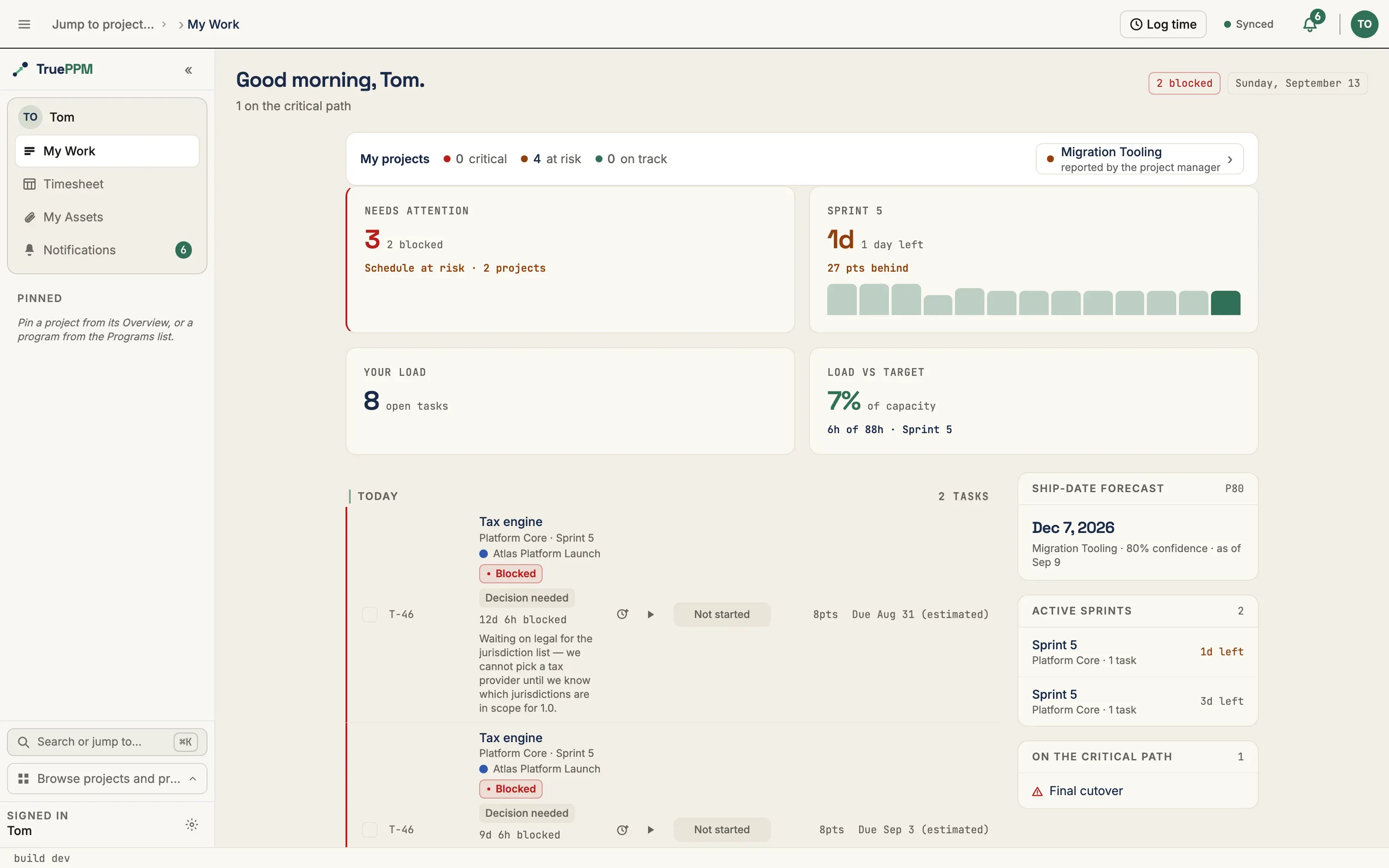
- Views live in the left navigation rail, not in top-bar tabs. Within a project they are grouped Plan (Schedule, Grid, Calendar) · Deliver (Backlog, Sprints, Board) · Track (Dashboard, Today, Risks, Reports, Activity, Assets), followed by a ruled-off Workspace band pinned to the bottom holding Team and Settings. A view you do not see is hidden by the project’s methodology — an agile project has no Schedule or Calendar by default, and no Deliver band exists on a waterfall project.
- The top bar carries the
Program › Projectlocation switcher on the left and the health / sync / notifications / user cluster on the right. - ⌘K opens the command palette — the fastest way to jump to a view or find a task by name if a walkthrough step names something you cannot spot.
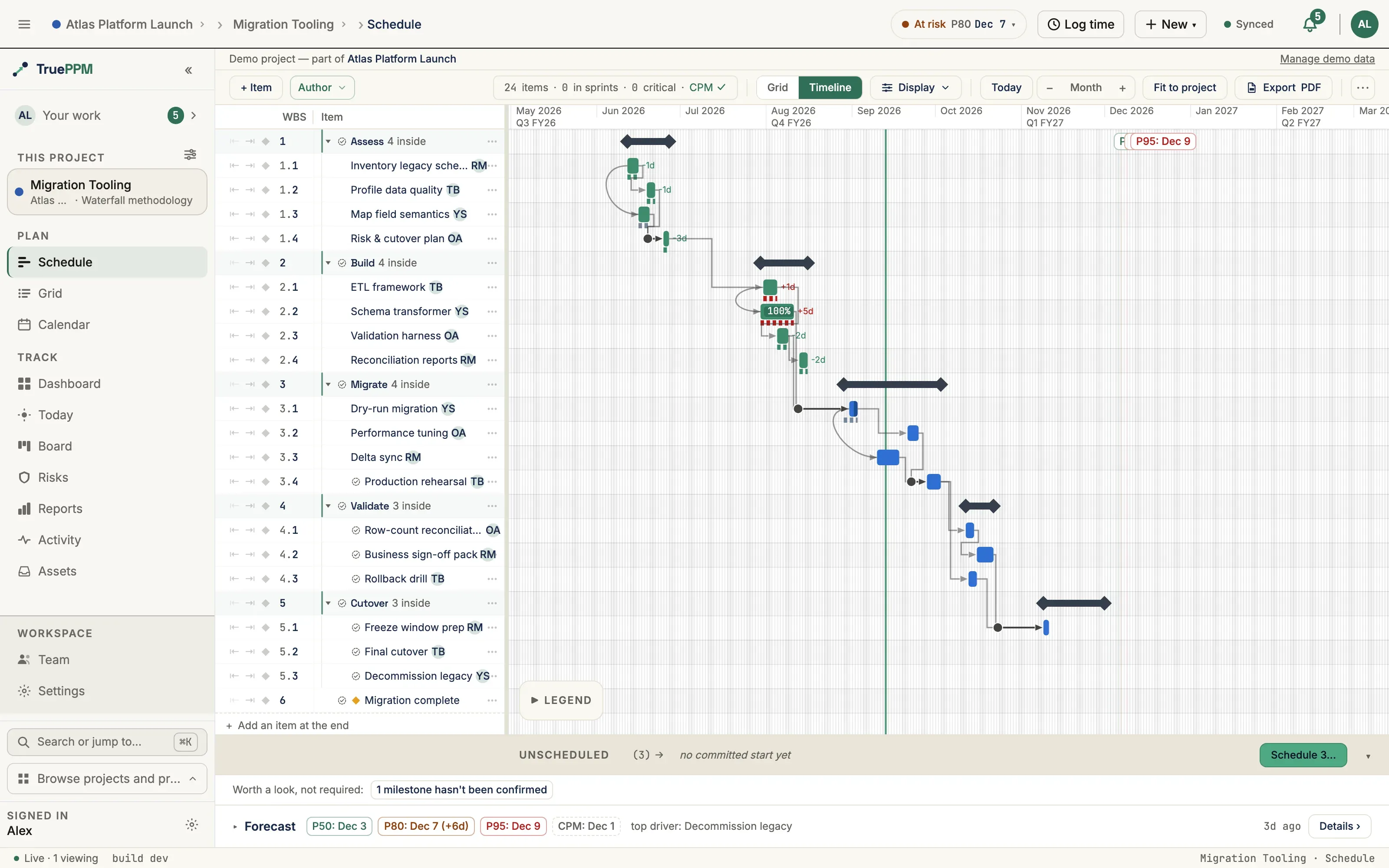
- The forecast is a docked bar, not a modal. On the Schedule view, the Forecast strip sits along the bottom with the P50/P80/P95 chips and Details › for the full distribution. It also states when the forecast was last run. Rerun appears beside that stamp whenever the server reports the forecast no longer describes the current plan — after any edit to the project, after a schedule recompute, or once the run is more than a week old. Because that judgment is made on the server rather than tracked in your browser session, it survives a page reload and picks up a teammate’s edits as readily as your own. To force a run when the forecast is current, use Rerun forecast on the project Overview.
The funnel map — install to your own first output
Section titled “The funnel map — install to your own first output”Everything above tours sample data. This section maps the separate path — the one a self-hoster actually needs before they trust TruePPM with real work — from install to a first useful output on a project you built yourself, for the three funnel-defining evaluators. Each step is marked UI (a documented in-app path), API (curl/REST only, no in-app path today), or Missing (no path at all yet).
Waterfall PM
Section titled “Waterfall PM”| Step | Path | Status |
|---|---|---|
| Install and sign in | Installation | UI |
| Tour a sample to see what “done” looks like | Bayside Civic Center | UI |
| Create your own waterfall project | Start sheet → New project → Waterfall | UI |
| Build a WBS: phases, tasks, milestones | Schedule Build Mode | UI (opt-in toggle on 0.3, on by default from 0.4) |
| Wire dependencies (all four types, lag) | Right-click a row → Add dependency | UI |
| Capture a baseline | Baselines — Actions → Capture baseline | UI from 0.4; API-only on 0.3 |
| Set the status date so forecasts anchor on your data | Project settings → General → Status date | UI from 0.4; API-only (PATCH /projects/{id}/) on 0.3 |
| Run Monte Carlo and read P50/P80/P95 | Schedule → Forecast bar | UI |
| Hand the plan to a stakeholder | Schedule toolbar → Export PDF | UI |
Until this MR, the step from “create your own project” to “a WBS with phases and milestones” had no UI walkthrough anywhere in the docs — quickstart.md’s Route B is curl-only. The Waterfall day-one guide closes that gap.
Scrum Master / agile delivery
Section titled “Scrum Master / agile delivery”| Step | Path | Status |
|---|---|---|
| Install and sign in | Installation | UI |
| Tour a sample sprint in flight | Aurora Mobile App | UI |
| Create your own agile project | Start sheet → New project → Agile | UI |
| Groom a backlog: stories, epics, points, DoR | Product backlog & scoring | UI |
| Plan the first sprint | Plan Sprint dialog | UI |
| Run the board day to day | Board | UI |
| Preflight capacity before committing | Capacity preflight — set the points ceiling on the Board’s Capacity card | UI |
| See a velocity trend and a backlog delivery forecast | Velocity panel | UI, but needs 2–3 real closed sprints of elapsed time before it renders — there is no way to see a trend on day one of your own project |
The agile path has had a UI-only day one since 0.3 — the funnel gap here is not missing UI, it is the multi-sprint wait before velocity has anything to show. A day-one evaluator should expect the sample tour to be where they see a velocity trend, and their own project to be where they start building one.
Hybrid program (multi-project PM)
Section titled “Hybrid program (multi-project PM)”| Step | Path | Status |
|---|---|---|
| Install and sign in | Installation | UI |
| Tour a sample program | Atlas Platform Launch | UI |
| Create your own program | Programs directory → + New program | UI |
| Add or create projects under it | Program → Projects tab → New project | UI |
| Cross-project critical path across your own projects | Program schedule | UI |
| Cross-project resource contention | Program → Resources tab | UI |
| Shared cross-project backlog | Program → Backlog tab | UI |
The hybrid-program funnel has no UI gap today — every step above works on a program you build yourself, on 0.3. The gap in this persona is coverage, not capability: nothing in getting-started walks a reader through doing it end to end on their own data the way the sample tour does on Atlas’s.
Capability checklist
Section titled “Capability checklist”Each row is independently verifiable. “Look here” names the screen and how to
reach it; “Expect” is the signal that the capability works. Routes are written
against the project or program you loaded — ⌘K will jump you to any of them by
name if you would rather not read URLs.
Agile team (the 0.3 headline)
Section titled “Agile team (the 0.3 headline)”| Capability | Sample · persona | Look here | Expect |
|---|---|---|---|
| Sprint lifecycle & burndown | Aurora · aurora-priya | Rail Deliver → Sprints (/projects/:id/sprints) → switch to a closed sprint (1 or 2) | A real downward curve with day-by-day points, not a single number |
| Velocity trend with a range | Aurora · aurora-priya | Same page — right column of the metrics row, bottom half | A 20 → 27 ramp across the closed sprints, with a forecast spread |
| Sprint goal verdict | Aurora · aurora-priya | Same page — header of a closed sprint | Sprint 1 reads Partially met (20 of 26), Sprint 2 Met |
| Active sprint brackets “today” | Aurora · aurora-priya / Helios · helios-jordan | Rail Deliver → Board (/projects/:id/board) | The in-flight sprint straddles the current date, with work mid-column |
| Mid-sprint scope audit (accepted) | Aurora · aurora-priya | Board → open “Widget gallery” → sprint scope chip in the drawer | A goal-impacting injection accepted mid-sprint, recorded in the audit |
| Mid-sprint scope audit (rejected) | Helios · helios-ivan / helios-jordan | Board or ⌘K → open “Search & filters” | An injection rejected and deferred — the task drops out of the sprint |
Task history & collaboration (new in this guide)
Section titled “Task history & collaboration (new in this guide)”| Capability | Sample · persona | Look here | Expect |
|---|---|---|---|
| Reassignment trail | every sample | ⌘K the task name → drawer → Activity tab | Dated “reassigned to …” rows by name (e.g. Aurora “Biometric login”: Diego → Mei) |
| Non-linear “hero” task | every sample | ⌘K the hero task → drawer → Activity tab | A Review → In Progress bounce, then Review → Done (Aurora “Onboarding flow”; Atlas “SSO login”; Bayside “Rebar & formwork”) |
| Persona comments | every sample | Same tab → filter the event list to Comments | Standup, blocker, handoff, and review-rework notes by named people, dated |
| Backdated, attributed history | every sample | Any Done card on the Board → drawer → Activity | ”Moved to Done by … N days ago”, not everything stamped “today” |
Collaboration layer
Section titled “Collaboration layer”| Capability | Sample · persona | Look here | Expect |
|---|---|---|---|
| Program backlog | Atlas · atlas-alex / Aurora · aurora-priya / Helios · helios-jordan | Program rail Backlog (/programs/:id/backlog) | Proposed intake with tags and ranks, items already pulled into the task they became (Helios “Search & filters”), and archived rejects with the reason written down |
| Threaded review | every sample | ⌘K the hero task (Atlas “SSO login”, Aurora “Onboarding flow”, Bayside “Rebar & formwork”, Helios “Lead pipeline”) → drawer Comments | A reviewer’s comment with the fix and the approval as replies under it, a 👍 reaction, and an “I saw this” acknowledgement |
| @mentions that resolve | every sample | Same drawer Comments — e.g. Atlas “Digest scheduler”, Aurora “Settings sync” | Mentions that link to real project members, not plain text |
| Acceptance criteria | Aurora · aurora-priya / Atlas · atlas-jordan | Board → “Crash reporting” (Aurora) or “Dunning flow” (Atlas) → drawer | Criteria on in-sprint stories, some ticked with who ticked them and when, some still open |
| Decisions log | Atlas · atlas-priya | Project rail Track → Reports on Platform Core → Decisions | Several dated decisions by name — the SSO callback rule, multi-jurisdiction tax leaving 1.0, the backfill injection — and at least one in every other sample |
| Logged time and submitted weeks | Atlas · atlas-mei / Aurora · aurora-tom | User menu → Timesheet (/me/timesheet) → step back a week | A populated grid on completed and in-flight work, marked submitted for fully elapsed weeks |
| Agent oversight | Atlas · atlas-alex | Program rail Agents (/programs/:id/agents) | Reads, one computed answer that shows its derivation (what drives the cutover date), and one refused write — every row labeled [Sample data] |
| Share link | Aurora · aurora-priya | Project Settings → Sharing | One live, revocable board link. Its token is generated at load and never shown; mint an openable link with create_demo_share_link |
| Program ceremonies | Atlas · atlas-alex | Program Settings → Cadence (/programs/:id/settings/cadence) | Program Sync, Cross-team Dependency Review, Steering Committee and an on-milestone Launch Readiness Review — program-level ceremonies, not sprint events |
| Continuous-flow lane | Aurora · aurora-priya | Rail Deliver → Board with no sprint selected (the project view) → In Progress → Support lane | Three kanban support cards in a lane limited to two, flagged over its WIP limit, with the older ones past the column’s five-day age threshold |
| Bug, spike and tech-debt work | Aurora · aurora-priya / Atlas · atlas-jordan | Board card type chips, or ⌘K the task | Aurora’s support bugs; Atlas “Anomaly detection spike” and the tech-debt “Tenant data cutover hook” |
| A blocker of every type | Atlas · atlas-priya / Bayside · bayside-sam / Helios · helios-ivan | ⌘K the task → drawer Blocker section; on Atlas also the Board’s Blocked lane | Blocked on load: Atlas’s cutover hook waiting on Migration’s performance tuning (a cross-project dependency) and the tax engine (decision), Bayside’s rooftop-unit delivery (vendor). Raised and cleared in the task’s Activity: Helios “Workflow rules” (resource), GA “Press & analyst outreach” (other) |
| Scrum Master and Product Owner | Aurora · aurora-priya / Atlas · atlas-alex | Project Settings → Team | Sam holds the Scrum Master facet and Priya (Aurora) or Jordan (Atlas) the Product Owner facet on a named team |
| Skills and skill fit | Atlas · atlas-alex | Schedule → open the tax engine (4.5) → assign a resource | The resource search groups people into Best fit / Partial fit / No skill match against the task’s requirement, and the current assignee does not meet it |
| A recurring task | every sample | ⌘K “standup” (Bayside: “Weekly site status report”) → drawer Recurrence section | A recurrence template with its rule; occurrences appear as the generator reaches them, not all at once |
| Subtasks | Aurora · aurora-priya / Atlas · atlas-jordan | ⌘K “App shortcuts” (Aurora) or “Webhook retries dashboard” (Atlas) → drawer Subtasks | A story broken into drawer subtasks, each with its own owner |
Schedule (CPM) & forecasting
Section titled “Schedule (CPM) & forecasting”| Capability | Sample · persona | Look here | Expect |
|---|---|---|---|
| Critical path | Bayside · bayside-sam | Top-bar switcher → the program → rail Schedule (/programs/:id/schedule) | A cross-project critical path running from the structure into the fit-out |
| Cross-project dependencies | Bayside · bayside-sam | Same program schedule | Fit-out tasks gated on the structure’s framing inspection, incl. a negative-lag lead |
| All four dependency types | Bayside · bayside-sam | Project rail Plan → Schedule → the Foundation / Finish-out link lines | FS, SS, FF, and SF links present (parallel pours, “finish together”, SF on commissioning) |
| Three-point estimates | Bayside · bayside-sam | Schedule → click any task row → drawer Details → Estimates | Optimistic / most-likely / pessimistic on the estimate |
| Baseline + rebaseline | Bayside · bayside-sam | Schedule toolbar → Actions → Baselines… | The current plan compared against the superseded Contract baseline and the active change-order Rebaseline, captured months apart rather than on the same afternoon |
| Calendar exceptions that bite | Bayside · bayside-sam | Program Schedule → the Framing and Finish-out bars | Two site stand-downs with different outcomes: the crane window stretches floor decking and is absorbed by framing’s float; the contract weather allowance lands on the thinnest float left and pushes the certificate of occupancy |
| Labels | every sample | Board or Schedule → the toolbar filter | Themed labels (e.g. Bayside “critical-path”, “inspection”; Atlas “security”, “cutover”) |
| Monte Carlo P50/P80/P95 | Bayside · bayside-sam / Atlas · atlas-alex | Schedule → Forecast bar along the bottom → Details › | Monotonic P50 ≤ P80 ≤ P95; toggling a high-impact risk shifts P80 |
Risk register
Section titled “Risk register”| Capability | Sample · persona | Look here | Expect |
|---|---|---|---|
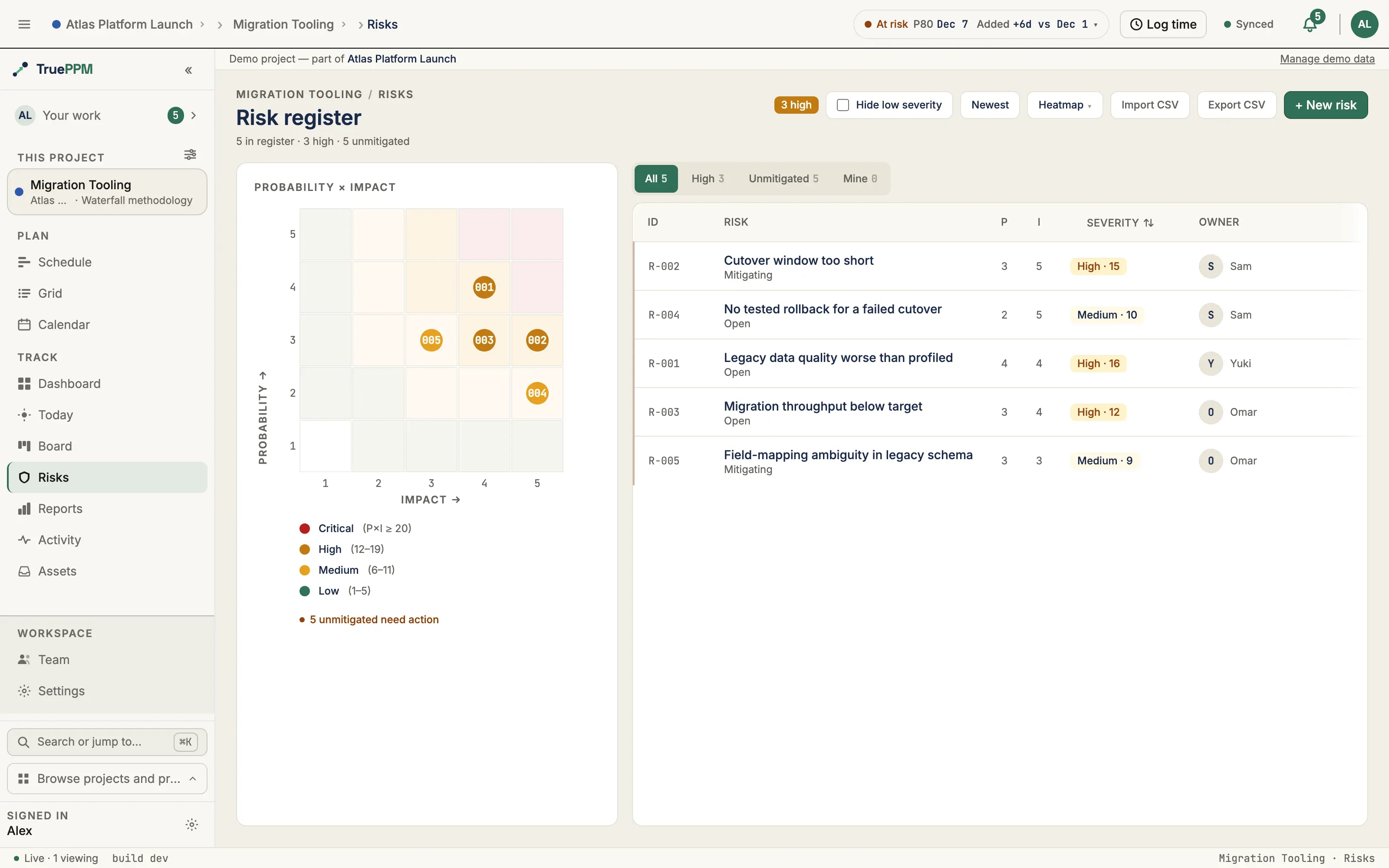
| Populated register | Bayside (13) · Atlas (20) | Rail Track → Risks (/projects/:id/risk) | A full register with a probability × impact matrix |
| Risk status lifecycle | every sample | Risks → open a risk → its activity trail | Dated Open → Mitigating → Resolved/Closed (e.g. Bayside “unsuitable bearing material”; Atlas “SSO security finding”) |
| Triggers and contingencies | Bayside · bayside-sam | Risks → open a risk → Details | The condition that fires the risk and the plan if it does — not just a probability and an impact |
| A realized risk | Bayside · bayside-sam | Risks → “Unsuitable bearing material at excavation” → activity trail, then Schedule → task 2.1 | A mitigation that was tried and did not hold: the contingency fires, and “Excavate footings” carries the overrun as variance against the Contract baseline |
TRANSFER response | Bayside · bayside-sam | Risks → “MEP subcontractor financial risk” | The only transfer in any sample, with the instrument named — and a note on what the bond does not cover, which is why it stays open |
| Schedule-driving risks | Atlas · atlas-alex | Risks, then Schedule → Forecast bar → Details › | Several high probability × impact risks that visibly move the forecast |
Hybrid & program scale
Section titled “Hybrid & program scale”| Capability | Sample · persona | Look here | Expect |
|---|---|---|---|
| The bridge demo | Helios · helios-jordan | Rail Plan → Schedule, then Deliver → Sprints | A completed waterfall plan feeding live build sprints across a cross-phase dependency |
| Sprint goals behind the outcome | Helios · helios-jordan | Deliver → Sprints → each sprint header | Every sprint states a goal, so Sprint 1’s PARTIAL close is an outcome against something written down |
| Mitigation that costs scope | Helios · helios-jordan | Risks → “Legacy data migration fidelity”, then Deliver → Sprints → Build Sprint 3 | A dry-run harness scheduled against the risk with a due date — and “Custom fields” pushed back to the backlog to pay for it, rather than the sprint quietly absorbing both |
| Hybrid rollup | Helios · helios-jordan / Atlas · atlas-alex | Rail Overview (/projects/:id/overview, or /programs/:id/overview) | Gated and flow work rolling up together under one parent |
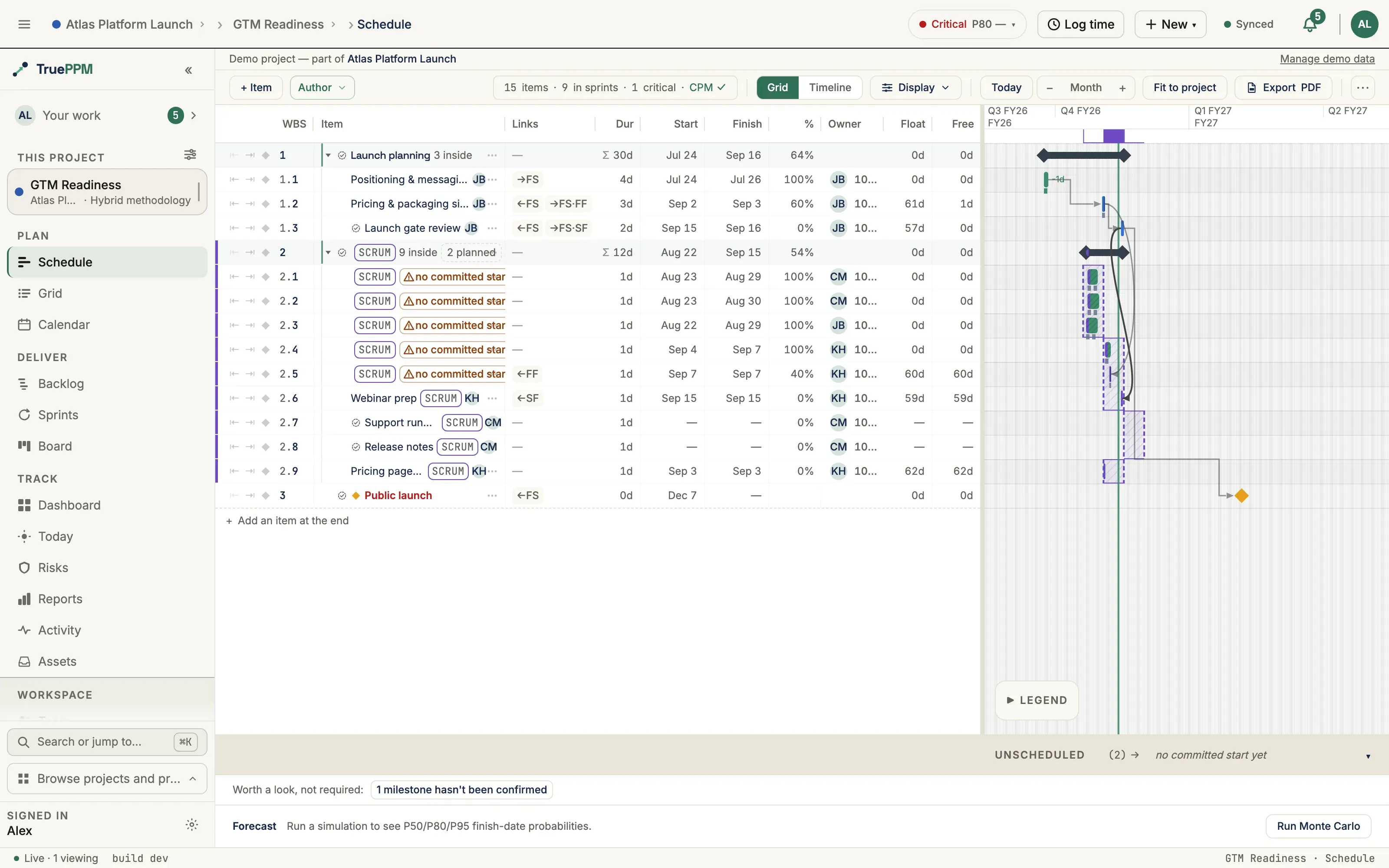
| Cross-project critical path | Atlas · atlas-alex | Program rail Schedule (/programs/:id/schedule) | Platform Core gates Migration, which gates the public-launch milestone |
| Methodology mix in one program | Atlas · atlas-alex | Program rail Projects (/programs/:id/projects) | Agile, waterfall, and hybrid streams side by side |
Interface (v2)
Section titled “Interface (v2)”| Capability | Sample · persona | Look here | Expect |
|---|---|---|---|
| Unified app-shell bar | any · any | Top bar + left rail | One 56-px bar: a Program › Project location switcher on the left and a pinned utility cluster (health, sync, notifications, user menu) on the right. View switching lives in the left navigation rail, not in top-bar tabs |
| Command palette | any · any | Press ⌘K | Jump to backlog/board and search tasks inline |
| Role-based landing | any · sign in as different roles | Post-login screen | Each role lands on the surface it lives on (a Viewer lands read-only) |
A 30-minute tour by persona
Section titled “A 30-minute tour by persona”If you would rather follow one role end to end, pick the path that matches you. Each tour assumes you have finished Set up once and loaded the sample it names.
Scrum Master / agile delivery — ~10 min (Aurora)
Section titled “Scrum Master / agile delivery — ~10 min (Aurora)”- Sign in as
aurora-priyaand use the top-bar switcher to land on the Aurora Mobile App project. - In the left rail open Deliver → Sprints. Switch the sprint selector to the closed Sprint 1 — read its Partially met verdict in the header and its burndown curve.
- On the same page, look at the right column of the metrics row: the velocity chart is in its bottom half. Note the 20 → 27 ramp and the forecast range.
- Open Deliver → Board. Click “Onboarding flow” and open the drawer’s Activity tab: it went to Review, bounced back on a real defect, was reworked, and shipped — with Tom’s review comments inline.
- Still on the board, open “Widget gallery” — a mid-sprint injection the PO pulled in and the team accepted, recorded in the scope audit on its drawer.
Project Manager / scheduler — ~10 min (Bayside)
Section titled “Project Manager / scheduler — ~10 min (Bayside)”- Sign in as
bayside-samand switch to the Bayside Civic Center project. - Open Plan → Schedule in the left rail. Follow the highlighted critical path and spot the four dependency types in the link lines (the parallel pours and the “finish together” framing links).
- Open the Schedule toolbar’s Actions menu → Baselines… to see the superseded Contract baseline alongside the active change-order rebaseline. For a single task’s variance, click its row and read the Baseline section in the drawer.
- Look at the Forecast bar docked along the bottom of the Schedule — confirm the chips read P50 ≤ P80 ≤ P95, then press Details › for the distribution and the tornado of top drivers.
- Open Track → Risks, find soil conditions, and read its trail: Open → Mitigating → Closed as the geotech survey cleared it.
Product Owner / hybrid lead — ~10 min (Helios, then Atlas)
Section titled “Product Owner / hybrid lead — ~10 min (Helios, then Atlas)”- Sign in as
helios-jordanand switch to the Helios CRM Replacement project. - Open Plan → Schedule to see the finished waterfall Planning phase, then Deliver → Sprints to see the live Build sprints it hands off to across the cross-phase dependency.
- Press ⌘K, search “Search & filters”, and open it — an injection that was rejected mid-sprint and deferred, so it dropped back out of the sprint.
- Switch to Atlas in the top bar and sign in as
atlas-alex(the program lead). Open the program’s Schedule (/programs/:id/schedule) and follow the cross-project critical path: Platform Core → Migration → public launch. - ⌘K to the SSO login task and open its Activity tab — a security-review bounce that became a tracked audit risk.
Team member / contributor — ~5 min (Aurora)
Section titled “Team member / contributor — ~5 min (Aurora)”- Sign in as
aurora-mei—aurora-priyais Aurora’s Product Owner and Owner (see Sample projects), not a contributor. Click My Work, pinned at the top of the left sidebar (/me/work), and find your in-flight cards. - Open Deliver → Board and drag a card to the next column. Go back to Deliver → Sprints: the active sprint’s burndown has already redrawn, and you didn’t touch anything else.
- Open a “hero” task and read its Activity tab — your reassignments and a review bounce-back are there, dated and by name. This is what “your board moves are the status” looks like.
Resource manager — ~5 min (any sample), with one honest caveat
Section titled “Resource manager — ~5 min (any sample), with one honest caveat”Cross-project allocation and pre-commit conflict warnings are a 0.5 capability — they are not here yet, and an honest evaluation should expect that. What you can verify today is project-scoped:
- Sign in to any sample and open People → Team in the left rail
(
/projects/:id/resources, Roster tab). Every sample seeds realistic capacity profiles — full-time, part-time, and 10% advisors, not everyone at 100% — with a non-default working calendar on at least one person. - Open Deliver → Sprints and read capacity preflight in the top half of the metrics row’s right column: over-allocation within the project is flagged before the sprint starts.
See the resource managers guide for what lands when.
Executive sponsor — ~5 min (Atlas), no login of your own
Section titled “Executive sponsor — ~5 min (Atlas), no login of your own”You don’t need to drive the tool. Ask whoever set up the demo to sign in as
atlas-alex — the program lead — open Atlas, and share their screen.
Have them do this while you watch:
- Open a project in the program and go to Plan → Schedule. The Forecast bar along the bottom is the answer: a range with a confidence level (P50 ≤ P80 ≤ P95), computed from the live plan, not a hand-built status slide.
- Press Details › and read the tornado of top drivers — the named risks and tasks moving P80. That’s the difference between “we’re on track” and “we’re 80% likely by this date, and here’s what would change it.”
The portfolio dashboard and pushed weekly digest you’d want next are still ahead — see the executives guide.
PMO director — ~5 min (Atlas)
Section titled “PMO director — ~5 min (Atlas)”Atlas is a program — three related projects under one team — which is exactly the community-edition scope.
- Sign in as
atlas-alex. Use the top-bar location switcher to select the Atlas program rather than a project inside it. - Open the program’s Overview (
/programs/:id/overview) and read the cross-project rollup: the public-launch milestone gated by Platform Core and Migration. - Open the program’s Schedule (
/programs/:id/schedule) and follow the cross-project critical path across the three projects.
Portfolio governance across many programs (enforced org-wide SSO, immutable audit, cross-program leveling) is the enterprise layer — the PMO directors guide draws the line.
Agile coach — ~10 min (Aurora, then Helios)
Section titled “Agile coach — ~10 min (Aurora, then Helios)”Your evaluation is about autonomy, so check the artifacts that prove the sprint belongs to the team:
- Sign in as
aurora-priyaand open Deliver → Sprints in Aurora. Select Sprint 3 — one of the two closed sprints (with Sprint 1) whose retro the sample seeds — and scroll to the retrospective panel below the timeline. Confirm a promoted action item carried into the project backlog as a real task, reachable from its→ T-XXXXXXchip — the pipeline is real, not a checkbox. - On the board, open “Widget gallery” — the mid-sprint scope injection that was accepted and recorded in the scope audit, not slipped in silently.
- Switch to Helios as
helios-jordanand open “Search & filters” — the injection that was rejected and deferred. The team’s boundary held, with a record either way. - Note that velocity stays team-private unless the team opens the audience (Settings → Signal privacy) — it is not auto-published to a management view.
The full autonomy-vs-control contrast test (sign in as the team, then as management) is in the agile coaches guide.
If what you see doesn’t match
Section titled “If what you see doesn’t match”The three things that actually go wrong, and what each one means:
| Symptom | What it means |
|---|---|
| The persona login is rejected | The sample was loaded without --with-personas, so the accounts exist but have no usable password. Re-run the load command with the flag. |
The password demo doesn’t work | You are not on a DEBUG=True stack. The real password was printed once when the command ran — it is $TRUEPPM_DEMO_PASSWORD if you set it, otherwise a random token. Re-run the load command to print a fresh one. |
| A view named in a step isn’t in the rail | The project’s methodology hides it — an agile project has no Plan group, a waterfall project has no Deliver group. Switch to the sample the step names, or check Settings → How this team works. |
Anything else that doesn’t match this page is worth telling us about — the walkthroughs are meant to be followable exactly as written.
Where this data comes from
Section titled “Where this data comes from”Every sample is generated from a committed builder
(scripts/seeds/build_atlas_seed.py, scripts/seeds/build_samples.py) and
replayed by the importer (ADR-0114). The event timeline — reassignments,
comments, status moves, scope changes, risk lifecycles — is authored in those
builders and reconstructed as backdated history on import. To author your own,
see the seed data schema reference.