Resources & Skills
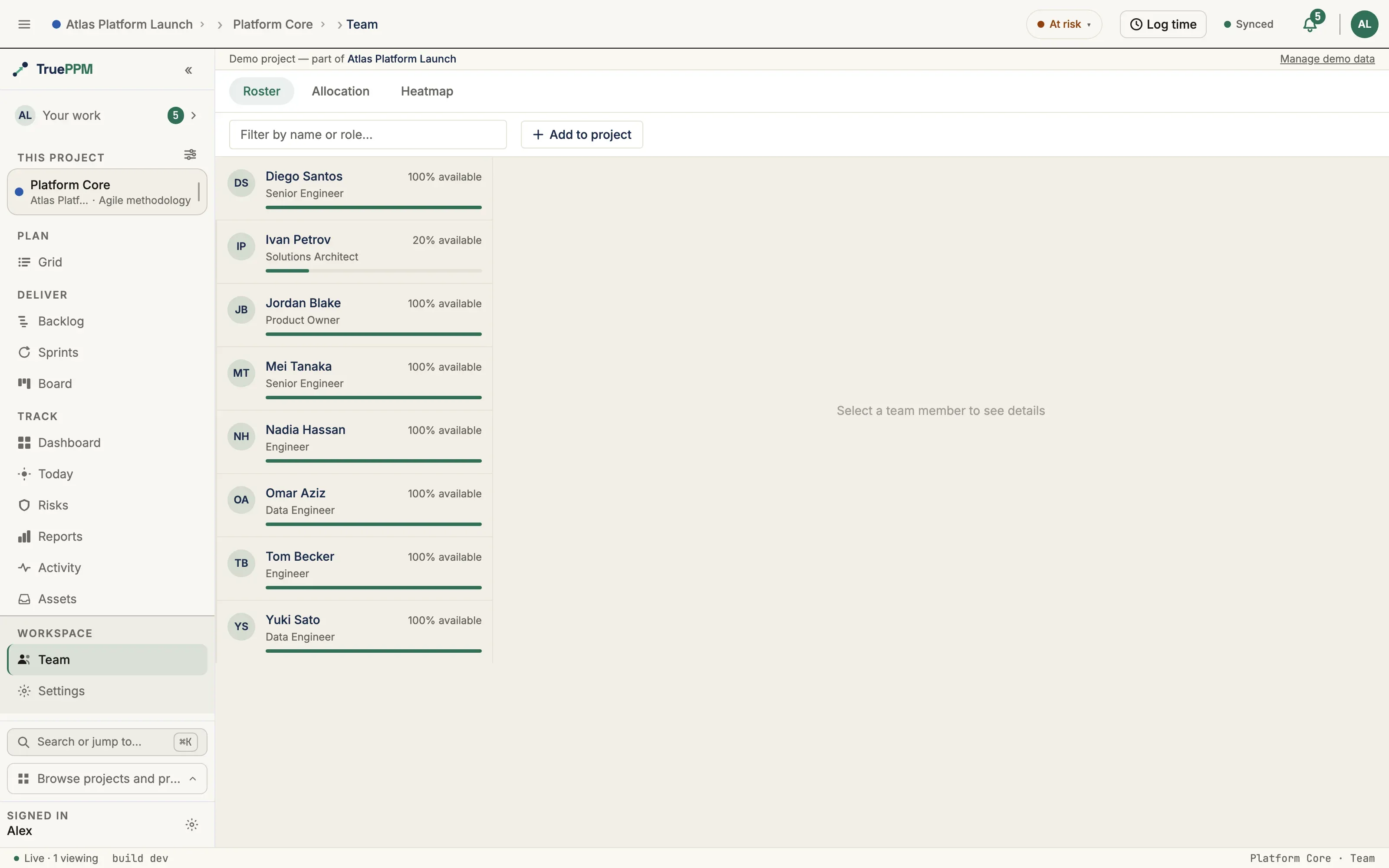
This is for a resource manager or PM who staffs projects and wants to see who’s available and who’s overloaded. TruePPM models the people who do the work as resources. Resources live in a Workspace-wide catalog, carry skills at a proficiency level, join a project roster, and get assigned to tasks at a fractional capacity. When you assign someone, TruePPM surfaces soft warnings if their skills don’t match the task or if they’re overcommitted.
The resource catalog
Section titled “The resource catalog”A resource has a name, email, job role, an optional calendar (to model individual
availability), and a max units value expressing capacity — 1.0 is a full-time
equivalent, 0.5 is half-time. Resources are Workspace-level: create them once and use
them across projects.
Deactivating a resource
Section titled “Deactivating a resource”Removing a resource deactivates it rather than deleting it. Its task assignments are kept, so the record of who did what survives an off-boarding — which is the moment that record matters most. Everything that describes the current team drops the person immediately:
- they leave every project roster;
- their load disappears from the resource heatmap, the daily utilization view, and the allocation timeline;
- they stop counting toward the project’s headcount;
- they stop contributing capacity to the Team utilization denominator, so the card reports the remaining team getting busier rather than the team getting calmer;
- they drop out of program resource contention and sprint capacity;
- their skill tags stop appearing in the Workspace skill list.
While a resource is deactivated it cannot be added to a roster, assigned to a task, or tagged with a skill — those writes are refused rather than silently creating a row no view would show.
Restoring the resource reverses all of it, including the roster memberships the deactivation removed. A membership somebody had already ended by hand stays ended — a restore puts back what the deactivation took away and nothing else.
Skills and proficiency
Section titled “Skills and proficiency”A skill is a Workspace-level tag (optionally grouped into a category). Tag a resource with the skills they have at one of three proficiency levels — Beginner, Intermediate, or Expert. Skill names are de-duplicated case-insensitively, so “React” and “react” resolve to the same skill.
Tag skills inline from a resource’s detail panel: choose a proficiency, then search the catalog under + Add skill. Each selection is added immediately and the search clears, so you can tag several skills in a row; skills already on the resource are hidden from the results.
Rosters and assignments
Section titled “Rosters and assignments”- Project roster — add resources to a project before (or without) assigning them to specific work. A roster entry can override the resource’s job role or capacity for that project. The capacity override says “this person is only half on this project”; see what the capacity override governs.
- Task assignment — assign a resource to a task at a fractional units value (e.g.
0.5for half their capacity). Assigning someone who isn’t yet on the roster adds them automatically.
Assignments across projects
Section titled “Assignments across projects”Opening a person’s card in the Workspace resource catalog will answer the first question a resource manager has — what is this person working on? The detail panel will gain an Assignments section that lists every task the resource is assigned to, across every project, grouped by project. Each task row links to that task in its project schedule, and each project heading links to that project’s allocation view, so you can drill from the catalog straight into the work.
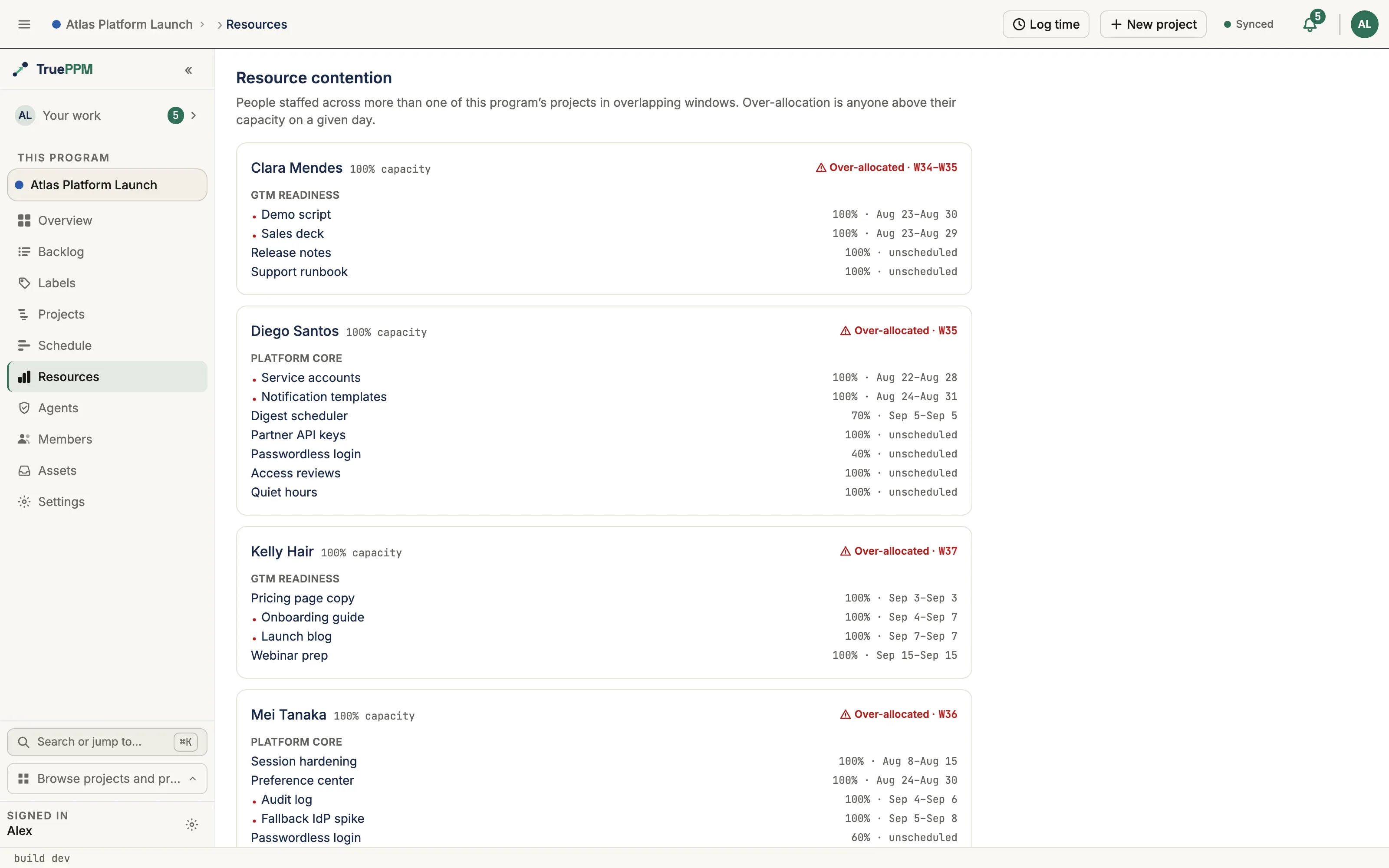
Every row shows the task’s status, percent complete, and the resource’s allocation
on that task (the raw units fraction of their capacity). A neutral summary — for
example “3 tasks across 2 projects” — sits at the top. The view is read-only:
it projects the assignments that already exist and lets you read the load yourself.
It does not compute a utilization score, flag overallocation, or roll up across
programs — cross-program resource leveling and portfolio heat maps remain part of
the Enterprise edition.
Because task and project names are project-scoped, the Assignments section will be visible only to a workspace Admin. Everyone else, project admins included, still sees the rest of the resource card (role, capacity, skills) but not the assignments list. The view reaches into every project in the installation, and a project-level role does not carry that far: any account can create a project and become its Owner, so a project role cannot stand in for installation-wide authority.
To see what someone is working on within the projects you are a member of, read
GET /api/v1/task-resources/?resource=<id>, which is scoped to your own
memberships and needs no elevated role.
Skill-fit and overallocation warnings
Section titled “Skill-fit and overallocation warnings”You can attach skill requirements to a task — the skills (and minimum proficiency) the work needs. When you assign a resource, TruePPM evaluates the fit and returns it with the assignment:
- Exact — the resource meets every requirement.
- Partial — some requirements met, some short on proficiency.
- Missing — the resource lacks one or more required skills (listed explicitly).
Separately, if a resource’s committed allocation on any single working day exceeds their max units, the assignment comes back with an overallocation warning naming that day. Both checks are soft — they inform the assigner but never block the assignment, so you stay in control.
The overallocation check windows by date against the same calendar-aware engine as the heatmap, so the two cannot disagree about who is overcommitted: three 80% tasks that never share a working day are 80% allocated, not 240%. Two consequences are worth knowing:
- Non-working days are not conflicts. Spans that meet only across a weekend, or only on a calendar exception, do not stack. A resource’s own calendar wins over the project’s, exactly as it does on the heatmap.
- A task with no scheduled dates counts against every day. An unscheduled task has no window that could rule out an overlap, so it is treated as concurrent with everything else. This keeps the warning meaningful on a project whose schedule has not been calculated yet — which is often when the first assignments are made.
- A very large project may show a partial roster, and says when it does. The allocation timeline and the program contention view cap how many assignments one response carries. The cut always lands on a whole person: someone is either shown with every one of their in-window tasks, or left out and counted in a notice above the list (“Showing 40 of 62 resources”). Nobody is ever shown with only part of their work, because a partial view of a person would under-report exactly the overcommitment these views exist to surface. The cap is set clear of the supported project size, so you should not meet it. If you do, the notice names the remedy that surface actually offers: the project allocation timeline can narrow the window or search by name, and the program contention view — which has no filters yet — points you at a member project’s Resources view instead.
Team utilization on the project Overview
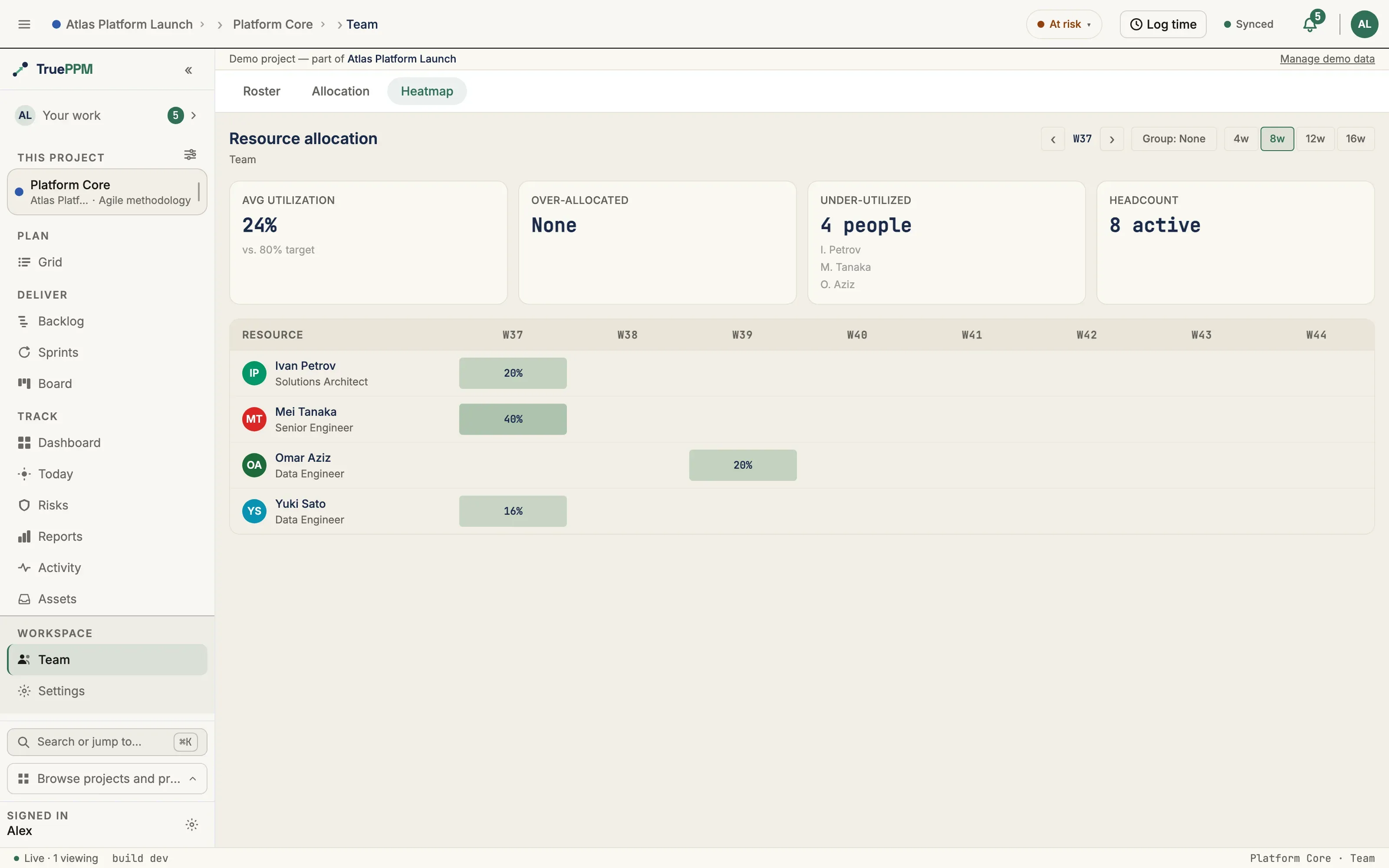
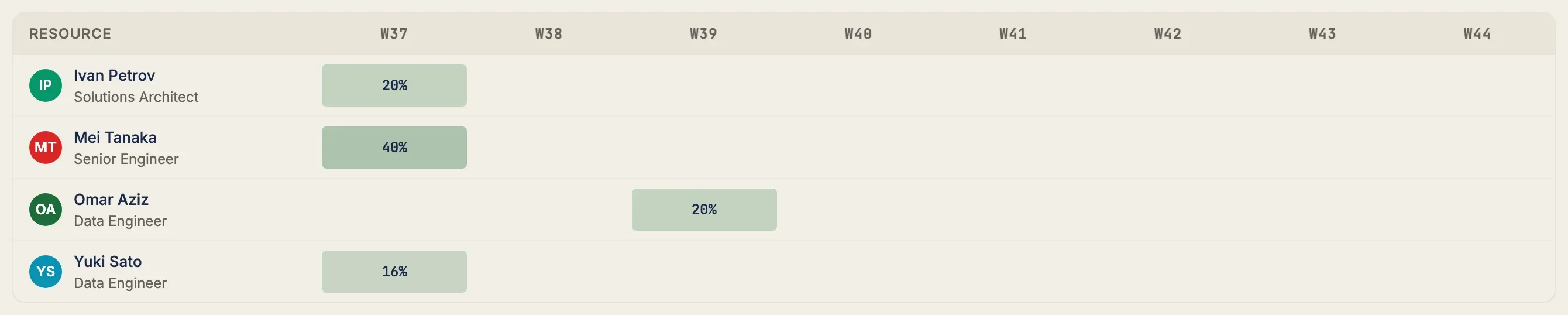
Section titled “Team utilization on the project Overview”The project Overview carries a Team utilization KPI card: this week’s committed load as a percentage of the team’s working capacity. It is computed from the same calendar-aware engine as the resource heatmap — hours per day × units × working days, with a resource’s own calendar winning over the project’s — so the Overview card and the heatmap cannot disagree about how loaded a team is.
Three details are worth knowing:
-
The window is the current week (Monday–Sunday). The card answers “how loaded is this team now”, so work scheduled for next month does not raise it. A project-lifetime average would read as calm straight through a crunch week.
-
Everyone measured counts on both sides. The population is the project roster plus anyone holding an assignment this week. A rostered person with no assignments is idle capacity and lowers the percentage; someone assigned without being on the roster still brings their own capacity, so they cannot show up as a phantom overallocation. A per-project capacity override on the roster wins over the resource’s default max units — as it does on every other per-project capacity read; see what the capacity override governs.
-
A task’s load is measured over its full span, not its remaining work.
The heatmap and the Team utilization card both window a task’s assignments on its span (
scheduled_startthrough finish — see the bar vs. the remaining-work window), not on the narrower remaining-work window thatearly_startshrinks toward as a task approaches completion. A person’s allocation on a task does not shrink just because they finished part of it — reporting progress moves a task closer to done; it does not delete the load they were assigned in the first place.
0% is a real reading — it means nobody is allocated this week. When the ratio is genuinely undefined the card is muted and says why, rather than showing a blank:
| The card says | It means |
|---|---|
Needs people on the project roster | The project has no roster and no assignments, so there is nothing to measure. |
Roster has no working hours this week | Everyone on the roster is at zero capacity, or every calendar is closed for the whole week. |
Clicking the card opens the Team view, which is available to the Scheduler role and above; for a Member or Viewer the card is a static read rather than a link into a permission error.
What the capacity override governs
Section titled “What the capacity override governs”A roster entry’s capacity override is a statement about this project: “this person is only half on this project.” From 0.4 every capacity figure scoped to a single project will measure against it rather than against the resource’s catalog-wide max units:
- the resource heatmap and the Team summary (weekly percent, over-allocated count)
- daily utilization and its load bands — on track, at risk, over
- the Team utilization KPI card on the project Overview
- the allocation timeline on the project’s Team view
- the overallocation warning shown when you assign someone
- the overallocated row in the project’s attention feed, and the overallocation indicator on a task
- the sprint capacity preflight panel
Two things it deliberately does not change:
- Cross-project views keep the resource’s own max units. A person’s row in a program’s resource contention view spans several projects at once, so there is no single project whose override applies — and the overrides are slices of one person’s time rather than capacities that add up. That view states the whole person.
0means zero, not “unset.” An override of0is a real value — rostered on this project, holding no capacity here — and is never read as an absent override. Clear the field instead to fall back to the resource’s max units.
The overallocation indicator on a task changes for a second reason: it compared every
assignee against a flat 100%, with no capacity figure at all. From 0.4 it reads the same
capacity as everything else, so a person whose max units is not 1.0 is affected even
with no override — someone at 1.5 stops being flagged at 130%, and someone at 0.8
starts being flagged at 90%. An assignee with no linked resource still uses 100%.
What a resource manager can do today
Section titled “What a resource manager can do today”- Maintain the Workspace resource catalog (name, role, capacity, calendar). From
0.4, email addresses can be set only by a workspace Admin — an ordinary
Project Manager or Project Admin can still create and edit a catalog row, but a
write that includes
emailis rejected unless the caller holds the workspace Admin role, the same floor that already governs reading it back. Anywhere the resource serializer renders a resource — the Workspace catalog and a project’s roster (resource_detailonGET /api/v1/project-resources/expands the same serializer) — email is not returned to anyone except a workspace Admin and the person the resource represents. Both surfaces are readable by every signed-in user with access to the project or the catalog, so echoing every address, or letting any project creator overwrite one, would make either one an org-wide address book with no read protection at all. The project and program resource-allocation views and the project seed export build their responses separately from that serializer and still includeemailfor resources attached to a project you administer. - Maintain the Workspace skill catalog and tag resources with proficiency.
- Build per-project rosters with role and capacity overrides.
- Assign resources to tasks at fractional capacity.
- Define per-task skill requirements and see skill-fit on assignment.
- See overallocation warnings when someone is overcommitted.
- View project utilization across the team, on the resource heatmap and as a this-week percentage on the project Overview.
- See, from a resource’s card, every task they are assigned to across all projects — grouped by project, read-only (shipped in 0.4).
- Deactivate and restore resources — deactivation takes the person off every roster and out of every capacity figure while keeping their assignment history, and restore reverses both (shipped in 0.4). Remove them from a roster (cascading task assignments when forced).
Deactivating or restoring a resource in the Workspace catalog will require the workspace Admin role from 0.4 — it soft-deletes a shared record and recalculates the schedule of every project that person is assigned to, including projects the actor cannot see. Taking someone off your project’s roster is unchanged and stays with the Resource Manager role.
The catalog and assignment surfaces are exposed under
/api/v1/resources/, /api/v1/skills/, /api/v1/resource-skills/,
/api/v1/project-resources/, /api/v1/task-resources/, and
/api/v1/task-skill-requirements/. Reading resources requires any authenticated user.
Creating and editing catalog resources requires the Project Manager or Project
Admin role on at least one active project; editing the skill catalog, rosters,
and task assignments requires the Resource Manager role or above on at least one
active project. Roles held on an archived or deleted project will stop counting
in 0.4 — an archived project is declared read-only, so it no longer confers authority
anywhere else either. Setting email on a create or edit is the one exception:
regardless of project role, it requires the workspace Admin role — a Project Manager
or Project Admin without it gets a 400 if the request includes email at all, on
both the Workspace catalog and any create/edit that carries the field.
POST /api/v1/skills/ de-duplicates on the case-insensitive normalized name, so
posting a name that already exists is not an error. Telling the two apart from the
status code — 201 when the skill was added to the catalog, 200 when an existing
row is returned unchanged — shipped in 0.4; before it, the endpoint answered 200 in
both cases. The response body is identical either way, so a client that needs to
know whether it created the skill must read the status code.
From 0.4 the following four surfaces will require the workspace Admin role rather than a project role:
| Surface | Why |
|---|---|
DELETE /api/v1/resources/{id}/ and POST .../restore/ | Soft-deletes a shared record and recalculates every project the person is assigned to. |
email on catalog rows, on a project roster’s expanded resource detail (GET /api/v1/project-resources/), ?search= by email, and writing email on a catalog create or edit | The catalog and project rosters are readable by every signed-in user with access; a project role would make either one an org-wide address book, whether by reading it off every row or by overwriting one to redirect who it belongs to. |
?include_deleted=true on the catalog | Enumerates the deactivated pool. |
GET /api/v1/resources/{id}/assignments/ | Returns task and project names for one person across every project in the installation. |
Each of these reaches the whole installation, and a project role cannot bound it:
project creation is deliberately open, so any account can hold Owner on a project of
its own. A workspace role is different — it is granted from Settings → Members by
someone who already holds it (or by your identity provider, if you use SSO), so it
cannot be self-assigned. If you are the only administrator of a fresh install, you
already have it: an account with Django superuser rights and no workspace membership
row resolves to workspace Owner. Use GET /api/v1/task-resources/?resource=<id> for the membership-scoped
view of one person’s assignments.