Monte Carlo
TruePPM’s Monte Carlo simulation converts three-point task estimates into a probability distribution over the project finish date. Rather than a single deterministic finish from CPM, you get P50, P80, and P95 dates alongside the full distribution curve — a complete answer to “what is the chance we finish by date X?”
This capability is rare in open-source P3M tools. The sections below document exactly how it works so you can trust the numbers and explain them to stakeholders.
How to use it
Section titled “How to use it”Step 1 — Add three-point estimates to tasks
Section titled “Step 1 — Add three-point estimates to tasks”Open any task’s detail drawer and navigate to the Estimates section. Set all three values (working days):
| Field | Meaning |
|---|---|
| Optimistic (O) | Duration if everything goes well — no blockers, best-case execution |
| Most Likely (M) | Your honest expected duration under normal conditions |
| Pessimistic (P) | Duration if significant problems occur — realistic tail risk, not fantasy |
All three fields must be set for a waterfall task to be sampled from its
three-point estimate. A waterfall task with any of the three missing is treated
as having zero duration uncertainty: its deterministic duration is used for
every simulation run.
Your planned duration is the floor. The three-point estimate is the risk
band read upward from the plan, not a replacement for it: every sampled
duration is clamped up to the task’s own duration before the network is
solved. A task planned at 20 days and estimated at O=1 / M=2 / P=3 contributes
20 days to every run, not 2 — see The plan is the
floor for why. If you believe a task will finish faster
than planned, lower its duration; an optimistic estimate alone will not pull
the forecast in.
Agile (Scrum) tasks are the exception — a task delivered as sprint work draws its uncertainty from team velocity rather than a three-point estimate, so it does not need O/M/P values set. See Agile tasks: velocity-based sampling below.
Focus your effort on critical path tasks. Tasks with float do not drive the finish date; uncertainty in their durations has little effect on the output.
Phases are not simulated — put your estimates on the leaves. A summary (phase) row is a grouping node: its dates are rolled up from the tasks beneath it and it has no duration of its own, so it is excluded from the simulated network exactly as it is excluded from the CPM pass. A three-point estimate on a phase does nothing. Dependencies drawn to or from a phase are honored — they are applied to its leaf tasks — so you do not need to redraw them.
Step 2 — Run the simulation
Section titled “Step 2 — Run the simulation”In the app, open the Schedule view and expand the Forecast bar docked at the bottom, then run a simulation from the Monte Carlo row — no API call needed. See Forecast for what the collapsed and expanded states show.
To script it instead, or to integrate against it directly:
POST /api/v1/projects/<project_id>/monte-carlo/Content-Type: application/json
{ "n_simulations": 1000 }
The n_simulations field is optional; it defaults to the server’s
MC_SIMULATION_CAP setting (1,000 on OSS; operators can raise it). The
endpoint is synchronous and fast — about 60–100 ms of engine time for a 200-task
project at 10,000 runs on a current laptop CPU, more on slower server hardware.
The endpoint also enforces a task cap (MC_TASK_CAP, 5,000 on OSS): a project
with more tasks than the cap returns HTTP 402 rather than running an unbounded
simulation. The vectorized engine handles a 5,000-task × 1,000-run simulation in a
few seconds; operators on constrained hardware can lower the cap, and self-hosted
operators can raise or remove it.
Step 3 — Read the output
Section titled “Step 3 — Read the output”{ "project_id": "...", "runs": 1000, "p50": "2025-11-14", "p80": "2025-12-02", "p95": "2026-01-08", "status_date": "2025-10-21", "distribution": ["2025-10-21", "2025-10-22", "..."]}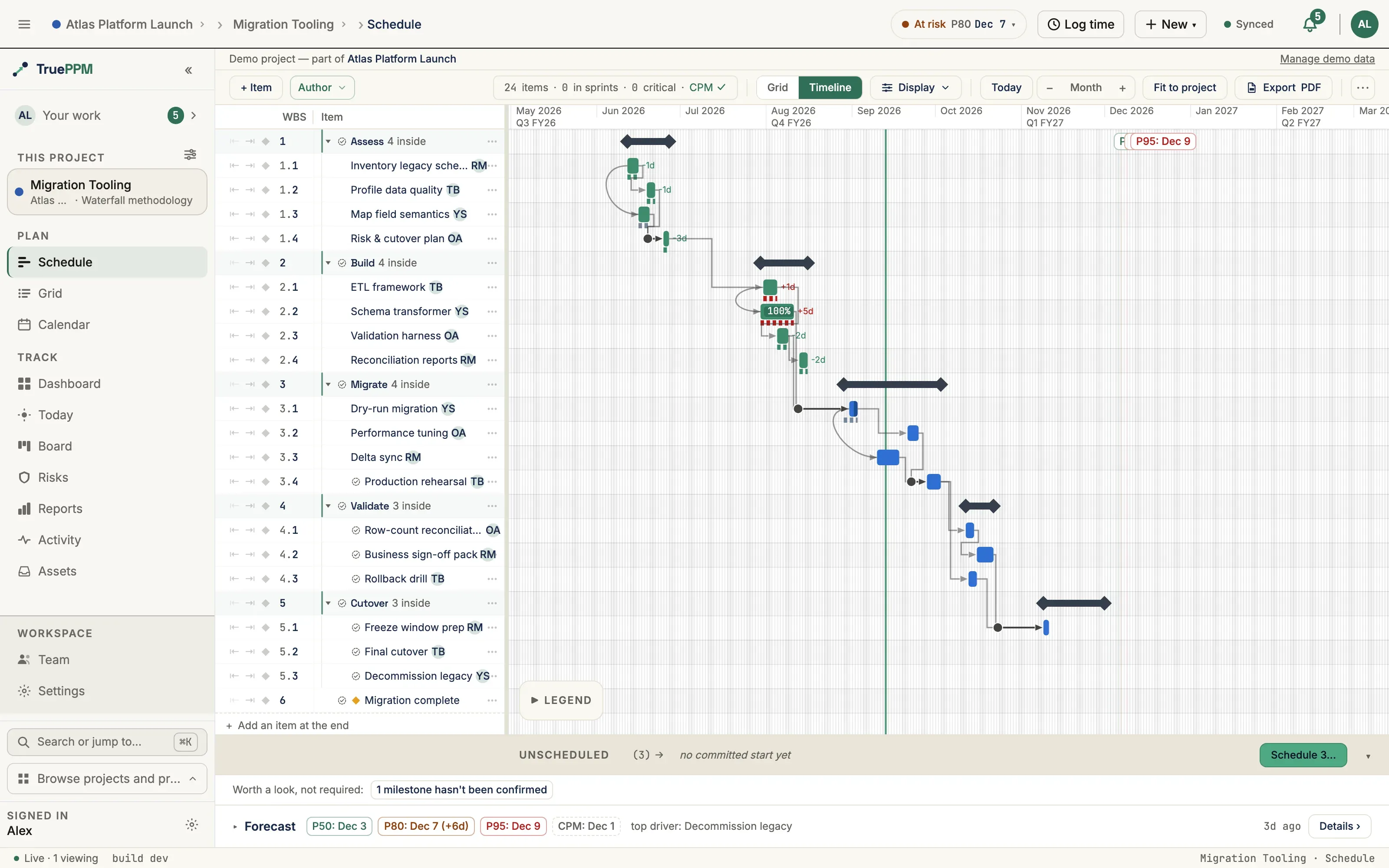
| Field | Meaning |
|---|---|
p50 | 50% of simulated runs finished on or before this date. Closest to the deterministic CPM date. |
p80 | 80% of runs finished by this date. The standard commitment date for most project plans. |
p95 | 95% of runs finished by this date. Use for contractual deadlines and hard external commitments. |
p50_at_day_start / p80_at_day_start / p95_at_day_start | Which edge of its day each percentile is. true means the start of the day: the finish is a milestone that a lag or a floor puts at the start of that day, such as a milestone a one-day lag lands on a Sunday, shown at the start of Monday. false means the end of the day. The start of a Monday and the end of the Friday before it are the same point in the working week. When some runs finish at the end of that Friday and others at the start of that Monday, the percentile is shown on whichever of the two days its share of runs reaches, so p80 is still a date 80% of runs are shown on or before. |
cpm_finish / cpm_finish_at_day_start | The deterministic CPM finish the percentiles are compared with, and which edge of its day it is. |
delta_vs_cpm | Signed calendar days each percentile sits past cpm_finish (p50/p80/p95), measured in working time from the two readings. A percentile at the start of a Monday against a CPM finish at the end of the Friday before it is 0, not 3. A run recorded before TruePPM kept these readings has none: two equal days count as 0, and otherwise each date is read as the end of its day. |
status_date | (added in 0.4) The data date this run was actually computed against — the project’s explicit status date (set at Project settings → General → Status date, not API-only), or today when unset (see Progress-aware forecasting below). Recorded on every run so a past forecast states which “today” produced it. |
distribution | Full sorted list of all simulated finish dates. Use this to render a histogram or answer “what is the probability of finishing by date X?” |
The most recent result is also available without re-running the simulation:
GET /api/v1/projects/<project_id>/monte-carlo/latest/Forecast history
Section titled “Forecast history”A single percentile date answers “when?” once. The more useful planning question is “is my confidence eroding?” — has the P80 finish slipped since you last looked?
As of 0.3 (ADR-0175), TruePPM persists project-level Monte Carlo runs so you can read finish-date drift over time: “my P80 was Aug 14 two weeks ago, now it’s Aug 28.” Each recorded run carries its P50/P80/P95 as of that moment, so the history is a true before/after, not just the latest snapshot.
From 0.4, a run will be recorded only when it is triggered by a Scheduler or above — the members who own the schedule. Everyone from Viewer up will still be able to run the forecast and read the result and the drift history; their runs will simply not add a history row. This keeps the drift timeline a signal about deliberate re-planning rather than a log of every incidental read, and prevents a low-privilege member from flooding the history or skewing run attribution.
The history will be available at:
GET /api/v1/projects/<project_id>/monte-carlo/history/It will return persisted runs newest-first. Each run carries:
| Field | Meaning |
|---|---|
taken_at | When the simulation was run (ISO 8601). |
p50 / p80 / p95 | The percentile finish dates as of that run. |
cpm_finish | The deterministic CPM spine at run time, for context. |
n_simulations | Number of runs in that simulation. |
task_count | Committed tasks included in that simulation — leaf tasks only, since phases are not simulated. |
status_date | (added in 0.4) The data date that run was computed against — see Progress-aware forecasting below. null for runs recorded before this field existed. |
delta | Per-percentile signed day change versus the immediately previous run (positive = the forecast slipped later). null on the oldest/baseline run. |
triggered_by_name | Who ran the simulation — see the visibility note below. |
In the UI, the Monte Carlo drawer (and the mobile bottom sheet) will gain a
collapsible Forecast history list showing each run with its per-run delta
(for example, P80 ▲ +14d), so the drift is legible at a glance.
The latest-result endpoint (GET .../monte-carlo/latest/) will also fall back to
this persisted history once the 24-hour cache has expired, so your most recent
forecast survives past the cache rather than disappearing.
Forecast history is Community (OSS) edition and single-project scope. Rolling forecast drift up across programs or a portfolio is out of scope here and belongs to the Enterprise edition.
Retention
Section titled “Retention”Consistent with the OSS cap philosophy (MC_SIMULATION_CAP, MC_TASK_CAP), OSS
will keep the newest 100 runs per project (MC_HISTORY_CAP); a nightly job
trims older runs. Operators can set the cap to None (unlimited history). 100 runs
is ample to read multi-month drift on an actively re-forecast project.
What-if analysis
Section titled “What-if analysis”Forecast history answers “is my confidence eroding?” over time. The other planning question is forward-looking: “if this task slips a week, where does the whole forecast land?” — without actually changing the plan to find out.
A non-mutating what-if endpoint answers exactly that (#993, added in 0.4). Point it at one task, give it a duration change, and it recomputes CPM and Monte Carlo in memory and hands back the perturbed forecast — persisting nothing, so it is safe to call as many times as you like:
GET /api/v1/projects/<project_id>/monte-carlo/whatif/?task_id=<task_id>&duration_delta=5Supply exactly one of:
| Parameter | Meaning |
|---|---|
duration_delta | Signed day offset applied to the task’s current duration (5 slips it a week later, -2 pulls it in). |
new_duration | Absolute day count to set the task’s duration to (>= 0). |
An optional n_simulations controls the iteration count (default and cap are the
same MC_SIMULATION_CAP as a normal run). The response will carry:
| Field | Meaning |
|---|---|
current | The unperturbed forecast — p50/p80/p95 with their *_at_day_start readings, cpm_finish with cpm_finish_at_day_start, and the critical_path (task IDs). |
whatif | The same fields recomputed with your perturbation applied. |
critical_path_changed | true when the perturbation moved which tasks are on the critical path. |
delta_vs_current | Per-field signed calendar-day shift (p50/p80/p95/cpm_finish); positive = later/worse. All four are measured in working time: a finish shown at the start of a Monday counts as the end of the Friday before it, so a finish whose shown date only hops a weekend is 0 (Scheduler Conventions). |
applied | The resolved perturbation (base_duration_days, duration_delta_days, new_duration_days). |
cpm_status_date / mc_status_date | The resolved data dates fed to the deterministic CPM and Monte Carlo passes respectively — both floor a null project status date at today, so they always agree — see Progress-aware forecasting below. Shared by both current and whatif, since one call resolves each once. This endpoint never persists a run, so these are the only record of which data date produced the answer. |
A perturbation target must be a real unit of work: a milestone (zero duration by
definition) and a phase (whose span is rolled up from its children) will both be
rejected with a 400. Point it at a leaf task instead.
Both forecasts sample with the same fixed RNG seed, so the delta isolates the effect of your change rather than run-to-run noise, and the same query always returns the same answer.
Sprint-delivered tasks. A task set to the SCRUM delivery mode with story points,
on a project that has a velocity history, is simulated from that team’s throughput
rather than from a duration estimate — so a day offset is translated into the
equivalent story points at the team’s mean pace before the simulation runs. The
cpm_finish still moves by exactly the days you asked for; the p50/p80/p95
bands move by that much on average, rounded to whole sprints, because that is how a
sprint-delivered task’s finish date actually behaves. A one-day slip on a two-week
cadence either changes nothing or costs a sprint, and the forecast says so.
This is the endpoint behind the MCP whatif read tool: because it is a pure,
side-effect-free GET, an AI client with a read-only token can ask “what happens to
the Apollo forecast if design review slips two weeks?” and the CPM/Monte Carlo engine
— not the model — computes the answer, server-side, on your own instance.
What-if analysis is Community (OSS) edition and single-project scope. Cross-program what-if belongs to the Enterprise edition.
Progress-aware forecasting
Section titled “Progress-aware forecasting”As of 0.3 the forecast accounts for what is already done rather than re-simulating the project from its original start date every run. As work progresses, the simulation will:
- Pin completed tasks to their recorded actual finish dates instead of re-rolling their durations — finished work is a fact, not a probability.
- Sample only the remaining duration of in-progress tasks. A task that is 60% complete contributes the uncertainty of its last 40%, not its whole estimate.
- Anchor remaining work at a data date. Not-started and remaining work will be scheduled no earlier than the project’s status date, so the forecast never places future work in the past.
- Floor in-progress work at its recorded actual start. A task that actually began after the data date will be forecast from the day it really started, not from the status date — actuals are truth and are never smoothed back to an earlier slot in the network. This is the same floor the deterministic CPM schedule applies, so the Monte Carlo band can never claim a finish date the Gantt has already ruled out. (This floor landed in 0.4. Up to and including 0.3 the forecast anchors in-progress work at the data date alone, so a project whose work started later than its last status report can read percentiles earlier than its own CPM finish — re-run those forecasts after upgrading.)
A new optional status_date field on the project (GET/PATCH /api/v1/projects/<id>/) will set that anchor — in the app, under
Project settings → General → Status date (data date), not API-only. When it is left null the forecast
defaults to today, so an actively-tracked project reads correctly with no extra
configuration; a PM who wants a reproducible, frozen forecast for a report can
pin an explicit date. The same progress signals will flow through the
deterministic CPM schedule, so the Gantt bars and the Monte Carlo band stay
consistent.
Whichever date actually anchors a given simulation — the project’s explicit
status_date, or today when it is unset — is recorded as status_date on that
run’s response and on its history row, so a forecast is always traceable to the
data date that produced it. Re-running an otherwise-unchanged project on two
different days will show different percentiles with different recorded
status_date values, rather than looking like an unexplained change.
The math
Section titled “The math”PERT-Beta distribution
Section titled “PERT-Beta distribution”Each task’s duration is sampled from a PERT-Beta distribution, a standard technique for converting three-point estimates into a probability distribution. TruePPM’s convention is a Beta fitted by method of moments to the classic PERT mean and σ = (P − O) / 6 (below) — not the λ=4 Beta-PERT that @RISK and Primavera Risk Analysis default to. Both have the same mean. In practice: on a symmetric estimate the band here is slightly narrower (about 12% smaller σ) than @RISK’s default, so P80 and P95 land a little earlier; on an estimate whose most-likely value sits at the optimistic end it is wider (#4133). Changing the convention would move every stored forecast, so it is not a setting. PERT is preferred over a triangular distribution because it gives more weight to the most-likely estimate, producing more realistic samples for human-estimated tasks.
The PERT mean and standard deviation are:
μ = (O + 4·M + P) / 6σ = (P − O) / 6The 4× weight on M is what makes PERT more conservative than a triangular distribution: the most-likely estimate pulls the mean strongly toward the center.
Note that σ is one-sixth of the full range. A task with O = 3, M = 10, P = 17 (a 14-day spread) has σ ≈ 2.3 days. This is by design — PERT encodes the assumption that extreme outcomes are genuinely unlikely.
Beta parameterization
Section titled “Beta parameterization”The PERT distribution is a Beta distribution scaled to the interval [O, P].
Parameters α and β are derived by method-of-moments from the PERT mean and
variance:
μ_norm = (μ − O) / (P − O) # normalize mean to [0, 1]var_norm = σ² / (P − O)² # normalize varianceκ = μ_norm · (1 − μ_norm) / var_norm − 1α = μ_norm · κβ = (1 − μ_norm) · κSamples are drawn from Beta(α, β) and then scaled back to [O, P]:
duration_sample = O + Beta(α, β) · (P − O)For the symmetric example O = 3, M = 10, P = 17, this produces Beta(4, 4) —
a unimodal distribution centered at 10 days whose standard deviation in the
scaled domain is exactly (P − O) / 6 = 2.33 days. The PERT approximation is
exact for symmetric inputs. The λ=4 Beta-PERT would give Beta(3, 3) here — the
same mean with a wider spread (σ ≈ 2.65 days).
The plan is the floor
Section titled “The plan is the floor”Every sampled duration — from the PERT-Beta draw above or from the
velocity path below — is clamped up to
the task’s own duration before the run is solved:
duration_sample = max(duration_sample, task.duration)duration is what the deterministic CPM pass lays out,
and the estimate is a separate field a separate person often fills in. Without
the clamp the two passes answer the same question from different inputs, and a
task whose estimates simply sit below its planned duration produces a forecast
earlier than the earliest date CPM considers feasible. A risk tool that reports
less risk than the plan it is stressing fails silently and plausibly — nothing
about the output looks wrong.
Two consequences worth stating plainly:
- The optimistic tail below
durationis not expressed. A plan deliberately padded above its own estimates reports no upside. Model finishing ahead of plan by loweringduration, not by lowering the optimistic estimate. - Ordering the estimate is not a substitute. A triple that brackets its
duration — O=1 / M=1 / P=20 against a 20-day task — still piles the PERT mass
onto the most-likely value and lands P95 well before the CPM finish. Only the
comparison against
durationitself binds the two passes.
The simulation still expresses risk in the direction that matters: any sample
above duration passes through untouched, so P80 and P95 continue to carry the
full tail of the estimate.
Agile tasks: velocity-based sampling
Section titled “Agile tasks: velocity-based sampling”A task delivered as Scrum work — delivery_mode = scrum with committed
story_points — has no meaningful three-point duration estimate; its
uncertainty comes from how much the team completes each sprint. For these tasks
the simulation samples sprints-to-completion from the team’s velocity
distribution instead of a PERT curve:
- The completed-points totals from the team’s last eight closed sprints (excluding any sprint flagged exclude from velocity) form the velocity sample set.
- Each run bootstraps that set with replacement, accumulating points sprint by
sprint until the task’s
story_pointsare burned down. - The number of sprints that took, multiplied by the team’s typical sprint length (converted to working days), is the task’s sampled duration for that run.
A faster team (high-throughput draws) finishes in fewer sprints; the slow tail needs more — so the spread reflects real velocity variability, the dominant source of schedule risk on agile work. This path takes precedence over a three-point estimate: a Scrum task that also carries O/M/P values still samples from velocity, because the delivery mode is an explicit declaration that uncertainty comes from throughput, not a duration guess.
Velocity samples take the same floor as PERT samples:
a team burning its points down faster than the task’s planned duration
contributes that planned duration, not the shorter one. On a Scrum task
duration is usually left at its default, so the clamp is normally a no-op —
it binds only where someone has planned a longer duration than the team’s
throughput implies.
A project with no usable velocity signal — no closed, velocity-eligible sprint
with recorded completed points — falls back to each task’s deterministic
duration, exactly as a waterfall task with no estimate does. So an agile
project with no sprint history yet still simulates (to a single deterministic
date) rather than failing.
Degenerate cases are handled explicitly:
- If
P − O < 1e-9(zero spread), all samples equal M. - If the computed α or β is ≤ 0 (numerically degenerate input), all samples equal M.
CPM forward pass
Section titled “CPM forward pass”The simulation pre-computes an (n_runs × n_tasks) duration matrix — all
sampled durations for all runs — using vectorized NumPy operations. It then
evaluates the CPM forward pass n_runs times in parallel, respecting all four
dependency types (FS, FF, SS, SF) and lead/lag offsets. Working-day calendars
are applied when converting numeric offsets back to finish dates.
Project finish for each run is max(early_finish) across all tasks. The full
set of simulated finish dates is sorted to produce the percentile output.
At 10,000 runs on a 200-task project, the full simulation takes about 60–100 ms on a current laptop CPU (measured on Apple Silicon with numpy 2.4: 63 ms for a chain, 88 ms for a network mixing all four dependency types with lag). Expect it to take longer on a shared or older server; the scheduler’s test suite holds it under a loose 2 s regression bound (#3859).
A fixed seed reproduces the same percentiles for the same input on the same
numpy and trueppm-scheduler versions. numpy guarantees its random streams only
within one release, so an upgrade of either can move a seeded forecast
(#4099).
Why the Central Limit Theorem compresses your spread
Section titled “Why the Central Limit Theorem compresses your spread”When the critical path has many tasks, the project finish date is the sum of
many sampled durations. By the Central Limit Theorem, the standard deviation of
that sum grows as √n · σ_task, but the coefficient of variation (spread
relative to the mean) shrinks as σ_task / (√n · μ_task). With ten tasks on
the critical path each having σ = 2 days, the project-level σ is only
√10 · 2 ≈ 6.3 days — much less than the 20 days you might naively expect
from adding up individual ranges.
This is not a flaw. It reflects the real statistical property of summed uncertainty: diversification reduces relative risk. The implication is that P80/P95 divergence from P50 grows slowly with critical path length and is driven primarily by how genuinely pessimistic your P estimates are.
Known constraints
Section titled “Known constraints”The risk register does not feed this forecast
Section titled “The risk register does not feed this forecast”The risk register and this simulation are separate systems that do not exchange information. A risk’s severity is the product of two 1–5 ordinals (probability × impact); this forecast is computed from task three-point estimates and, for sprint-delivered work, team velocity (see The math above). Scoring a risk, changing its severity, linking it to a task, or resolving it touches neither input, so the P50/P80/P95 band never reflects the register — a high-severity risk sitting on a task with weeks of total float moves the finish date not at all, and completing mitigation work on the critical path does not pull the forecast in either.
Mitigation: widen the pessimistic value of the three-point estimate on the task(s) a risk affects. This is a genuine workaround with genuine costs: the padding is unattributed (nothing records which risk it was for, so it is never removed when the risk closes) and uncorrelated (one risk touching five tasks becomes five independent spreads instead of one shared draw, which understates the tail rather than overstating it).
This is a tracked, open gap, not an oversight — see Known Issues and #3660. Making risks a first-class simulation input is sequenced for 0.5, per ADR-0711.
Statistical precision at low run counts
Section titled “Statistical precision at low run counts”At 1,000 runs (OSS default), the P95 estimate is based on the top 50 samples. The binomial standard error on a P95 estimate at this sample size is roughly ±1.4 percentage points, meaning your “P95” line could realistically represent anywhere from P93 to P97. P80 is more stable (200 samples in the tail), and P50 is very stable (500 samples on each side).
For planning conversations where the tail matters, a higher run cap
(MC_SIMULATION_CAP is operator-configurable) produces more stable P80 and P95 estimates.
| Edition | Max runs | P50 stability | P80 stability | P95 stability |
|---|---|---|---|---|
| Community (OSS) | 1,000 | Good | Acceptable | Noisy (±1.4 pp) |
Task durations are sampled independently
Section titled “Task durations are sampled independently”Each task’s duration is sampled independently of every other task. In practice, risks are often correlated: a vendor delay, a key person out sick, or a weather event affects multiple tasks simultaneously. The simulation cannot model these shared risk factors, and independent sampling therefore underestimates tail risk in projects with strong correlated uncertainty.
Mitigation: If you know that several critical-path tasks share a common risk driver, widen their pessimistic estimates to reflect the scenario where that driver fires across all of them. This is a manual proxy for correlation, not a true joint distribution, but it moves the tail in the right direction.
No resource constraints
Section titled “No resource constraints”The CPM forward pass assumes unlimited resources: two tasks that are both earliest-feasible on the same calendar day are treated as fully parallel. If your project has a bottlenecked resource — a single specialist assigned to sequential critical-path tasks — the simulation will produce dates that are optimistic relative to the resource-leveled schedule.
Mitigation: Ensure your duration and three-point estimates reflect
realistic resource availability, not theoretical parallel execution. If you have
a resource-leveled CPM baseline, use its task durations as your M values.
P estimates must be genuinely pessimistic
Section titled “P estimates must be genuinely pessimistic”A common mistake is setting P = M × 1.2 (20% contingency). PERT with σ = (P − O) / 6 means a P that is only slightly above M produces a very narrow distribution. The P estimate should represent a realistic bad scenario — a dependency that slips, an approval that takes twice as long, a technical problem that requires a rework cycle — not just a scheduling buffer.
A well-calibrated three-point estimate typically has P at 2–4× the O value, not 1.2× M.
OSS edition limits
Section titled “OSS edition limits”| Limit | OSS default |
|---|---|
Max runs per request (MC_SIMULATION_CAP) | 1,000 |
Max tasks per project (MC_TASK_CAP) | 5,000 |
Max run history per project (MC_HISTORY_CAP, added in 0.3) | 100 |
Both settings can be changed in settings/base.py (or a local override). Self-hosted OSS operators may set any integer or None in their local
settings — the cap is advisory, not license-enforced.
Exceeding either cap returns HTTP 402 with a structured error body:
{ "error": "simulation_cap_exceeded", "tier": "team", "message": "Simulation count exceeds the community-edition cap."}Interpreting results
Section titled “Interpreting results”Use P50 as your baseline. P50 is close to the deterministic CPM finish date. The gap between deterministic CPM and P50 is small and usually reflects the slight asymmetry in PERT distributions (a long right tail from pessimistic scenarios pulling the mean above the mode).
Use P80 as your commitment date. An 80th-percentile date is the standard for internal and stakeholder commitments in project management practice. It means you have a 4-in-5 chance of finishing on or before that date given your estimates.
Use P95 for hard external commitments. Contractual deadlines, public launch
dates, and regulatory submissions warrant a 95th-percentile buffer. At OSS run
counts the P95 value is noisy; raise MC_SIMULATION_CAP and run more
simulations for meaningful precision.
Do not commit to P50. A P50 date has a 50% probability of being missed by definition. Committing to it is equivalent to flipping a coin on every project.
Velocity and throughput forecasts are a floor
Section titled “Velocity and throughput forecasts are a floor”The two backlog-delivery forecasts — the velocity Monte Carlo on a sprint board and the weekly-throughput Monte Carlo on a continuous-flow board — bound how far each simulated run is allowed to go. A run that has not cleared the backlog by that horizon is counted as finishing at the horizon rather than sampled any further, which cuts off the slowest outcomes.
The consequence is one-directional: the upper percentiles on those two forecasts are a floor, not an unbiased P80/P95. The true figure is the date shown or later, never earlier, and the gap widens the more the team’s sprint-to-sprint velocity (or week-to-week throughput) varies. The product says so next to every affected number — look for the “a floor, not a percentile” qualifier and its help icon on the backlog forecast, the sprint release-horizon chips, and the board’s flow analytics card.
This does not affect the schedule forecast built from three-point (PERT) task estimates, which is unclamped. For a date you must commit to externally, estimate that work with PERT durations rather than reading it off a velocity forecast.
The estimator fix is tracked as #2469, planned for 0.6.
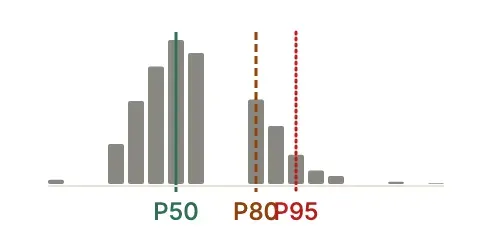
Read the distribution, not just the percentiles. The distribution field
contains every simulated finish date. A bimodal distribution — two clusters of
simulated dates — usually signals that one or two tasks have extreme P estimates
that dominate the tail. Investigate those tasks; they are your primary risk
drivers.
Added time
Section titled “Added time”Added time is the number of calendar days the P80 commitment date sits beyond the computed (CPM) finish, measured in working time. A finish at the start of a Monday and one at the end of the Friday before it are the same point in the working week, so a P80 that differs from the computed finish only by that hop over a weekend adds no time. The computed finish is what your plan says if nothing varies; P80 is the date 4 in 5 simulations finished by. The difference between them is the time schedule uncertainty adds on top of the plan.
Every Monte Carlo delta — delta_vs_cpm, the run-to-run deltas in the history
and the what-if shifts — is measured the same way, from each finish’s
*_at_day_start reading. A run recorded before TruePPM kept those readings is
read as the end of its day. For how the rest of TruePPM measures finish shifts, see
Scheduler Conventions
(#4204).
It appears on the project Overview, alongside both dates it spans, and in the project health chip in the top bar on every other project view — Schedule, Board, Table and the rest — so it is one glance away wherever you are working. On Overview the chip stays quiet, because the full card is already on that screen.
The chip shows added time in whichever form is readable where you are standing.
On Schedule it is a bare +11d, because the dashed CPM chip in the forecast
row already puts the computed finish on screen beside it. Everywhere else it
names its own baseline — +11d vs Oct 24 — because a signed number with no
visible reference is a figure you cannot check. If the top bar is too narrow to
hold the qualified form, the chip drops it rather than showing the bare number:
open the chip and the full read is in the popover, which never drops it.
On a phone the same value rides the Monte Carlo card at the foot of the schedule, and tapping through opens the full added-time card at the top of the forecast sheet.
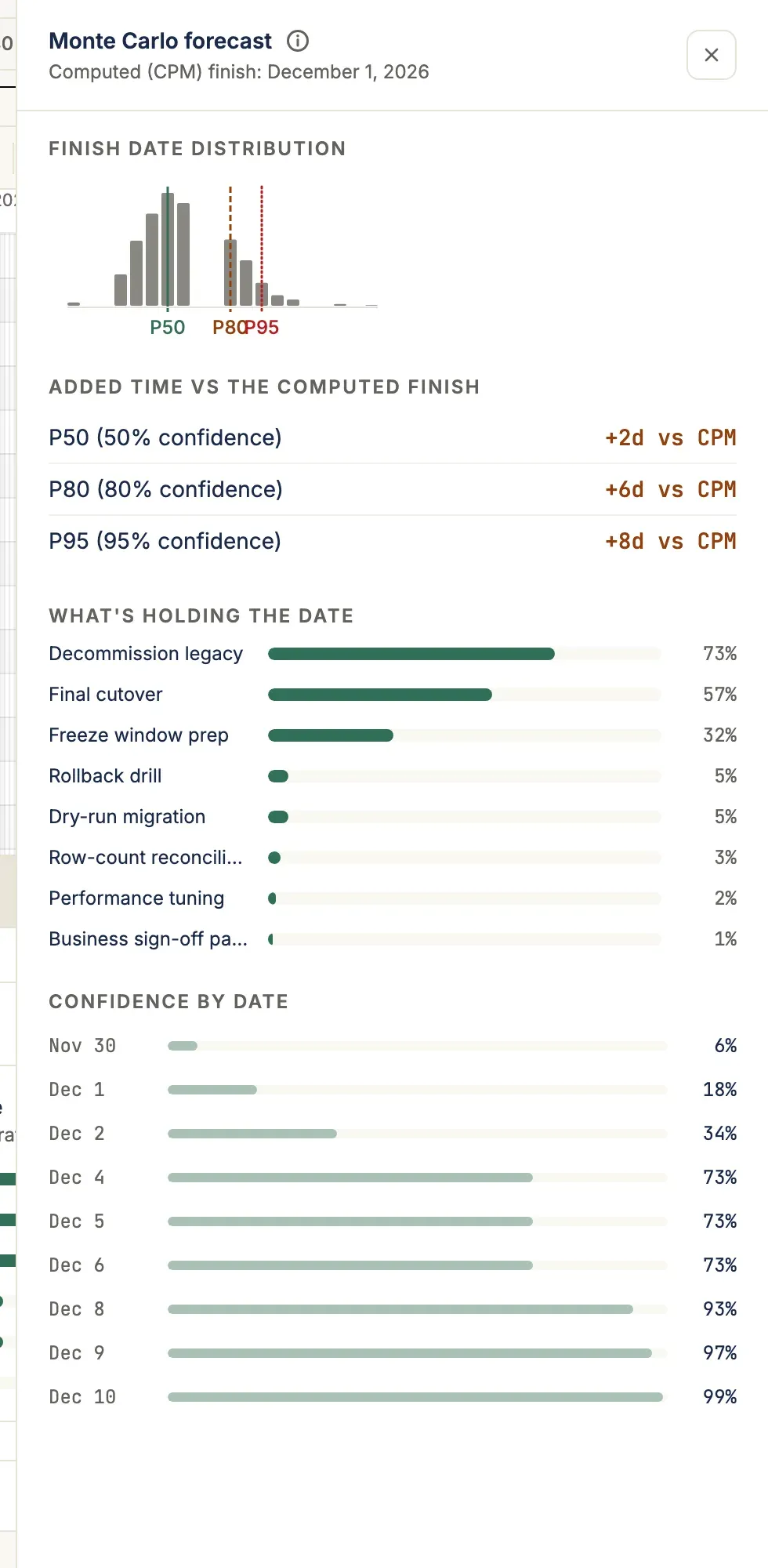
Every one of those surfaces reads the same server-computed value, delivered on
both the project overview API (risk_premium_days and friends) and the Monte
Carlo forecast payload. None of them decides for itself what the number means —
which is what the next section is about.
It is a gap between two forecasts, not a prediction of lateness. A project with 11 days of added time is not forecast to run 11 days late — it is forecast to need 11 days of buffer beyond the plan to reach 80% confidence.
Compare projects by ratio, not by days. risk_premium_ratio expresses the
premium as a share of the duration remaining between today and the computed
finish. Eleven days on a six-week project and eleven days on a three-year
program are very different findings, and only the ratio says so.
A blank is not a zero. Added time reports one of three things, and the difference matters:
| What you see | What it means |
|---|---|
A number (+11d, −4d) | Measured. Estimates existed and the simulation produced a spread. |
| No added time | Measured. Estimates exist and the variance is genuinely low. |
| Can’t be measured yet | Not measured. No task could contribute duration variance, so the simulation had nothing to work with. |
The third case is the one to watch. A project with no three-point estimates simulates flat, which makes its premium exactly zero days — numerically identical to a well-estimated project with low variance. TruePPM will not print that zero, because doing so would tell the least-understood project in your portfolio that it carries no schedule risk. Add estimates to the tasks you are unsure about and re-run the forecast.
Check the as-of date. Added time is only as current as the run it came from. A forecast older than a week is marked stale and its date is shown beside the commitment, so an old number cannot be read as a current one.
Is this forecast still about my current plan?
Section titled “Is this forecast still about my current plan?”Age is only half the question. A forecast can be minutes old and already out of date, because the plan moved after it ran.
TruePPM answers this on the server and reports it as forecast_staleness on
every forecast payload, so the UI, the API and an MCP client all get the same
answer:
| Value | Meaning |
|---|---|
current | The run matches the plan the project is on now, and it is recent. |
project_changed | The project has been written to, or its schedule recomputed, since the run. |
aged | Nothing has changed, but the run is over a week old, so the data date has moved under it. |
unknown | The run predates this field and cannot be placed against the plan. |
On the Schedule view’s forecast bar, anything other than current offers the
Rerun button. The bar also says Edited since this run for
project_changed — and deliberately does not say your plan changed, because
the signal behind it is “something in this project was written”, which includes
a logged time entry or a renamed label. Treat it as a reason to rerun, not as
evidence that a date moved.
unknown is the one value that offers Rerun without any accompanying claim:
it means TruePPM does not know, and it will not present that as reassurance. It
resolves itself the next time the forecast is run.
Because the judgment lives on the server rather than in your browser session, it survives a page reload and reflects a collaborator’s edits as readily as your own — the answer is about the data, not about how long the page has been open.
There is deliberately no severity band on added time yet — no “low / moderate / high” verdict. Threshold cut points chosen without evidence would be a judgment dressed as a measurement. The band arrives once TruePPM can calibrate it against measured actual-vs-estimate history.
Why is my forecast a single flat date?
Section titled “Why is my forecast a single flat date?”When P50, P80, and P95 are identical, the simulation found no uncertainty to
model — every run finished on the same day. This is correct when no committed task
can vary the finish, but the cause is not always “missing estimates”. The result’s
forecast_diagnostic field reports the reason, and the schedule view shows it in place
of the distribution:
-
Estimates awaiting approval — in Suggest & Approve estimation mode, three-point estimates do not feed the forecast until a Scheduler approves them (
estimate_status = accepted). The estimates are visible on the tasks, but the forecast treats them as not-yet-trusted. Approve them to fold their range in.estimate_statusis read-only on the task API:POST /api/v1/tasks/{id}/approve-estimates/is the only way to reachacceptedover the API, and it requires the Resource Manager role or above. A task’s assignee cannot approve their own estimate by writing the field on a task update. The one exception is imported data — MS Project and seed imports writeaccepteddirectly, because the values are PM-authored migration data rather than contributor suggestions. Importing into an existing project requires Project Manager; the import-as-new-project and seed-import endpoints need only a signed-in user, but they can only ever create a new project or program that the importer owns, never modify an existing task. -
Who may write an estimate at all — this is set by the project’s estimation mode, and it is enforced on the server, not just in the browser. In Open (the default) any Team Member or above may write three-point estimates directly. In Suggest & Approve they may write, but the value lands
pendingand is withheld from the forecast until approved, as described above. In PM Only only the Project Manager role and above may write them — a Team Member who can otherwise edit the task receives403on any request carryingoptimistic_duration,most_likely_durationorpessimistic_duration, on create and update alike. The task API reports the caller’s own authority ascan_edit_estimates, which is what the estimate inputs gate on. -
No estimate ranges — tasks carry only a single duration (or a degenerate range where optimistic = pessimistic). Add genuine optimistic/most-likely/ pessimistic estimates to the tasks you are unsure about.
-
Agile work with no velocity history — story-point (Scrum) tasks sample from the team’s completed-sprint velocity rather than a duration range. Until at least one sprint has closed there is no distribution to draw from. Close a sprint and re-run.
-
Estimated work off the critical path — your estimates vary, but the longest path runs through fixed-duration work, so the variance never reaches the finish. Estimate the tasks that actually drive the date (see What’s holding the date).
-
Estimates below the planned duration — the range is real, but all of it sits at or below the task’s own
duration, which every sample is floored at. A 20-day task estimated at 1 / 2 / 3 days samples to a constant 20. Adding more estimates cannot open a range here: either lower the planned durations to match what you expect, or raise the pessimistic values above them. -
All work complete, or nothing committed — finished tasks have no remaining work to vary, and backlog cards are excluded from the forecast entirely.