Connected Accounts & Git-Aware Links
TruePPM lets each contributor connect their own Git host credentials and then track the live status of merge requests, pull requests, and issues from the task detail panel. The credential is per-user — a personal access token (PAT) belongs to you, not to a project or program — and it is read-only: TruePPM fetches status, it never writes back.
This page covers the two user-scoped surfaces. For the project- and program-scoped integration surfaces, see:
- Webhooks — outbound HTTP callbacks for project and program events (Slack, CI, custom tooling).
- Inbound Task Sync — authenticated API tokens that let external systems push tasks into a project.
A workspace-level “manage all integrations across all programs” surface — the Integration Hub with bidirectional connectors, OAuth bots, and a cross-program audit trail — is part of the Enterprise edition.
Connected accounts
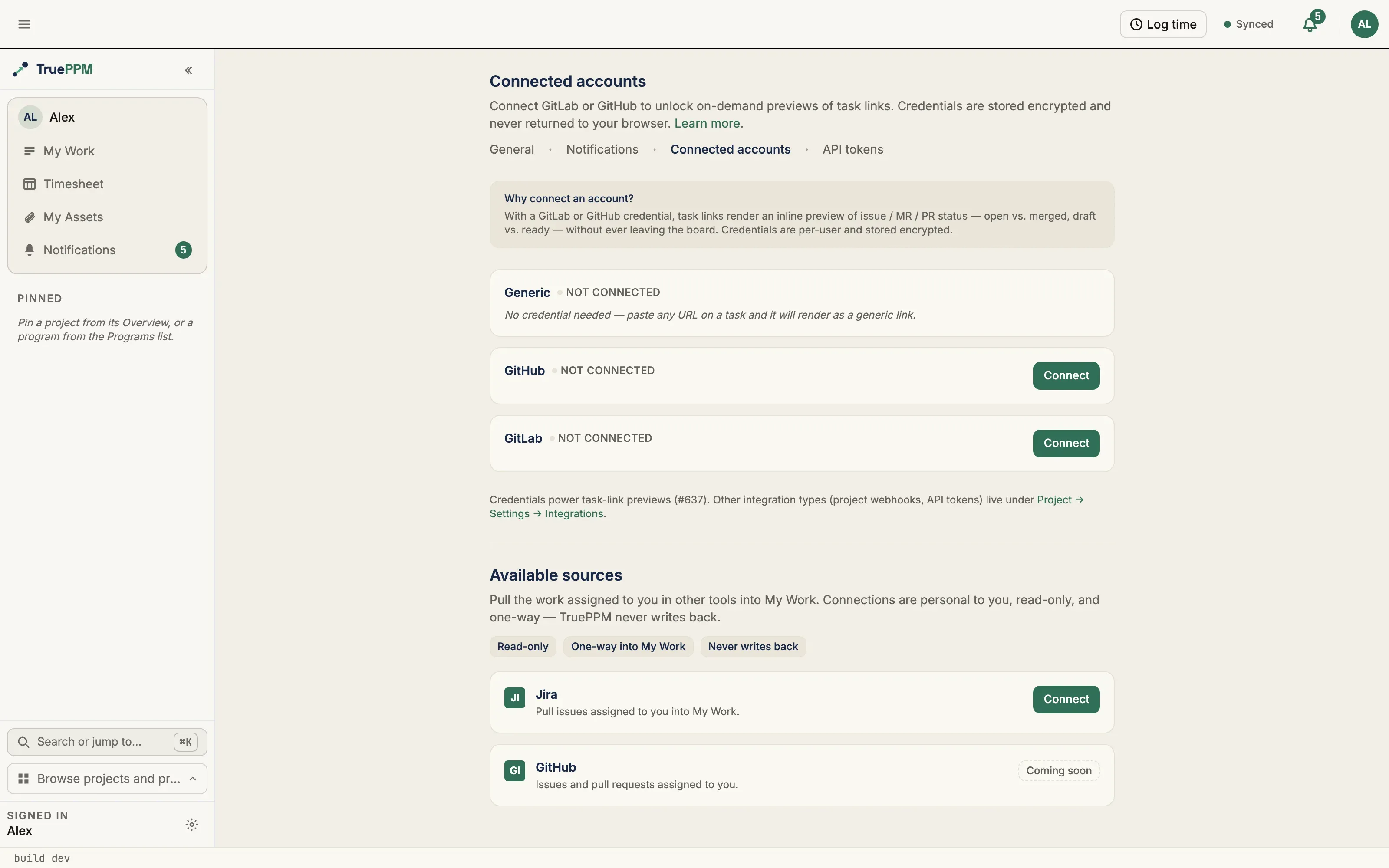
Section titled “Connected accounts”Per-user PATs for GitLab, GitHub, and generic Git hosts are managed at
User → Settings → Connected Accounts (/me/settings/connected-accounts).
Credentials are per-user, not per-project or per-program — a PAT authorizes
status fetches that preview links into issues, merge requests, and pull requests
on tasks.
What the page does
Section titled “What the page does”- Lists one section per provider registered against the
TASK_LINK_PROVIDERSregistry — GitLab, GitHub, and a catch-all generic provider. - For each provider, surfaces the connection state (Connected / Not connected), the optional self-hosted host URL, the credential’s expiration if you recorded one, and the last time the credential was used by the task-link refresh endpoint.
- Provides per-provider Connect, Rotate, and Revoke actions. Connect
and Rotate share the same upsert API — one row per
(user, provider)pair, never duplicated. - Connect and Rotate verify the token before storing it. GitLab and GitHub
credentials are checked against the provider’s
/userendpoint; a wrong, expired, wrong-scope, or wrong-host token (for example a github.com PAT pasted into the GitLab section) is rejected with a clear error and nothing is stored. The generic provider is accepted without a live check, since there is no known endpoint to verify it against. - Renders a deep-link anchor per provider —
/me/settings/connected-accounts#githubscrolls straight to the GitHub section. The project Integrations page links here.
Security guarantees
Section titled “Security guarantees”- Your credential is encrypted before it’s stored, so it isn’t readable in plain
text even with direct database access. For your TruePPM administrator: the
encryption key is the
INTEGRATION_ENCRYPTION_KEYenvironment variable (set it through the Helm values); generate one withpython -c "from cryptography.fernet import Fernet; print(Fernet.generate_key().decode())". - The encrypted value is never returned by any API response, not even to the credential’s owner — only whether a credential exists, when it was created and last used, and when it expires, never the credential itself.
- You can never see or reach another person’s connected accounts — no URL or request can be crafted to address someone else’s saved credential.
- Checking a token and refreshing a task’s status both make their outbound requests through a guarded connection that resolves the target address first and refuses anything that points at a private, internal, or cloud-infrastructure address — so a self-hosted host URL cannot be used to probe your own internal network. These requests are time-bounded and never follow redirects.
The connected credential is consumed by git-aware task links to fetch live status.
Available sources
Section titled “Available sources”Below the credentials list, the same page carries an Available sources section — the personal registry of external task sources you can pull your own assigned work from into My Work. This is a different registry from the git-link providers above: a source connection is a one-way, read-only feed of the items assigned to you, not a token for previewing links.
The connection is governed by three guarantees, shown as badges on the section: read-only, one-way into My Work, and never writes back. TruePPM mirrors the work assigned to you; it never pushes a change back to the source. Jira stays your source of truth.
Jira here is Community (OSS) whether you use Atlassian Cloud or self-hosted Data Center / Server — the read-only, one-way, personal-pull carve-out (ADR-0097) keys on how you connect, not on where Jira runs.
What the section does
Section titled “What the section does”-
Lists each available source (Jira today) with a short description of what it brings into My Work.
-
Connect a source — an available source shows a Connect button that opens a short, in-page wizard. There is no OAuth redirect. The first choice is the deployment:
- Cloud (Atlassian-hosted) — enter your site URL
(
https://your-team.atlassian.net), your account email, and a read-only API token you create in your Jira Cloud account. This authenticates over the Jira REST v3 API with Basic auth (email:token). - Data Center / Server (self-hosted) — enter your instance site URL
(which may include a context path, e.g.
https://jira.example.com/jira) and a Personal Access Token you create in your Jira profile. No account email is needed — a PAT authenticates on its own over the Jira REST v2 API with Bearer auth. Requires Jira Data Center / Server 8.14+ (the first release with Personal Access Tokens). Your self-hosted host must first be allow-listed by your TruePPM operator (seeTRUEPPM_INTEGRATION_ALLOWED_HOSTSin Configuration); if it isn’t, the wizard says so and names the setting — ask your operator to add the host. If your instance is reachable only on a private / internal network, your operator must also add the host toTRUEPPM_EGRESS_ALLOWLISTED_HOSTS— the allow-list above controls where your token may be sent, while a separate SSRF guard blocks private addresses unless the host is explicitly trusted. A publicly-reachable instance needs only the first setting.
Then choose what to pull — the issues assigned to you (recommended) or a specific JQL filter (JQL is Jira’s own search-query language, for anyone who wants a more precise filter than “assigned to me”) — and, optionally, limit it to named projects. The project keys narrow whichever filter you chose: they are combined with it (
AND), never substituted for it, so namingRIV, BAYmeans nothing outside those two projects is pulled even if your own JQL would have matched it. Leave the field blank to pull from every project you have access to. Both fields are checked before they are saved — a project key that is not a Jira project key, or a JQL whose parentheses or quotes do not balance, is rejected on the field with a message rather than stored. TruePPM verifies the token against Jira before storing it (encrypted), so a wrong, expired, wrong-scope, or non-allow-listed-host credential is rejected up front with a clear message and nothing is saved. - Cloud (Atlassian-hosted) — enter your site URL
(
-
Connected state — a connected source shows an Active badge, the linked account and site, a cached-item count and last-sync time (or “first sync in progress” until the first pull lands), and a Recently pulled preview of the items now appearing in My Work.
-
What the last pull did — the connected card reports the outcome of the last sync, not just when it happened: how many items were pulled, and — when the source had more than one pull can carry — an explicit “Showing the first 100 of 412 items assigned to you.” A pull is a single page from the source (100 items for Jira) and the personal cache is capped at 500 rows per source, both deliberate bounds. Narrow the JQL or the project keys to change which items are pulled. The same line appears in My Work next to the external feed it qualifies, so a partial list is never presented as a complete one. If the last pull failed while your token is still valid — the source was unreachable, or it rate-limited every attempt — the card says so and names the reason instead of reporting a bare “Active”.
-
Manage inline — Sync now triggers an immediate read-only pull; Disconnect (with a confirmation step) removes the stored token and clears the source’s items from My Work. Nothing in Jira is ever modified — you can reconnect at any time.
-
Check for new items automatically — a switch on the connected card, off by default. Off, the source refreshes only when you press Sync now (or when opening My Work finds the cache stale). On, TruePPM checks the source for you about every 15 minutes. It is per connection and per person: nobody else — not a project Admin, not an Owner — can turn it on for your account, and turning it on spends only your own Jira rate budget. The pull it makes is the same read-only, one-way pull as Sync now; nothing is written back either way. The setting survives reconnecting with a new token, so rotating an expired credential does not silently stop the automatic check.
-
When automatic checking is paused — a connection that needs a Reconnect or an Update filter stops being checked automatically until you fix it, even with the switch on. The card says so beside the switch rather than claiming a refresh that will not happen.
-
When pulling stops — two states get their own prompt, because they have different fixes. Reconnect means the token was rejected (expired or revoked). Update filter means the token is fine but the saved JQL or project keys can no longer be scoped to the projects you selected, so TruePPM stops pulling rather than pull wider than you asked for. Both are fixed by reopening the connect wizard, and in both cases the items already in My Work are kept until the next successful pull.
-
When the source is busy — if Jira rate-limits the pull, nothing is flagged and you are not asked to do anything. TruePPM reads the
Retry-Afterthe source sends and re-queues the same pull behind that clock, so it completes on its own shortly after. The connection stays Active and your existing items stay in My Work throughout — a rate limit is the source asking for a moment, not a broken connection, and it is deliberately not reported as one. -
Enterprise sources appear here automatically when the Enterprise edition is installed — the OSS build shows only OSS sources.
The connection API behind the flow is documented under
Inbound Task Sync and ADR-0097. Once a source is
connected, its items appear in My Work with a per-source freshness line and a
reconnect prompt if the credential expires. Opening My Work also triggers a
refresh automatically when a connected source’s cache has gone stale — a
non-blocking background pull, same as Sync now, just without you having to
find the button. That one is unconditional; it is separate from the Check for
new items automatically switch above, which keeps a source current whether or
not you open My Work. See TRUEPPM_EXTERNAL_SYNC_ON_OPEN_STALE_SECONDS in
Configuration for the staleness window.
Git-aware task links
Section titled “Git-aware task links”Paste a GitLab, GitHub, cloud-file, or any URL onto a task and track its live status — or, for a cloud-file link, see an inline preview — from the task detail panel. Links are managed in the External links section of the task drawer.
What the section does
Section titled “What the section does”- Add a link — paste a URL; the provider is detected automatically from the
host (gitlab.com → GitLab, github.com → GitHub, a Google Drive / Dropbox / Box /
OneDrive host → that cloud-file provider, anything else → a generic link). You
can paste a bare address without a scheme (
github.com/acme/api) —https://is assumed. For a self-hosted GitLab CE/EE or GitHub Enterprise Server instance, a link on that host routes to the matching provider when you have a credential connected with that host as its base URL. The provider is always resolved server-side — the typed hint is only a preview. - Title — give a link your own name (optional). A custom title is shown in preference to the provider-fetched title, so a generic link that has no fetched title still reads clearly. A refresh updates the provider title only and never overwrites a custom title.
- Labels — tag a link with free-text labels (e.g.
spec,design) to categorize it. Labels are trimmed and de-duplicated; a link can carry up to 12. - Edit a link — change a link’s title or labels after it’s added via the per-link edit (pencil) control. Editing follows task-edit permission. As of 0.3, Viewers see links and attachments read-only — the add, edit, and delete controls (and the editable description field) are hidden rather than shown and then rejected with a 403 on submit.
- Status badge — each git link shows a cached status: open, draft, merged, closed, or unknown. A new link starts unknown — there is no background polling; status is fetched only when you refresh.
- Refresh — the per-link refresh button fetches live status synchronously (5-second timeout) from the provider’s API using your connected personal access token, mapping the PR/MR/issue state onto the badge. Merge requests and pull requests resolve to merged/closed/draft/open; issues to open/closed; commits and branches stay unknown. The fetch is SSRF-guarded (it refuses any host that resolves to a private/loopback/link-local/cloud-metadata address) and does not follow redirects.
- Who a refresh is saved for — a preview fetched with a personal access token is saved to the task, and shown to the rest of the project, only when the person who added the link — or who last changed its address — refreshes it. Changing a link’s URL makes you its owner and clears its saved title, status, and preview, since they described the old address; editing only the title or labels changes neither. If anyone else refreshes a git link, they see the fetched title and status on their own screen until the row next changes, but nothing is saved or broadcast, so your token can never publish a private issue’s title to people who lack access to it. Links added before this rule have no recorded creator, so a git link refresh never saves for them. Cloud-file previews need no credential and are saved whoever refreshes.
- Connect prompt — if the link’s provider needs a personal access token you haven’t connected, refresh points you to User → Settings → Connected Accounts to connect one, rather than failing silently. Generic links need no credential and have no live status.
- Remove — delete a link with an inline confirm.
Cloud-file previews
Section titled “Cloud-file previews”A link to a Google Drive, Dropbox, Box, or OneDrive file renders an inline preview card instead of a status badge — a thumbnail, the file’s title and description, and a file-type chip (Document, Spreadsheet, Presentation, Image, PDF, Folder, or File). These hosts have no merge/close lifecycle, so a cloud-file link shows its type, not a status.
- No account needed. Unlike git links, a cloud-file preview needs no connected credential — it reads only the public OpenGraph metadata a file’s share page already exposes, the same way a chat app unfurls a pasted link. Private files (ones that show a sign-in wall to anyone not logged in) simply show no thumbnail and fall back to a type glyph; their private contents are never read.
- Fetched on demand. Like git links, there is no background polling — the preview is fetched when you press Refresh on the link, and the cached card rides the project sync delta, so an offline client will be able to read it without a connection once one exists — only the thumbnail image, which lives on the file host, ever needs the network. No client consumes the delta today; see Offline sync.
- Safe by construction. The fetch goes through the same SSRF-guarded egress
helper as git refresh (it refuses private/loopback/link-local/cloud-metadata
hosts and does not follow redirects), is bounded in time and size, and is
rate-limited per user. Only
httpsthumbnail URLs are stored.
Because cloud-file providers store no token, they do not appear on the Connected Accounts page — there is nothing to connect.
At-a-glance status on the schedule
Section titled “At-a-glance status on the schedule”As of 0.3, you no longer need to open the drawer to see whether a task’s work is landing. The schedule surfaces each task’s worst external-link status in two read-only places:
- Task list row — a link glyph and count, immediately left of the assignee avatars, tinted by the most-attention status. The tint follows the same colors as the drawer badges: closed (red) outranks draft (amber), then open (green), then merged (sage), then unknown (neutral). Color is never the only signal — the count and an accessible label (“3 external links, worst status: closed”) carry the same information for screen readers and color-blind users. The glyph is hidden on summary and milestone rows and on tasks with no live links.
- Gantt bar — a small worst-status dot at the right edge of each bar, shown at Day and Week zoom only (it is omitted at Month and coarser zooms, and on summary/milestone bars).
Both indicators are computed server-side from the same per-link statuses shown in the drawer, so they stay in sync with a refresh and add no extra requests when the schedule loads. Soft-deleted links are excluded from the count and the worst-status roll-up.
| Action | Endpoint | Min role |
|---|---|---|
| List links | GET /api/v1/projects/{id}/tasks/{task_id}/links/ | Viewer |
| Add link | POST /api/v1/projects/{id}/tasks/{task_id}/links/ | Member |
| Edit title/labels | PATCH /api/v1/projects/{id}/tasks/{task_id}/links/{link_id}/ | Member |
| Refresh status | POST /api/v1/projects/{id}/tasks/{task_id}/links/{link_id}/refresh/ | Viewer |
| Remove link | DELETE /api/v1/projects/{id}/tasks/{task_id}/links/{link_id}/ | Member |
The add/edit body accepts url, custom_title, and labels (provider,
title, status, and the cloud-file preview fields description,
thumbnail_url, and preview_type are server-owned). Adding, editing, and
removing follow task-edit permission; listing and refreshing follow task-read.
Links inherit offline-sync parity with tasks, so add/remove/status changes — and
the cached preview — ride the project sync delta and will reach an offline client
when one ships (see Offline sync).
Related ADRs
Section titled “Related ADRs”- ADR-0049 — External Integration Extension Points (the OSS registries)
- ADR-0050 — Task Detail Drawer Section Extension Points (where
task_detail.external_linksregisters) - ADR-0076 — Integration Management Surface Boundary
- ADR-0097 — User-scoped external task sources (the OSS Jira personal pull)
- ADR-0291 — “Available sources” section on the Connected Accounts page
- ADR-0313 — Jira connect flow: PAT-based, in-page connect/manage wizard
- ADR-0589 — Jira Data Center / Server as a deployment variant of the
jiraexternal source - ADR-0155 — At-a-glance external-link status indicators (the schedule list/Gantt roll-up)
- ADR-0163 — OSS cloud-file URL preview connector (Drive/Dropbox/Box/OneDrive OpenGraph previews)