Baselines
A baseline is a frozen snapshot of your project’s schedule at a point in time. Capture one when you commit a plan to stakeholders, then compare it against the live schedule to see exactly how far — and which tasks — have drifted.
Committing the plan
Section titled “Committing the plan”Most projects get their first baseline automatically, by being committed.
A project can be created as a draft — a plan nobody has agreed to yet. Tick Create as a draft in the footer of the New project sheet; leave it unticked and the project is created active, which is the default.
A draft is fully writable; what it is not is visible. TruePPM holds a draft out of program rollup, portfolio health, search, My Work and the notification fan-out, so a half-built plan cannot quietly become part of an aggregate someone reports upward.
Committing ends that. On the project Overview, a draft shows a Draft chip, and a Project Manager sees a Commit plan button beside Update Status:
Committing happens in one step and does two things at once:
- Captures
Baseline v1and makes it active — including a copy of the working calendar the dates were computed against, stored by value. A later calendar edit therefore changes your variance rather than silently moving the thing variance is measured from. - Flips the project from draft to active, so it joins every aggregate it was held out of.
You can keep editing afterwards — committing is not a lock. What changes is that editing a committed plan is amending it: the edit is recorded in the project’s change history and the people who hold an assignment on the changed work are notified.
TruePPM does not yet ask you why a committed plan changed — the amendment is recorded without a reason. The prompt that collects one, and the changeset view that reads those reasons back, ship in 0.5.
You cannot un-commit. A plan is committed once, so that the anchor every variance number is measured from cannot move — trying to commit an already-active plan again is refused.
If you’re automating this instead of using the button, the same action over the API looks like:
# Commit the plan. Requires the Project Manager role. Returns 409 if already committed.curl -X POST -H "Authorization: Bearer $JWT" \ https://trueppm.example.com/api/v1/projects/$PROJECT_ID/commit/{ "baseline_id": "8f14e45f-ceea-467a-9f6b-2c1a3e9d4b70", "baseline_name": "Baseline v1", "task_count": 12, "assigned_resource_count": 4}assigned_resource_count is how many people hold a resource assignment in the plan you
just committed — the audience the commit concerns. It is not a count of notifications
sent; committing sends none. People are notified when their work later moves, which is
the amendment path described above.
| Method & path | Purpose | Permission |
|---|---|---|
POST /api/v1/projects/{id}/commit/ | Commit the plan; capture Baseline v1 | Project Manager (ADMIN) |
Structured rebaseline reasons and a post-commit changeset view also ship in 0.5.
Capturing and managing baselines in the app
Section titled “Capturing and managing baselines in the app”Beyond the automatic Baseline v1, you can capture further baselines at any time — for
example one per phase gate.
From the Schedule view, open the toolbar’s Actions menu:
- Capture baseline takes a snapshot of every task’s current planned dates. It
requires the Project Manager role, auto-names the snapshot (
Baseline N), and makes it active. A short confirmation first explains what a baseline is and — if one is already active — reminds you that capturing a new one keeps the previous baseline in the project’s history rather than overwriting it. You can also capture from the Baseline section of a task’s detail drawer when no baseline exists yet. - Baselines… opens the baseline manager, where any project member can see every baseline (name, capture date, and task count) and which one is active. A Project Manager can Set active to switch the comparison baseline, and a Project Owner can Delete one.
The same operations are available through the REST API for automation. Baseline ghost bars drawn directly on the Gantt canvas and structured rebaseline reasons are planned for 0.5.
What a baseline captures
Section titled “What a baseline captures”Capturing a baseline records, for every task in the project at that moment:
- the task name (kept even if the task is later deleted),
- planned start and finish dates,
- duration, and any actual start/finish already recorded.
Snapshots are immutable — once written, a baseline’s task rows never change, so a baseline remains a faithful record of what the plan looked like when you took it. A baseline notes whether its tasks had computed CPM dates at capture time, so a comparison can flag a snapshot that was taken before the schedule was fully calculated.
Multiple baselines
Section titled “Multiple baselines”A project can hold many baselines — for example one per phase gate — but one is active at a time. The active baseline is the one used for comparison. Activating a different baseline automatically deactivates the previous one.
Capturing and managing baselines via the API
Section titled “Capturing and managing baselines via the API”All endpoints are project-scoped and authenticated with a bearer token ($JWT);
$PROJECT_ID is the project UUID.
# 1. Capture a baseline (name optional — auto-named "Baseline N" if omitted).#    Requires the Project Manager role. Snapshots every task atomically.curl -X POST -H "Authorization: Bearer $JWT" -H "Content-Type: application/json" \  -d '{"name": "Phase 1 commit"}' \  https://trueppm.example.com/api/v1/projects/$PROJECT_ID/baselines/
# 2. List baselines for the project.curl -H "Authorization: Bearer $JWT" \  https://trueppm.example.com/api/v1/projects/$PROJECT_ID/baselines/
# 3. Activate a baseline (deactivates any other). Requires the Project Manager role.curl -X POST -H "Authorization: Bearer $JWT" \  https://trueppm.example.com/api/v1/projects/$PROJECT_ID/baselines/$BASELINE_ID/activate/
# 4. Delete a baseline. Requires the Project Admin (owner) role.curl -X DELETE -H "Authorization: Bearer $JWT" \ https://trueppm.example.com/api/v1/projects/$PROJECT_ID/baselines/$BASELINE_ID/| Method & path | Purpose | Permission |
|---|---|---|
GET /api/v1/projects/{id}/baselines/ | List baselines | Project member |
POST /api/v1/projects/{id}/baselines/ | Capture a baseline (auto-named if blank) | Project Manager (ADMIN) |
GET /api/v1/projects/{id}/baselines/{baselineId}/ | Retrieve (with task count) | Project member |
POST /api/v1/projects/{id}/baselines/{baselineId}/activate/ | Make active, deactivate others | Project Manager (ADMIN) |
DELETE /api/v1/projects/{id}/baselines/{baselineId}/ | Delete a baseline | Project Admin (OWNER) |
Comparing against the plan
Section titled “Comparing against the plan”Once a baseline is active, opening a task in the Schedule view shows a Baseline section in the task detail drawer with the planned-vs-current comparison for that task:
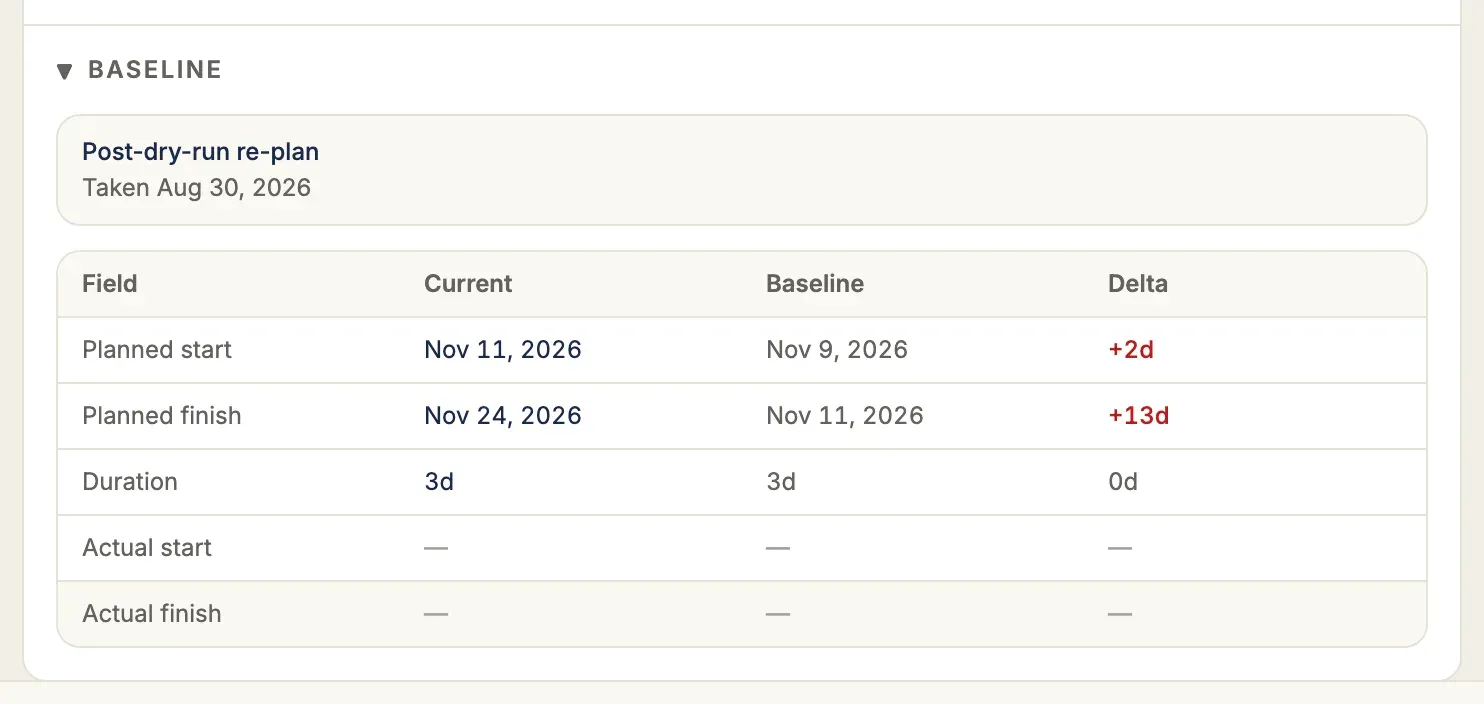
| Planned (baseline) | Current (live) | Delta |
|---|---|---|
| Start / finish at capture | Start / finish from the latest CPM run | Variance in days (e.g. +3 days) |
The same per-task comparison is available directly from the API:
# Active baseline vs current schedule for a single task.curl -H "Authorization: Bearer $JWT" \ https://trueppm.example.com/api/v1/projects/$PROJECT_ID/tasks/$TASK_ID/baseline/The response is discriminated by has_baseline / in_baseline: it reports no baseline,
a task added after the baseline was taken, or a full comparison row with
start_delta_days / finish_delta_days (positive = slipping later than planned).
Both are calendar days, measured in working time: a milestone shown at the start of a
Monday is at the same point as one shown at the end of the Friday before it, so a
milestone baselined at Friday’s end and now shown at Monday’s start reads 0, not 3.
Each task in a baseline’s detail (GET /api/v1/projects/{id}/baselines/{baseline_id}/,
tasks[]) records which edge of the day its finish sat on as finish_at_day_start.
For a baseline captured before TruePPM recorded it, the finish is read as the end of its day.
The task list carries the same comparison on every task, so a client does not have to
subtract dates itself: baseline_finish_variance_days is the forecast finish against the
active baseline’s finish, and schedule_variance_days is the actual finish of completed
work against it. Both are measured in working time the same way and are null when
either date is missing. The baseline chip on a board card and in the task drawer shows
baseline_finish_variance_days.
current_start and start_delta_days compare against the task’s span
(scheduled_start — see the bar vs. the remaining-work
window), not the
narrower remaining-work window that early_start shrinks toward as an
in-progress task approaches completion. Comparing against the remaining-work
window would make start_delta_days grow purely from progress being
reported, not from any actual schedule slip.