Timesheet
This is for anyone who needs to record time spent on their work — a contributor logging hours against tasks, or a PM who wants an accurate picture of effort. TruePPM offers three ways to capture time, and all three feed the same record behind the scenes: a running timer you start and stop against a task, a quick-log popover for logging a chunk of time you already finished, and the weekly grid below for reviewing and submitting a whole week. Whichever you use, the same entry shows up in the others — stop a timer and its entry appears in today’s grid cell immediately; log time from the grid and it counts toward the same task total the timer would show.
The running timer
Section titled “The running timer”A timer chip appears in the TopBar’s right cluster — but only while a timer is running; the calm shell stays quiet when nothing is being tracked. Start one from a task row on My Work: its Start timer affordance begins a server-side timer scoped to that task.
The timer is a server singleton — exactly one active timer per person, persisted so it
survives a reload, a navigation, or switching devices. The chip’s live clock (1:24:06) is derived
client-side from the server’s started_at every second; the server, not the browser tab, is the
authoritative source, so the elapsed time is never lost to a closed tab and never drifts.
Starting a second timer while one is already running stops and logs the first one automatically — there is no “timer already running” error to work around. The just-logged entry surfaces in a confirmation toast with Undo, naming the task the prior timer was on. The one exception: if the prior timer’s own project has since been archived, or your membership there has ended, it is silently discarded instead — no entry, no toast, nothing to undo — rather than logging a chunk of time against a project you can no longer write to. Your new timer still starts normally either way.
Stopping a timer (the chip’s stop control, or starting a new one) writes a TimeEntry dated to
the day the timer started — so a timer that happens to cross midnight is attributed to the day
the work began, not the day it happened to stop.
The stale-timer warning
Section titled “The stale-timer warning”A timer left running is capped, not unbounded: if you forget to stop it, it keeps ticking visibly
in the chip, but the value it eventually logs is capped at a ceiling (default 10 hours,
TIMETRACKING_TIMER_MAX_MINUTES, operator-configurable) so a timer left running over a weekend
logs the ceiling rather than thousands of minutes. Once elapsed time passes that ceiling, the chip
flips from its running (on-track) tint to a critical tint — a “check me” signal rather than a
silent overrun — while continuing to run until you stop it.
Quick-log
Section titled “Quick-log”Log time, in the TopBar’s right cluster next to the timer chip, is the fast path for a chunk of
time you already worked and want to log without starting a timer for it — the “under 30 seconds”
capture the design calls Pattern C. It is always mounted (icon-only below the md breakpoint, icon
- label above it) and opens a popover on desktop or a bottom sheet on mobile.
The form is the same on both surfaces:
- Task — search starts against your own assigned work; once you type two or more characters it also searches every task across your projects, so logging time on a task you’re helping with but not assigned to is never a dead end.
- Duration — four preset chips (15m / 30m / 1h / 2h) or type your own:
2,2.5, and2:30all parse to two-and-a-half hours. - Date — defaults to today; no future dates (the server enforces this too).
- Note — optional, up to 500 characters.
Logging shows a success toast with Undo, matching the timer’s confirmation pattern — the same
useCreateTimeEntry mutation backs both surfaces, so the experience of logging time is identical
whichever entry point you used.
The weekly grid
Section titled “The weekly grid”Open the grid from Timesheet in the sidebar’s Personal group, or go straight to
/me/timesheet. Where the timer and quick-log capture single entries fast, the grid is where you
fill gaps and submit at the end of the week — every project and task you logged against, laid out
Monday to Sunday.
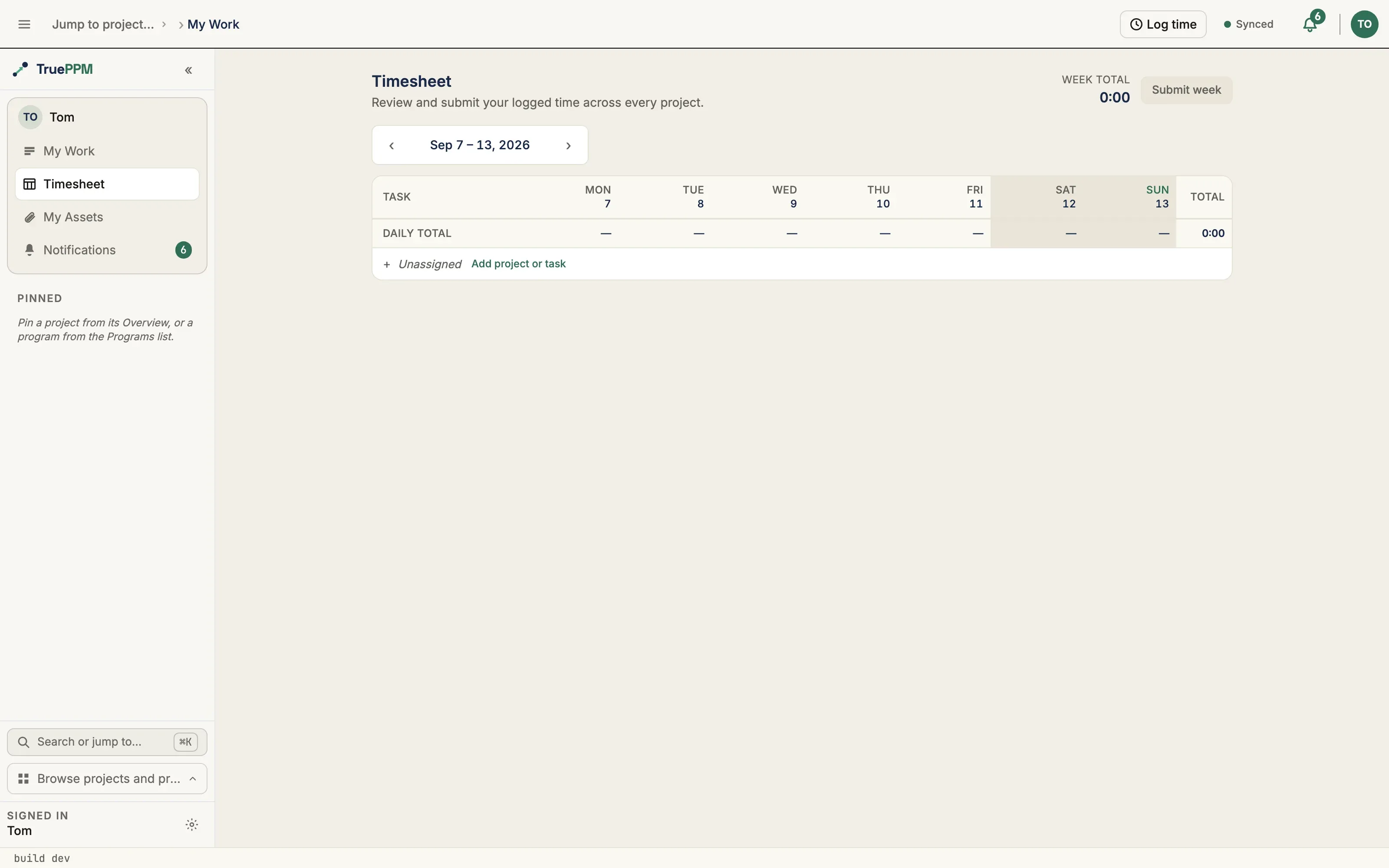
- Rows are your tasks, across every project. Each row shows the task and its project; the grid spans all the projects you’re a member of, so a cross-project week is one screen, not a tab per project.
- Columns are the seven days of the selected week (Mon … Sun). Each cell is the hours you logged on that task that day; an empty cell reads as a muted
·. - Type hours however is fastest —
2,2.5, or2:30all mean two-and-a-half hours.Tabmoves between cells,Entersaves the cell,Escdiscards the edit. Clearing a cell removes that day’s entry. - Totals update as you type — a row total per task, a daily total under each day, and the week total in the header. A daily total over eight hours is flagged amber so an over-long day is obvious.
- Weekends are shaded and today’s column is tinted, so you can orient at a glance.

Step between weeks with the ‹ … › stepper, and start logging against a task that isn’t in the grid yet with Add project or task.
Days with more than one entry
Section titled “Days with more than one entry”If you logged two separate sessions against the same task on the same day, that cell shows the sum and is read-only in the grid — a single number can’t be split back into the individual entries without losing their notes and provenance. Edit those entries from My Work, where each one is listed on its own.
Submitting your week
Section titled “Submitting your week”Submit week marks the week as done. It’s a signal, not a lock: your entries stay fully editable after you submit, and you can Reopen the week at any time. There is no approver and no manager view — submitting is just you telling yourself (and, later, an approval workflow) that the week is complete.
Manager approval, non-project time categories (PTO, admin, training), and the earned-value actuals feed are a separate, later track — they are not part of this grid.
Your own time only
Section titled “Your own time only”The timesheet is a personal, individual-contributor surface: it shows and submits your logged time on tasks you can access. It carries no cross-project rollup, no per-person visibility for managers, and no portfolio or governance scope — a contributor reviewing their own week is squarely community-edition functionality.
If you leave a project, or it’s archived
Section titled “If you leave a project, or it’s archived”Logging, editing, and deleting time are all live checks, not one-time checks made when the entry was first created. If a project is archived, or you are removed from it (or demoted below Team Member), logging a new entry, editing or deleting an existing one, or starting a timer there is refused, even though those entries belonged to you and still exist.
A running timer is treated differently from a logged entry, and the archived case and the membership case both lead here: if the project a timer is running on is archived, or your membership there ends, that timer is discarded, not auto-logged. Nothing silently turns into a TimeEntry on a project you can no longer write to — the time simply isn’t recorded, the same as if you had never started the timer. This applies whichever way the timer stops: you stop it yourself (the chip answers as if nothing was running — not an error), or you start a different timer elsewhere, which discards the stale one instead of logging it (see above). Unlike every other write here, stopping a timer is never refused outright — a refusal would leave the timer stuck running forever with no way to clear it, so the server always resolves it one way or the other.
Endpoints
Section titled “Endpoints”| Method | Path | Notes |
|---|---|---|
GET/POST | /api/v1/tasks/{task_id}/time-entries/ | Your own entries on a task, plus your total_logged_minutes. POST creates one. |
PATCH/DELETE | /api/v1/me/time-entries/{id}/ | Author-only edit or (soft) delete of one entry. |
GET | /api/v1/me/time-entries/?from=&to= | The weekly cross-project rollup that backs the grid: entries in range plus precomputed daily/cell/week totals and the week’s submission marker. |
POST/DELETE | /api/v1/me/timesheets/{week_start}/submit | Submit or un-submit a week (week_start is normalized to its ISO Monday). |
GET | /api/v1/me/timer/ | The caller’s running timer, if any, with server-computed elapsed_seconds and stale. |
POST | /api/v1/me/timer/start | Start a timer on a task (403 if that project is archived or you’re below Team Member); second-start atomically stops and logs the prior one, returned as finalized_entry — or discards it with finalized_entry: null if the prior timer’s own project is archived or your access there has lapsed. |
POST | /api/v1/me/timer/stop | Stop the running timer and log it as a TimeEntry; 409 if none is running, including when the timer is discarded rather than logged because its project is archived or your access there has lapsed. |
Every read and write here is scoped to the authenticated caller — there is no cross-project rollup of other people’s time and no admin surface to log or edit on someone else’s behalf.